
Last reviewed: October 2026
Here is how to do a website content audit: export every indexable URL on your site, attach search and conversion data to each one, then give every URL a single decision: keep, update, consolidate, redirect, delete or noindex. Finish by ranking those decisions by impact and effort, and work the list top down. The spreadsheet is the audit; the decisions are the point.
Most guides stop at “make a list and look at traffic.” This one adds the data limits that skew audits, a decision table tied to Google’s own documentation, a cannibalization check, a priority score, a copy-ready template and AI search checks.
What is a content audit, and why run one?
A content audit is a structured review of every page on your site that ends with a recorded action for each URL. It differs from a content inventory, which only lists what exists. The audit adds performance data, a quality judgment and a decision, so the site gets smaller, sharper and easier for search engines to understand.
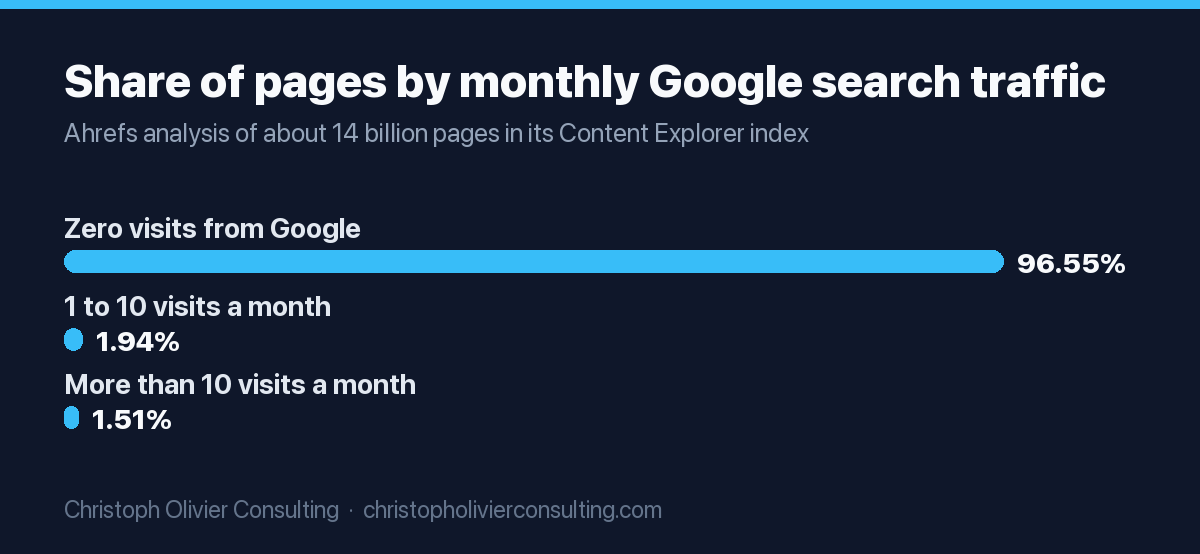
The reason to bother is simple: most published pages never earn search traffic. When Ahrefs analyzed its Content Explorer database of around 14 billion pages, it found that 96.55% of pages get zero traffic from Google and another 1.94% get between one and ten visits a month. The top reasons it gives are no search demand, no backlinks and a mismatch with search intent. A content audit is how you find out which of those problems each of your pages has.
Google’s guidance on helpful, people-first content asks whether a page offers original analysis, a complete description of its topic, and information presented in a way you would trust. Those questions become audit columns below.
How to do a website content audit: the 9-step process
A website content audit runs in nine steps: set the goal, build the inventory, pull performance data, check index status, review quality, check for cannibalization, assign one action per URL, prioritize, then execute and measure. Doing them in this order matters, because each step feeds the column the next step needs.
- Set the goal and scope. Traffic, leads or both, and which sections are in scope.
- Build the inventory. Combine a crawl, your XML sitemap and a CMS export so you catch orphan pages a crawler cannot reach.
- Pull performance data per URL. Clicks, impressions, average position and top query from Search Console; engaged sessions and key events from GA4; referring domains from a backlink tool.
- Check index status. Use the Page indexing report to tag each URL as indexed, excluded, duplicate or soft 404.
- Review quality by hand. Score accuracy, depth, intent match and trust signals.
- Check for cannibalization. Find queries where two or more of your URLs compete.
- Assign one action per URL. Keep, update, consolidate, redirect, delete, noindex or canonicalize.
- Prioritize. Score impact, business value and effort, then sort.
- Execute and measure. Ship in batches, log the date, and recheck 8 to 12 weeks later.
If you are also fixing crawl errors, speed and schema, run those technical checks first. A content decision made on a page Google cannot index is a wasted decision. Our guide to the order to run an SEO audit shows where the content audit fits in the sequence.
Step 1: Build the content inventory
Build the inventory by merging three lists: a crawl of the live site, your XML sitemap, and a full export from your CMS. A crawler only finds pages that are linked, the sitemap only lists what your CMS chose to include, and the CMS export catches drafts and orphans. The merged, de-duplicated list is your master sheet.
From the crawl, collect status code, title, meta description, H1, canonical, indexability, word count and internal inlinks. URLs in the CMS or sitemap but not in the crawl are orphans with no internal links. URLs in the crawl but not the sitemap are often parameter pages, tag archives or forgotten old pages.
Keep only canonical, 200-status HTML pages in the main tab. Redirects, 4xx pages and files belong on a separate technical fix list.
Step 2: Pull the metrics for every URL (and know the data limits)
For each URL, pull 12 months of Search Console clicks, impressions, average position and top query, GA4 engaged sessions and key events, and referring domains from a backlink tool. Each source has limits that can quietly distort an audit, so know them before you trust a zero in any column.
| Data source | What it gives you per URL | Limit to know |
|---|---|---|
| Site crawl | Status, titles, canonicals, word count, internal inlinks | Only finds pages that are linked from somewhere it can reach |
| XML sitemap and CMS export | Every published URL, including orphans, plus publish and update dates | Sitemaps can list noindexed or redirected URLs by mistake |
| Search Console Performance | Clicks, impressions, CTR, average position, queries per page | Data is kept for 16 months; the interface exports 1,000 rows, the API up to 50,000 rows per day per site per search type; anonymized queries are omitted from tables |
| Search Console Page indexing | Indexed, excluded and duplicate status with a reason | Shows examples, not always every URL; inspect key pages individually |
| GA4 | Engaged sessions, key events, landing page revenue or leads | On standard properties, user and event data retention is 2 or 14 months and applies to explorations, not standard reports |
| Backlink tool | Referring domains per URL | Third-party index; treat counts as directional |
The 1,000-row interface cap is the most common reason audits “find” zero-traffic pages that are not. On larger sites, pull page data through the Search Analytics API, where rowLimit goes up to 25,000 per request. And use 12 months, not 28 days, so seasonal pages do not look dead.
Google also says traffic from AI Overviews and AI Mode is included in the overall search traffic in the Performance report, under the Web search type, so read those numbers as one combined picture.
Step 3: Check index status and quality by hand
Before you judge a page’s performance, confirm Google has indexed it. A page with zero impressions might be weak, or it might be excluded. Tag each URL with its Page indexing status, then review every page that has traffic, links or business value against a short quality checklist covering accuracy, depth, intent match and trust signals.
The statuses in the Page indexing report map almost directly onto audit actions:
- Crawled, currently not indexed: Google saw the page and chose not to index it. This is usually a quality or duplication signal, so the page goes to update, consolidate or delete.
- Discovered, currently not indexed: Google found the URL but has not crawled it yet. Check internal links and crawl load before rewriting anything.
- Duplicate without user-selected canonical: Google picked another URL as canonical and will not serve this one. This is a consolidation candidate.
- Soft 404: the page returns a 200 code but looks like an error or empty page to Google. Fix the content or return a real 404.
For the manual pass, score each page 1 to 3 on four questions drawn from Google’s people-first guidance: Is it accurate and current? Is it complete for its query? Does it match the intent of the pages that rank? Does it show who wrote it and why to trust it? Google’s “Who, How, Why” framing (clear bylines, a disclosed process, content made to help people) is the lens.
Step 4: Find keyword cannibalization in your SEO content audit
Keyword cannibalization happens when two or more of your URLs target the same search intent and split impressions, clicks and links. Find it by exporting Search Console data with both the query and page dimensions, grouping by query, and flagging any query where more than one of your URLs earns a meaningful share of impressions.
The quick check: in the Performance report, filter to one query and open the Pages tab. The scalable check is an API export of query plus page, sorted by query. Flag a pair when both URLs rank on page one or two for the same term and a human reader would say they answer the same question.
Not every overlap is a problem: a service page and a how-to guide can share a keyword and serve different intents. The test is intent, not wording. The cleanest prevention is a keyword map that assigns one primary keyword to one URL; our keyword mapping template shows how to build one, and running it alongside the audit stops new duplicates from appearing next quarter.
The content audit decision framework: keep, update, consolidate, redirect, delete or noindex
Every URL in a content audit gets exactly one action. Keep pages that perform and are accurate. Update pages with demand but weak results. Consolidate pages that compete for the same intent. Redirect obsolete pages that have a close replacement. Delete pages with no value and no replacement. Noindex pages people need but searchers do not.
| Action | Use it when | What you actually do | Google’s documented basis |
|---|---|---|---|
| Keep | Steady clicks or leads, accurate, matches intent | Leave it alone; fix only broken links or facts | Do not change dates to look fresh when content has not substantially changed (helpful content guidance) |
| Update | Real impressions, weak position or CTR, outdated facts, intent drift | Rewrite sections, refresh data, improve the title, update the visible date | Dates should reflect real updates and match between visible text and structured data (byline dates) |
| Consolidate | Two or more URLs serve the same intent | Merge the best material into the strongest URL, 301 the others, update internal links | Redirects are a strong canonical signal and consolidate signals such as links (consolidating duplicate URLs) |
| Redirect | Obsolete page with backlinks or traffic and a close replacement | Server-side 301 or 308 to the most relevant live page | Use permanent redirects and keep them generally at least 1 year (site moves) |
| Delete | No traffic, no links, no business purpose, no close replacement | Return 404 or 410 and remove internal links to it | Google treats 404 and 410 the same and drops the URL from the index (HTTP status codes) |
| Noindex | Needed by users but not by searchers: thank-you pages, gated assets, thin archives | Add a noindex meta tag or header; do not block it in robots.txt | A robots.txt block stops Google seeing the noindex rule (block indexing) |
| Canonicalize | Near-duplicate that must stay live, such as a parameter or print version | Add rel=”canonical” pointing to the preferred URL | rel=”canonical” is a strong signal; methods stack when combined (consolidating duplicate URLs) |
Starting thresholds you can adjust
I use these defaults on a 12-month window, then override them with judgment, because a page’s business role matters more than its traffic:
- Keep: top 20% of URLs by clicks or any page that produced leads, with a quality score of 10 or more out of 12.
- Update: pages with impressions but an average position between roughly 5 and 20, or a CTR well below your site average for that position.
- Consolidate: any cannibalization pair from Step 4, plus thin posts that each cover a slice of one topic.
- Redirect or delete: zero clicks in 12 months and a quality score under 6. Redirect if it has referring domains or a close match; delete if it has neither.
One caution on deletes: pages that look idle may support a service page with internal links, or be pages your sales team sends to prospects. Ask each section’s owner before anything goes.
How to prioritize content audit fixes
Prioritize by scoring every non-keep URL on three 1 to 3 scales: search impact, business value and effort. Multiply impact by value and divide by effort. Work the highest scores first, which usually means updating money pages and near-page-one guides before you touch consolidations, redirects or deletes.
- Impact (1 to 3): 3 if the page has strong impressions and sits in striking distance; 1 if demand is low.
- Business value (1 to 3): 3 for service, pricing and contact-adjacent pages; 2 for guides that link to them; 1 for news and announcements.
- Effort (1 to 3): 1 for a title and intro rewrite; 2 for a section rebuild; 3 for a merge with redirects and link updates.
Then ship updates in batches of 10 to 20 pages, log the date, and compare the same Search Console metrics 8 to 12 weeks later. Changing everything at once hides which decision helped. If the audit surfaces topics you have no page for, those gaps move into your SEO content plan rather than the fix list.
Worked example: scoring five URLs
Here is how the scoring plays out on five pages from a hypothetical accounting firm’s site. The numbers are illustrative, not client data. The point is to show how the formula turns a messy list into an order of work, and why a low-traffic service page can outrank a higher-traffic blog post.
| URL | 12-mo clicks | Avg. position | Finding | Action | Impact × Value ÷ Effort | Order |
|---|---|---|---|---|---|---|
| /tax-planning-services/ | 310 | 9.4 | Thin copy, no pricing context | Update | 3 × 3 ÷ 2 = 4.5 | 2 |
| /blog/estimated-tax-deadlines/ | 2,400 | 4.1 | Dates out of date | Update | 3 × 2 ÷ 1 = 6.0 | 1 |
| /blog/s-corp-vs-llc/ and /blog/llc-or-s-corp/ | 640 combined | 14.8 and 18.2 | Same intent, split rankings | Consolidate | 3 × 2 ÷ 3 = 2.0 | 3 |
| /blog/office-holiday-party-2019/ | 0 | None | No links, no purpose | Delete | 1 × 1 ÷ 1 = 1.0 | 4 |
| /thank-you/ | 12 | 31.0 | Indexed by mistake | Noindex | 1 × 1 ÷ 1 = 1.0 | 4 |
The estimated-tax post scores highest because it already ranks near the top and the fix is small. The service page follows on business value. The merge scores lower only because the effort is higher, not because it matters less.
Content audit template: the columns to use
A content audit template needs four groups of columns: identity (URL, type, topic), performance (clicks, impressions, position, conversions, links), quality and status (index status, quality score, overlap), and decision (action, target URL, priority, owner, date shipped). Keep it in one sheet so filters and pivot tables work across every column.
| Group | Column | Where it comes from |
|---|---|---|
| Identity | URL | Merged inventory |
| Page type (service, guide, location, news, utility) | Manual or URL pattern | |
| Topic cluster or hub | Manual or keyword map | |
| Primary keyword | Keyword map | |
| Published and last updated dates | CMS export | |
| Performance | Clicks (12 months) | Search Console |
| Impressions (12 months) | Search Console | |
| Average position and top query | Search Console | |
| Engaged sessions and key events | GA4 | |
| Referring domains | Backlink tool | |
| Internal inlinks | Crawl | |
| Quality and status | Index status | Page indexing report or URL Inspection |
| Quality score (4 questions, 1 to 3 each) | Manual review | |
| Cannibalization partner URL | Step 4 export | |
| Extractability pass (yes or no) | Manual review | |
| Decision | Action | Decision table |
| Redirect or merge target URL | Manual | |
| Impact, value and effort scores | Manual | |
| Priority score | Formula | |
| Owner and status | Manual | |
| Date shipped and 90-day result | Manual, then Search Console |
Add a “Notes” column for context a filter cannot capture, such as “sales uses this in proposals.” The cluster column also shows which hubs are thin and which are crowded with overlapping posts; our guide to pillar page strategy covers how to restructure a crowded cluster around one hub page.
AI search checks: is your content extractable?
An AI search check asks whether a page can be indexed, shown with a snippet, and quoted cleanly. Google says there are no extra requirements to appear in AI Overviews or AI Mode, so the audit question is practical: is the answer in plain text, near the top, under a clear heading, with visible authorship?
Google’s documentation on AI features states that a page must be indexed and eligible to be shown with a snippet, and it lists ordinary best practices: allow crawling in robots.txt, make content findable through internal links, keep important content in text, and make sure structured data matches what is visible on the page. Add these yes or no checks to the template:
- The first paragraph under the main heading answers the query directly in two or three sentences.
- Headings are phrased the way people search, and each section opens with a self-contained answer.
- Comparisons and specifications live in HTML tables, not images or PDFs.
- Key content is not hidden behind tabs that require scripts, and no nosnippet rule blocks it.
- The author, the reviewed or updated date and the sources are visible on the page.
- Any structured data matches the visible content.
A page that fails three or more of these goes on the update list even if its traffic looks fine.
How often to run a content audit, and mistakes to avoid
Run a full content audit once a year and a light review of your top pages every quarter. Many guides suggest a 6 to 12 month cycle. Also run a targeted audit after any sharp ranking drop, starting with the pages and query types that lost the most visibility, which is what Google’s own guidance tells you to examine.
Crowdo’s guide, for example, recommends regular audits every 6 to 12 months, and the NSW Government’s audit guide grades pages A+ to F to schedule overhauls. On larger sites, audit one section per month so the work never stalls.
The mistakes that most often undo an audit:
- Redirecting everything to the homepage. Redirect to the closest relevant page, or let the URL return a 404.
- Refreshing the date without refreshing the content. Google names this as a practice to avoid.
- Mass-producing replacement pages. Pages created mainly to rank, with little value to users, fall under Google’s scaled content abuse policy.
- Skipping the measurement step. Without a date shipped and a 90-day result, next year’s audit starts from guesswork.
For the technical companion list, our SEO audit checklist of 26 fixes covers it. And if you would rather have someone run the audit with you and turn it into a prioritized plan, you can book a consultation to talk it through.
Frequently asked questions
How do you do a website content audit?
Merge a site crawl, your XML sitemap and a CMS export into one URL list. Add 12 months of Search Console clicks, impressions and position, GA4 engagement and key events, and referring domains. Check index status, score quality by hand, find cannibalizing pages, then give every URL one action: keep, update, consolidate, redirect, delete or noindex. Prioritize by impact, business value and effort.
What is the difference between a content inventory and a content audit?
A content inventory is a list of every URL and its basic attributes, such as title, type and publish date. A content audit adds performance data, a quality judgment and a recorded decision for each URL. You build the inventory first, then add the audit columns, such as action, priority and owner, to the same spreadsheet.
What should a content audit template include?
Four groups of columns. Identity: URL, page type, topic cluster, primary keyword, dates. Performance: clicks, impressions, average position, engaged sessions, key events, referring domains, internal inlinks. Quality and status: index status, quality score, cannibalization partner, extractability check. Decision: action, target URL, priority score, owner, date shipped and the result 90 days later.
Should I delete old blog posts with no traffic?
Only if they have no traffic, no backlinks, no internal role and no close replacement. If a page has referring domains or a closely related live page exists, use a 301 redirect instead. Google treats 404 and 410 responses the same and drops the URL from its index. Check with sales and section owners before deleting, since some low-traffic pages still support conversions.
How often should you do a content audit?
A full audit once a year and a light quarterly review of your highest-value pages works for most service businesses. Many guides suggest a 6 to 12 month cycle. Run a targeted audit after any sharp ranking drop, starting with the pages and query types that lost the most visibility. Large sites can audit one section per month instead.
How do I find keyword cannibalization during an SEO content audit?
Export Search Console data with both query and page dimensions, group it by query, and flag queries where two or more of your URLs earn meaningful impressions. Then read both pages. If they answer the same question for the same reader, consolidate them into the stronger URL with a 301 redirect. If the intents differ, keep both and sharpen each page's focus.
Do I need to optimize content differently for AI Overviews?
Google says there are no additional requirements or special optimizations to appear in AI Overviews or AI Mode. A page must be indexed and eligible for a snippet. In practice, audit for direct answers near the top, clear headings, comparisons in HTML tables, visible authorship and dates, and structured data that matches the visible content.
More SEO guides
- SEO Audit Checklist: 26 Critical Fixes
- SEO Audit Guide: The Exact Order to Run One (and What to Fix First)
- SEO Content Plan: From Keyword List to a Dated Publishing Calendar
- Corporate SEO: How Search Works at Enterprise Scale
- WordPress SEO in 2026: Complete Setup
- Answer Engine Optimization: Complete 2026 Guide
- All SEO guides →