

The drip campaign examples below are 12 complete email sequences you can copy. Each one gives you the trigger, the send day, the subject line, the first line, the call to action and the condition that stops it. A sound default for most drips is 3 to 6 emails: the first goes out immediately, the next two go 3 to 4 days apart, and the rest go weekly. Abandoned cart sequences are the exception, measured in hours.
Brackets mark what you replace. The service-business sequences (consultation follow-up, post-webinar, referral, B2B cold to warm) are written to be sent as plain text from a named person. The ecommerce and SaaS sequences assume a designed template. If you want single campaign ideas rather than automated sequences, our list of 48 email marketing ideas covers those; this page is only about sequences.
Drip campaign examples: 12 types at a glance
Pick the sequence that matches your biggest leak, then copy its table from the templates section.
| # | Drip campaign | Trigger | Emails | Runs over | Exit when |
|---|---|---|---|---|---|
| 1 | Welcome series | Newsletter signup | 4 | 14 days | Books a call or replies |
| 2 | Lead magnet nurture | Guide or checklist download | 6 | 28 days | Books a call |
| 3 | Webinar no-show | Registered, did not attend | 3 | 4 days | Watches replay or books |
| 4 | Post-webinar attendee follow-up | Attended live | 4 | 10 days | Books a call or replies |
| 5 | Consultation follow-up | Call held, no decision | 4 | 14 days | Any reply or booking |
| 6 | Trial to paid (SaaS) | 14-day trial starts | 6 | 13 days | Upgrades or cancels |
| 7 | Abandoned cart | Checkout started, no order | 3 | 72 hours | Purchases |
| 8 | Post-purchase and review | Order delivered | 4 | 30 days | Reviews, then reorders |
| 9 | Re-engagement and sunset | No clicks in 90 days | 3 | 10 days | Clicks, or is suppressed |
| 10 | Referral ask | Client milestone or 9 to 10 score | 3 | 30 days | Makes an introduction |
| 11 | B2B cold to warm nurture | Added to a prospect list | 4 | 14 days | Replies, opts in or opts out |
| 12 | Event countdown | Event registration | 4 | Signup to event start | Event starts |
Every drip has the same four parts: a trigger that starts it, delays that space it, one job per email, and exit rules that remove people once they act. Most broken drips fail on the exit rule, which is why each table below has a “stop if” column. Our guide to triggered emails covers the trigger setup for each type.
Email nurture drip sequence timing: 3-4 days apart, then weekly?
Yes, for a nurture sequence that is a good default. Send email 1 immediately, emails 2 and 3 three to four days apart, then move to weekly until the sequence ends. That gives you a 6-email nurture on days 0, 3, 7, 14, 21 and 28. Short, high-intent drips run faster: cart and event reminders are timed in hours. Sales follow-ups are timed in business days.
No vendor publishes a controlled test proving 3 to 4 days beats 2 or 5. What they do publish are defaults and series-length data, labeled here by source:
| Sequence | Vendor guidance | Timing it gives | Source |
|---|---|---|---|
| Welcome series | 3 emails over about a week | Immediately, after 3 days, then 4 days after email 2 | Klaviyo help center (pre-built flow cadence) |
| Abandoned cart | 3-email sequence is “standard practice” | 30 to 60 minutes, 24 hours, 72 hours | Omnisend |
| Abandoned cart | “A common sequence might involve 3 messages” | 2 to 4 hours, 24 hours, 48 hours | Klaviyo (illustrative, not tested) |
| Webinar | 3-email example prompt | On signup, a day before, an hour before | ActiveCampaign help center |
| Autoresponder cycles | 1 to 3 message cycles had the highest open and click rates and were 57.9% of cycles; longer cycles did not sharply raise unsubscribes or spam reports | No delay data | GetResponse benchmarks (4.4 billion messages, 2023) |
| Sales sequences | Steps run on business days by default; automated email delays up to 90 business days | Business days | HubSpot knowledge base |
| Follow-ups with no response | After 2 to 3 opportunities with no follow-through, stop | Number of touches, not days | ActiveCampaign help center |
Two timing rules matter more than the exact gap. First, delays add up from the trigger: Klaviyo’s flow timing guide shows a 75-day delay followed by a 15-day delay landing the second email about 90 days after purchase, so map every email to its day count from the trigger before you build. Second, put the delay before any split that depends on what the person does next, or the split checks before anyone has had time to click.
My rule of thumb: match total length to how long your buyers take to decide. A cart decision takes hours, a proposal about two weeks, a professional-service hire often a month or more. If your nurture ends before a typical buyer is ready, add weekly emails at the end, not daily emails at the start.
Drip campaign templates: the 12 sequences, copy-ready
Day 0 is the trigger. “Stop if” is the exit condition checked before that email sends. Every sequence also stops on unsubscribe, bounce or spam complaint, so those are not repeated in each table.
1. Welcome series drip (4 emails, 14 days)
Trigger: newsletter or website signup. Goal: a reply or a booked call. Cadence: Klaviyo’s default (0, 3, 7) plus a day-14 reply ask.
| # | Day | Subject line | First line | CTA | Stop if |
|---|---|---|---|---|---|
| 1 | 0, immediately | You’re in: here’s [resource] | Here’s the [resource] you asked for: [link]. I write every [Tuesday], and each email takes under 3 minutes. | Open the resource | None |
| 2 | 3 | The [topic] mistake I see most | Most [audience] I talk to lose [time or money] on [specific problem] before they notice it. | Read the one article that fixes it | None |
| 3 | 7 | How we’d fix [problem], in order | If you’re dealing with [problem] right now, this is the order we work through it. | See the method page | Booked a call |
| 4 | 14 | Quick question (one word is fine) | What’s the one [topic] problem you’d fix first? Reply with one word. | Reply | Booked a call or replied |
Tag the email 4 replies and use them to choose which nurture each subscriber gets next. Before importing an old list, set the flow to manual: Klaviyo warns that imported contacts otherwise get the first welcome email “even if they subscribed months ago.”
2. Lead magnet nurture drip (6 emails, 28 days)
Trigger: guide, checklist or calculator download. Goal: a booked consultation. Cadence: 3 to 4 days apart, then weekly.
| # | Day | Subject line | First line | CTA | Stop if |
|---|---|---|---|---|---|
| 1 | 0 | [Guide name]: your copy | Your copy of [guide] is here: [link]. Start on page [x]; it’s the part readers use first. | Download | None |
| 2 | 3 | Did you try step [x]? | Step [x] takes about 10 minutes and is the one that shows a result first. | Do step [x], reply with your number | Booked a call |
| 3 | 7 | What [problem] costs a firm your size | Quick math: [hours lost per week] x [hourly rate] x 48 working weeks = your yearly cost. | Use the worksheet | Booked a call |
| 4 | 14 | A worked example: [scenario] | Here’s a hypothetical [type of firm] with [revenue, team size], run through the checklist. | Read the example | Booked a call |
| 5 | 21 | 5 questions to ask before you hire help | If you decide to bring someone in for [topic], these are the questions that separate a good fit from a bad one. | Read the buyer’s checklist | Booked a call |
| 6 | 28 | Want a second pair of eyes on [topic]? | If you’ve worked through the guide and want someone to check your answers, I keep [x] 30-minute slots open each week. | Book a call | Booked a call |
Label the email 4 scenario as hypothetical. Do not invent a client story. For the branching version of this sequence (different tracks by download or job title), see the lead nurturing guide.
3. Webinar no-show drip (3 emails, 4 days)
Trigger: registered, attendance = no, sent 2 hours after the session ends. Goal: replay view, then a booked call.
| # | Day | Subject line | First line | CTA | Stop if |
|---|---|---|---|---|---|
| 1 | 0, +2 hours | Sorry we missed you: the replay | The replay of [webinar] is up. Short on time? Skip to [minute 18], where we cover [the one thing]. | Watch the replay | None |
| 2 | 1 | The 3 slides people asked about most | Three slides got the most questions live: [A], [B] and [C]. Here they are as images, no video needed. | View the slides | Clicked replay (move to sequence 4) |
| 3 | 4 | Replay comes down [day] | We take the replay down on [date] at [time, time zone]. The [worksheet] stays up here. | Watch before [date] | Clicked replay or booked |
Only send email 3 if you really remove the replay. A fake deadline is the fastest way to teach a list to ignore you.
4. Post-webinar email drip for consultants (4 emails, 10 days)
Trigger: attended live, or watched at least half the replay. Goal: a booked diagnostic call. Send from the presenter.
| # | Day | Subject line | First line | CTA | Stop if |
|---|---|---|---|---|---|
| 1 | 0, +1 hour | Slides and the [worksheet] from today | Thanks for staying through [webinar]. As promised: the slides [link] and the [worksheet] [link]. | Download | None |
| 2 | 2 | Your question about [topic], answered properly | We ran out of time on [question from the chat]. Here’s the full answer. | Read the answer | Booked a call |
| 3 | 5 | What attendees usually do next | After this session people take one of two paths: work through the worksheet alone, or have us run a [30-minute diagnostic] on their numbers. | Book the diagnostic | Booked a call |
| 4 | 10 | Keep you on the [topic] list? | Reply 1 for the next session invite, 2 to book a call, or 3 for no more [topic] emails. | Reply 1, 2 or 3 | Booked or replied |
5. Consultation follow-up drip for a service business (4 emails, 14 days)
Trigger: deal stage moves to “consultation held” with no decision. Goal: a proposal request or a clear no. Plain text, from the person who ran the call.
| # | Day | Subject line | First line | CTA | Stop if |
|---|---|---|---|---|---|
| 1 | 0 | Recap: [goal] and the next step | Thanks for walking me through [situation]. Here’s what I heard: your goal is [goal], the obstacle is [obstacle], and the constraint is [budget, timing or approval]. | Reply “yes” for the proposal | Any reply |
| 2 | 3 | The [resource] I mentioned | I said I’d send [resource], so here it is: [link]. Page [x] covers [their obstacle]. | None; no reply needed | Any reply |
| 3 | 7 | What the first 90 days would look like | Month 1: [diagnose]. Month 2: [fix the biggest leak]. Month 3: [scale what works]. I can adjust this for [constraint]. | “Want this as a proposal?” | Any reply or meeting booked |
| 4 | 14 | Should I close your file? | I haven’t heard back, which usually means timing. Reply 1 to get the proposal, 2 to check back in [month], 3 if it’s not a fit. | Reply 1, 2 or 3 | Any reply |
Run this as a HubSpot sequence rather than a marketing workflow: contacts who reply or book a meeting through a link in a sequence email are unenrolled automatically, and “in most cases, out-of-office replies will not cause unenrollment,” according to HubSpot’s unenrollment article.
6. Trial-to-paid SaaS drip (6 emails, 13 days)
Trigger: 14-day trial starts. Goal: the activation event, then upgrade. Emails 2 and 4 are conditional on product usage. Our free trial conversion guide covers choosing the activation event.
| # | Day | Subject line | First line | CTA | Stop if |
|---|---|---|---|---|---|
| 1 | 0 | Do this one thing first | The fastest way to see [product] work is [activation action]. It takes about [4] minutes. | Do the action | None |
| 2 | 1, only if not activated | Stuck on [setup step]? | Most trials stall at [step]. Here’s the 90-second fix, or book 15 minutes with [name]. | Finish setup | Activated |
| 3 | 3 | [Feature] saves teams like yours the most time | If you [use case], [feature] is where [product] pays for itself. | Try [feature] | Upgraded |
| 4 | 7 | Halfway through: here’s what you’ve built | So far you’ve [created x projects, invited y people]. Teams that invite a colleague by now [describe the benefit]. | Invite a teammate | Upgraded |
| 5 | 11 | Your trial ends [date]: what happens next | On [date] your account moves to [free plan or read-only]. Nothing is deleted for [x] days. | Choose a plan | Upgraded |
| 6 | 13 | Last day tomorrow | Your trial ends tomorrow at [time, time zone]. Your [projects] stay where they are if you upgrade. | Upgrade | Upgraded or cancelled |
7. Abandoned cart drip (3 emails, 72 hours)
Trigger: checkout started, no order within the first delay. Goal: the order. Cadence: Omnisend’s 30 to 60 minutes, 24 hours, 72 hours.
| # | Timing | Subject line | First line | CTA | Stop if |
|---|---|---|---|---|---|
| 1 | +1 hour | Your cart is saved | You left [product] in your cart. It’s saved here: [link]. | Return to cart | Ordered |
| 2 | +24 hours | Questions about [product]? | Most people check [sizing, shipping or returns] before buying [product]. Short answers: [three lines]. | Return to cart | Ordered |
| 3 | +72 hours | Still want [product]? | Last reminder about your cart. If something stopped you, reply and tell me what. | Return to cart, or reply | Ordered |
Klaviyo’s own illustrative sequence starts at 2 to 4 hours and finishes at 48, so the first delay is worth testing. Keep any discount out of email 1 and gate it to people who have not bought before; Klaviyo recommends the same conditional-split approach for welcome discounts.
8. Post-purchase and review request drip (4 emails, 30 days)
Trigger: order delivered, or project milestone signed off for a service firm. Goal: a review, then a second purchase.
| # | Day | Subject line | First line | CTA | Stop if |
|---|---|---|---|---|---|
| 1 | 0, delivery day | [Product] arrived: start here | Your order was delivered today. Before you [use it], do this one thing: [step]. | Read the setup guide | None |
| 2 | 3 | The [x]-minute trick most owners miss | One setting changes how [product] [performs]: [setting]. | Watch the 60-second clip | Returned the order |
| 3 | 14 | How’s [product] working? (one tap) | Would you rate [product]? The star you tap opens the review page. | Leave a review | Left a review |
| 4 | 30 | Goes well with [product] | Customers who use [product] every day often add [complement] for [reason]. | Shop [complement] | Ordered again |
Send the review request to every buyer, not just the happy ones. The FTC’s Consumer Reviews and Testimonials Rule Q&A says incentives for reviews are allowed only if they do not require a particular sentiment, and that asking only satisfied customers, while not banned by the rule itself, “could violate the FTC Act.”
9. Re-engagement and sunset drip, a reconfirmation campaign example (3 emails, 10 days)
Trigger: subscribed more than 90 days, no clicks in the last 90. Goal: a click to stay, or removal from active sends.
| # | Day | Subject line | First line | CTA | Stop if |
|---|---|---|---|---|---|
| 1 | 0 | Still want these emails? | You haven’t clicked anything from us since [month]. That’s fine. One click keeps you on the list. | “Yes, keep me” | Clicked |
| 2 | 4 | Our 3 most-read pieces this year | In case the timing was off, here are the three emails readers saved most. | Read any one (counts as staying) | Clicked |
| 3 | 10 | Removing you on [date] | Unless you click below, this is the last email you’ll get from us. No hard feelings. | “Keep me subscribed” | Clicked |
After email 3, suppress everyone who did not click. Define “inactive” by clicks, not opens: GetResponse’s benchmark report notes that Apple Mail Privacy Protection auto-opens distort open data. Three tries fits ActiveCampaign’s own advice to stop after 2 to 3 opportunities rather than accumulate spam complaints.
10. Referral ask drip (3 emails, 30 days)
Trigger: a client hits a milestone or scores you 9 or 10 on a satisfaction survey. Goal: one named introduction.
| # | Day | Subject line | First line | CTA | Stop if |
|---|---|---|---|---|---|
| 1 | 0 | Thank you, and one small favor | You mentioned [result] on our last call. Do you know one other [role] dealing with [problem]? | Reply with a name | Introduction made |
| 2 | 4 | A 2-line intro you can forward | If it’s easier, copy this: “[Name], meet [you]. [She] helped us [result] and is worth 20 minutes.” | Forward the intro | Introduction made |
| 3 | 30 | If someone comes to mind later | No action needed. Here’s the link to share whenever a [role] asks who you use: [link]. | Save the link | Introduction made |
Survey-based triggers suit referral asks; they do not suit review requests, for the FTC reason above. Regulated professions should check their own rules on testimonials and referral rewards before automating this one.
11. B2B cold email drip campaign: cold to warm (4 emails, 14 days)
Trigger: prospect added to a researched list. Goal: a reply, or an opt-in to the lead magnet nurture (sequence 2). Send 1 to 1 from a named person, threaded.
| # | Business day | Subject line | First line | CTA | Stop if |
|---|---|---|---|---|---|
| 1 | 0 | [Company]’s [specific observation] | I noticed [specific, verifiable fact: a new office, a job post, a pricing change]. | “Worth 15 minutes?” | Replied |
| 2 | 3, same thread | Re: [original subject] | One number that might help: [public benchmark, linked] for firms like [Company]. | Reply | Replied |
| 3 | 7 | A [checklist] for [their exact problem] | No call needed. Here’s the [checklist] we use with [role]s. | Get the checklist (opt-in) | Replied or opted in (move to sequence 2) |
| 4 | 14 | Close the loop? | I’ll stop here. If [problem] becomes a priority, reply “later” and I’ll check in next quarter. | Reply | End of sequence |
Cold B2B email has legal limits. The FTC’s CAN-SPAM guide says “the law makes no exception for business-to-business email”: every message needs your postal address and a working opt-out honored within 10 business days. In Canada, CASL requires consent. The Government of Canada’s CASL guidance says implied consent lasts up to 2 years after a purchase or 6 months after an inquiry, that a publicly published address only counts if it carries no “no unsolicited messages” statement and your email is relevant to the person’s role, and that unsubscribes must be actioned within 10 business days. The cold email playbook covers list sourcing and sending volumes.
12. Event countdown drip (4 emails, signup to start)
Trigger: registration for a webinar or in-person event. Timing is relative to the event date, not the signup date. Goal: attendance.
| # | Timing | Subject line | First line | CTA | Stop if |
|---|---|---|---|---|---|
| 1 | On registration | You’re registered: [event], [date] | [Event] is on [date] at [time, time zone]. Add it to your calendar now so it doesn’t slip. | Add to calendar | None |
| 2 | 7 days before (skip if signup is within 7 days) | Bring one real [number or question] | We’ll work through three attendee examples live. Send yours by [date]. | Submit a question | Cancelled registration |
| 3 | 1 day before | Tomorrow at [time]: your link | Here’s your join link [or address and parking]. It’s the same link as your confirmation. | Save the link | Cancelled registration |
| 4 | 1 hour before | Starting in 1 hour | We start at [time]. Join here: [link]. | Join | Event started |
The day after, branch everyone into sequence 3 (no-shows) or sequence 4 (attendees). Build the timing with a date-based delay: “Calendar date” or “Date property” in HubSpot workflows, or “Until a specific day and/or time” in ActiveCampaign’s Wait action.
Real brand drip emails to study
These are archived emails in the public Really Good Emails collection, from its welcome and abandoned cart categories. The archive shows individual emails, not their send timing, so treat them as subject-line and first-email models.
| Brand | Archived email title | Sequence type | What to copy |
|---|---|---|---|
| Beefree SDK | “Make the Beefree SDK editor truly yours” and “Collaboration features that’ll make your users happy” | SaaS onboarding | One feature per email, named in the subject line |
| Renthunter | “How to actually get a home in the Netherlands” | Welcome | Leads with the reader’s problem, not a discount |
| VistaPrint | “Welcome to VistaPrint! Enjoy 15% off your qualifying order” | Welcome with incentive | States the offer in the subject so email 1 gets opened |
| Gantri | “Your light’s still here. Take another look.” | Abandoned cart | Names the product category, no pressure language |
| Teenage Engineering | “you’re signed up!” | Signup confirmation | Three words; confirmation emails do not need copy |
How to build a drip sequence in HubSpot, ActiveCampaign or Mailchimp
The UI names below come from each vendor’s help center. Plans and labels change, so check them against your account.
| Platform | Where it lives | Delay step | Built-in stop | Plan needed |
|---|---|---|---|---|
| HubSpot workflows (marketing drips) | Automation > Workflows > Create workflow > From scratch | Delay: “Set amount of time”, “Calendar date”, “Date property”, “Event occurrence”, “Days of week”, “Time of day” | Unenrollment criteria in the Settings tab | “Send email” action needs Marketing Hub or Service Hub Professional or Enterprise |
| HubSpot sequences (1 to 1 sales drips) | Sales > Sequences > Create sequence | Business-day delays, up to 90 business days | Auto-unenroll on reply or meeting booked | Sales Hub or Service Hub Professional or Enterprise, with an assigned Sales or Service seat |
| ActiveCampaign | Automations > Start from Scratch | Workflow tab > “Wait”: set period, specific day and/or time, custom date field, or until conditions are met | “Wait until specific conditions are met” plus If/Else branches | Starter, Plus, Pro and Enterprise |
| Mailchimp | Automations > Automation flows | “Time delay” and “Wait for Trigger” rules | “Conditional split” and filters on the trigger | Essentials: up to 4 steps; Standard or higher: up to 200 steps and conditional splits |
HubSpot. Use a workflow for marketing drips (sequences 1, 2, 3, 6 to 9 and 12) and a sequence for anything that should look like a personal email (5 and 11). In a sequence, each automated email can start a new thread or reply to the previous one, steps run on business days unless you turn off “Execute steps on business days only” in Settings, and each sequence is limited to 10 email templates, per HubSpot’s sequences article. Workflow setup is in HubSpot’s workflow guide and the delay and email actions are listed in its workflow actions reference.
ActiveCampaign. From ActiveCampaign’s build-from-scratch guide:
- Click Automations in the left menu, then “Start from Scratch” and choose the “Start from Scratch” option on the Browse Recipes page.
- Click “Add a start trigger”, pick a trigger such as “Subscribes to a list”, and leave it on “Runs Once” so contacts do not restart the drip.
- Click the (+) node, open the “Sending” tab and choose “Send an email”.
- Click (+) again, open the “Workflow” tab and add “Wait”. For a goal-based step, choose “Until specific conditions are met” and tick “Continue automation if conditions are not met within a specific time period” (the guide uses 7 days).
- Add “If/else” to branch clickers from non-clickers, and “Add a tag” on each path so the next automation can start from the tag.
Mailchimp. Mailchimp now calls its builder marketing automation flows. Per Mailchimp’s flow overview, you choose a trigger (up to 3 per flow, up to 5 filters each), then add rules such as “Time delay”, “Wait for Trigger” (up to 10 per flow), “Conditional split” (up to 5 conditions) and “Percentage split”, and actions such as “Send email” and “Tag/Untag”. Old classic automations can be moved over with “Convert to flow” under Automations > Classic Automations, which archives the original once the flow is on, according to Mailchimp’s conversion article. On Essentials, the 4-step limit fits sequence 7 but not sequence 2.
Gmail and Yahoo bulk sender rules for drip sequences
The rules are the same for a drip as for a newsletter. What changes is where they break: inside a running automation, after launch, when nobody is watching. Here is how each rule applies to a sequence.
| Rule | What it means inside a drip | Check before launch |
|---|---|---|
| Bulk sender is anyone sending close to 5,000 messages to personal Gmail accounts in 24 hours, and the status is permanent once reached (Google FAQ) | One big import into a welcome flow can make you a bulk sender for good | SPF, DKIM and DMARC in place before the first import, not after |
| Bulk senders need SPF, DKIM and DMARC, with the From domain aligned to SPF or DKIM (Google; Yahoo requires DMARC at least p=none, and it must pass) | Automations and HubSpot sequences sent through a connected inbox each use a sending domain | Authenticate every domain that appears in a From line |
| Marketing and subscribed messages need one-click unsubscribe plus a visible link; transactional messages such as form submission confirmations are excluded (Google FAQ) | A registration confirmation is closest to the transactional examples Google lists; the nurture emails after it are not | Send a test of each email and look for the List-Unsubscribe header |
| Google recommends honoring unsubscribes within 48 hours; Yahoo says honor them within 2 days | The unsubscribe must stop the running sequence, not just future broadcasts | Unsubscribe a test contact after email 1 and confirm email 2 never arrives |
| Spam rate below 0.3% in Postmaster Tools; Google suggests staying below 0.10% (Google; Yahoo also sets 0.3%) | Long tails to people who never click are where complaints pile up | Run sequence 9 every quarter and suppress non-clickers |
| Starting November 2025, Gmail is ramping up enforcement, with temporary and permanent rejections (Google FAQ) | A failing drip now bounces instead of just landing in spam | Watch bounce codes in the first week after any launch |
US law adds the CAN-SPAM floor for every commercial email in a sequence: a valid postal address, an opt-out that keeps working for at least 30 days after sending, and penalties the FTC lists at up to $53,088 per violating email. Our email deliverability guide walks through the DNS setup.
Pre-launch test: 8 pass/fail checks for any drip
Run these with a test contact before turning a sequence on. Any fail means the sequence is not ready.
| # | Check | Pass if |
|---|---|---|
| 1 | Trigger fires once | Submitting the form twice enrolls the contact once (“Runs Once” in ActiveCampaign, re-enrollment off in HubSpot) |
| 2 | Goal exit works | Booking or buying after email 1 means email 2 never sends |
| 3 | Reply stops sales drips | A reply to sequence 5 or 11 unenrolls the contact |
| 4 | Unsubscribe stops the drip | No further email after an unsubscribe mid-sequence |
| 5 | Day count is right | Each email’s day from the trigger matches your table (delays add up) |
| 6 | No double-dripping | A contact in two sequences at once gets at most one email a day |
| 7 | Merge fields have fallbacks | A contact with no first name sees “Hi there”, not “Hi ,” |
| 8 | Imports are excluded | Importing an old list does not send them the welcome email |
Do drip campaigns work? What vendor data shows
In every dataset vendors publish, automated sequences beat one-off broadcasts on clicks and orders. All of it is self-reported platform data, mostly ecommerce, so read it as directional for a service business.
| Finding | Source and dataset |
|---|---|
| Autoresponder emails averaged a 5.59% click-through rate vs 3.84% for newsletters; welcome emails 16.6% | GetResponse, 4.4 billion messages sent in 2023 |
| Automations were 2% of sends but 30% of email revenue: $2.87 per automated send vs $0.18 per scheduled campaign send; abandoned cart and welcome drove 76% of automation orders | Omnisend 2026 Ecommerce Marketing Report, 27 billion emails from 150,000 brands in 2025 |
| Flows averaged a 5.58% click rate vs 1.69% for campaigns, with 13x higher placed order rates | Klaviyo benchmarks, over 183,000 customers |
| Abandoned cart automations produced 37 times more orders per recipient than bulk email | Mailchimp, 150,000 businesses (undated) |
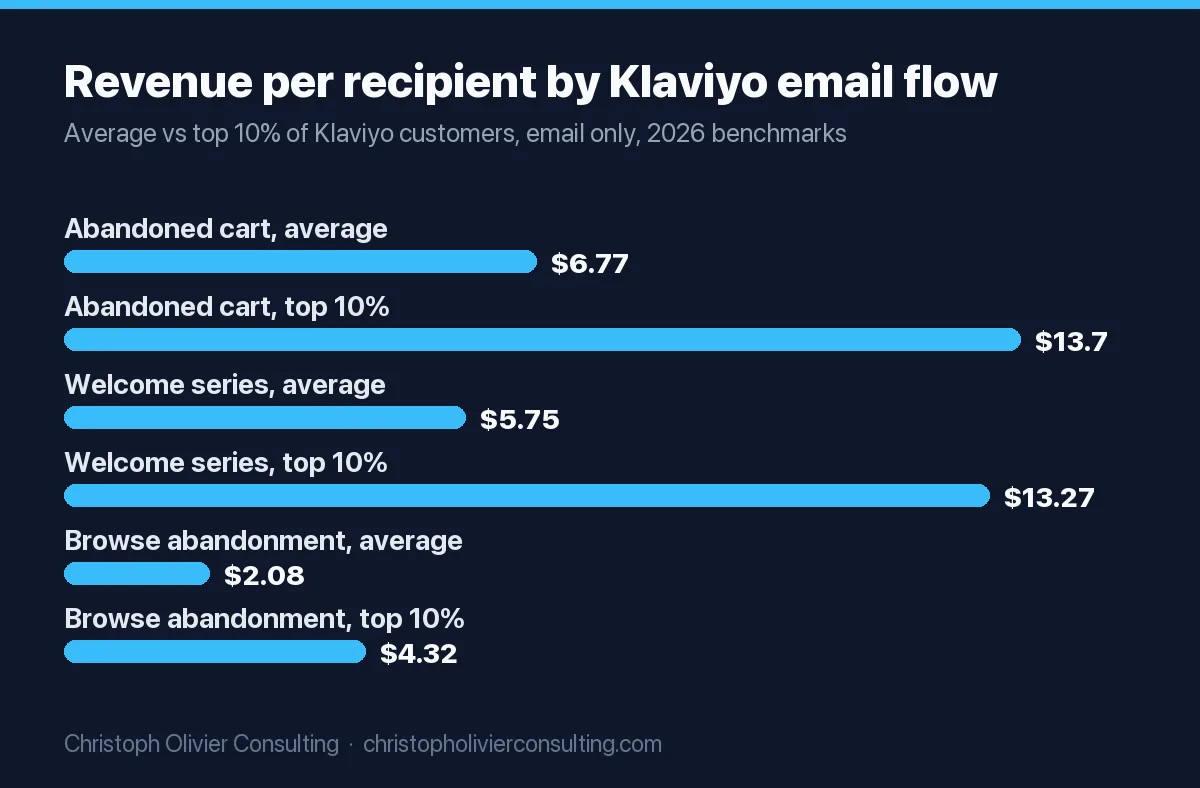
Klaviyo’s 2026 flow benchmarks also show how wide the gap is between an average flow and a well-built one: the top 10% of welcome series earn more than twice the average revenue per recipient.
For professional services there is no drip-only benchmark. The closest baseline is campaign click rates by industry, which a targeted sequence should aim to beat:
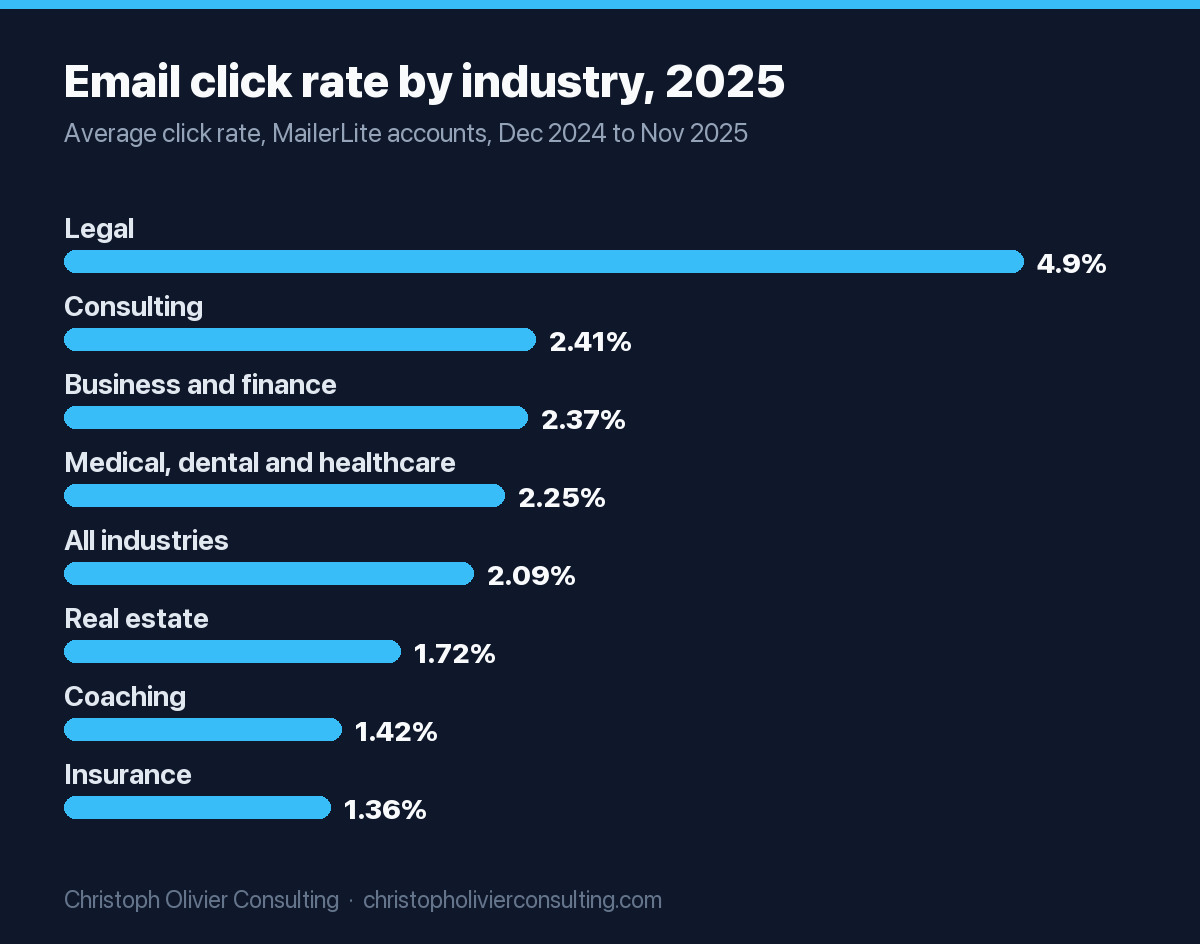
The figures come from MailerLite’s benchmarks: over 3.6 million campaigns from 181,000 accounts, December 2024 to November 2025. Judge each email in a drip on its own click rate and on the sequence’s goal (bookings, orders, signatures). A sharp drop at one step tells you which email to rewrite. If you would like a second opinion on which of these 12 sequences to build first for your sales cycle, you can book a consultation.
Frequently asked questions
What is an example of a drip campaign?
A welcome series is the classic example: someone signs up, gets the promised resource immediately, a useful tip on day 3, your method on day 7 and a reply question on day 14. A service-firm example is a consultation follow-up: a recap the same day, a resource on day 3, a 90-day plan on day 7 and a close-the-file email on day 14, stopped by any reply.
How far apart should email nurture drip emails be?
A good default is to send the first email immediately, the next two 3 to 4 days apart, then weekly, for example days 0, 3, 7, 14, 21 and 28. Klaviyo's pre-built welcome flow uses immediately, plus 3 days, plus 4 more days. Cart reminders run in hours, sales follow-ups in business days. No vendor has published a test proving one gap wins, so test it.
How many emails should a drip campaign have?
Start with 3 to 6. Cart, event and re-engagement drips usually need 3 or 4. A lead magnet nurture for a considered purchase can run 6 or more over four weeks. GetResponse found 1 to 3 message autoresponder cycles had the highest open and click rates, while longer cycles did not sharply raise unsubscribes. Add emails only where your data shows people are still clicking.
Is a cold email drip campaign legal?
In the US, yes, if each email follows CAN-SPAM: accurate headers, an honest subject line, your postal address and an opt-out honored within 10 business days. The FTC says there is no exception for business-to-business email. Canada's CASL is stricter: you need express or implied consent, such as a relevant, publicly published business address with no statement refusing unsolicited messages.
What should a post-webinar email drip include for consultants?
Split attendees from no-shows. Attendees get slides and the worksheet within an hour, a full answer to a question you ran out of time for, a diagnostic call invitation around day 5 and a reply 1, 2 or 3 check-in around day 10. No-shows get the replay with a timestamp, the key slides the next day and a real replay deadline. Stop either track when someone books.
What are the main types of drip campaigns?
The common types are welcome, lead magnet nurture, webinar and event sequences, sales or consultation follow-up, trial to paid onboarding, abandoned cart, post-purchase and review requests, re-engagement or sunset, referral asks and B2B cold to warm nurture. Each starts from a different trigger, such as a signup, a download, a booked call, a cart or 90 days without a click, and each needs its own exit rule.
What is a reconfirmation campaign?
A reconfirmation campaign asks inactive subscribers to confirm they still want your emails, then removes anyone who does not. A simple version is three emails over 10 days to people with no clicks in 90 days: a one-click keep-me button, your three most-read pieces, then a final notice with a removal date. Use clicks, not opens, because Apple Mail Privacy Protection inflates opens.
More Funnels & Email guides
- Welcome Email Sequence: The 5-Email Series You Can Copy
- Abandoned Cart Email: The 3-Email Sequence That Recovers Revenue
- Webinar Funnels: Predictable Sales
- Landing Pages That Convert: 11 Patterns
- What Are Funnels? A Plain-English Guide to Marketing, Sales, and Product Funnels
- Funnel Visualization: How to Build and Read a Funnel Chart
- All Funnels & Email guides →