

A digital marketing virtual assistant is a remote assistant who runs the repeatable parts of your marketing from your playbook: scheduling posts, building newsletters, publishing blog posts, answering routine comments and pulling the weekly numbers. Published 2026 prices run from $6 to $9 an hour for an intermediate Filipino marketing VA you hire directly, $8.50 to $15 an hour through an offshore staffing firm, $20 to $35 an hour for an experienced North American marketing VA on Upwork, and $36 to $39 an hour on Time etc’s US-based plans.
The rate matters less than the setup. A VA hired with a written scope, the right login roles and a weekly SOP pays for itself. A VA hired to “help with marketing” burns hours. This page gives you the pieces to do it properly: a delegation matrix with the exact role each task needs, verified rates and fees by source, cost math against a freelancer and an agency, a paid trial brief with a scoring rubric, and a weekly social and email SOP you can copy.
Need senior marketing leadership without a full-time hire? See CO Consulting’s fractional CMO services.
What a digital marketing VA should own, share and never touch
Scope by task, not by job title. The matrix below sorts the work a virtual assistant for digital marketing is usually asked to do into three groups and names the least-privilege role each task needs, using each platform’s own role names. Give the VA the role in the “access” column and nothing above it.
| Task | Who owns it | When to hand it over | Access the VA needs |
|---|---|---|---|
| Scheduling approved social posts | VA owns | Week 1 | Meta Page partial access with the Content task; LinkedIn Page Content admin |
| Weekly metrics pull into a sheet (the “marketing analytics VA” job) | VA owns | Week 1 | GA4 Viewer; Google Ads Read-only; Meta ad account View performance; LinkedIn Analyst |
| Publishing blog posts you have approved | VA owns | Week 2 | WordPress Author (own posts) or Editor (everyone’s posts) |
| Building newsletters from your template | VA builds, you approve the send | Week 2 | Mailchimp Author (create and edit emails, view reports) |
| Drafting posts from your notes, transcripts or blog | VA drafts, you approve | Week 2 | Shared doc or content tracker only |
| Replying to routine comments and DMs | VA owns, with a written reply guide | Week 3 | Meta Page Community activity and Messages and calls tasks |
| Importing contacts and cleaning lists | VA owns, with your rules | Week 3 | Mailchimp Manager (imports, cannot export audiences; Premium plan only) |
| Uploading ad creative and duplicating campaigns to your spec | VA executes, you decide | After 30 clean days | Google Ads Standard; Meta ad account Manage campaigns |
| Budgets, bids, kill or scale calls | You or your ads lead | Never delegated | None |
| Billing, payment methods, adding users | Owner only | Never delegated | None (these sit in Google Ads Admin, Meta full access, Mailchimp Admin) |
| Compliance review of posts and emails | Licensed reviewer | Never delegated | None |
| Channels, offers, positioning, what to say | You or a senior marketer | Never delegated | None |
Two details in that table save real trouble. First, Mailchimp’s role list shows that Author and Viewer seats need the Standard or Premium plan and Manager needs Premium, while Admin, which “has the same permissions as the Owner,” is the only extra level on Essentials. On Essentials, either upgrade or have the VA build in a draft doc. Second, a Mailchimp Manager can import audiences but can’t export them, which is the right shape for someone handling your list.
The compliance row is not theoretical for professional-service firms. If you are a broker-dealer, FINRA Rule 2210 requires that “an appropriately qualified registered principal of the member must approve each retail communication” before use. A VA can queue the post. They cannot be the approval step.
Digital marketing VA rates in 2026, by source and region
Every figure below comes from the provider’s own page, in USD. Effective hourly rates are simple division of the published plan price by its included hours.
| Source | Region | Published price | Effective hourly | Minimums and terms |
|---|---|---|---|---|
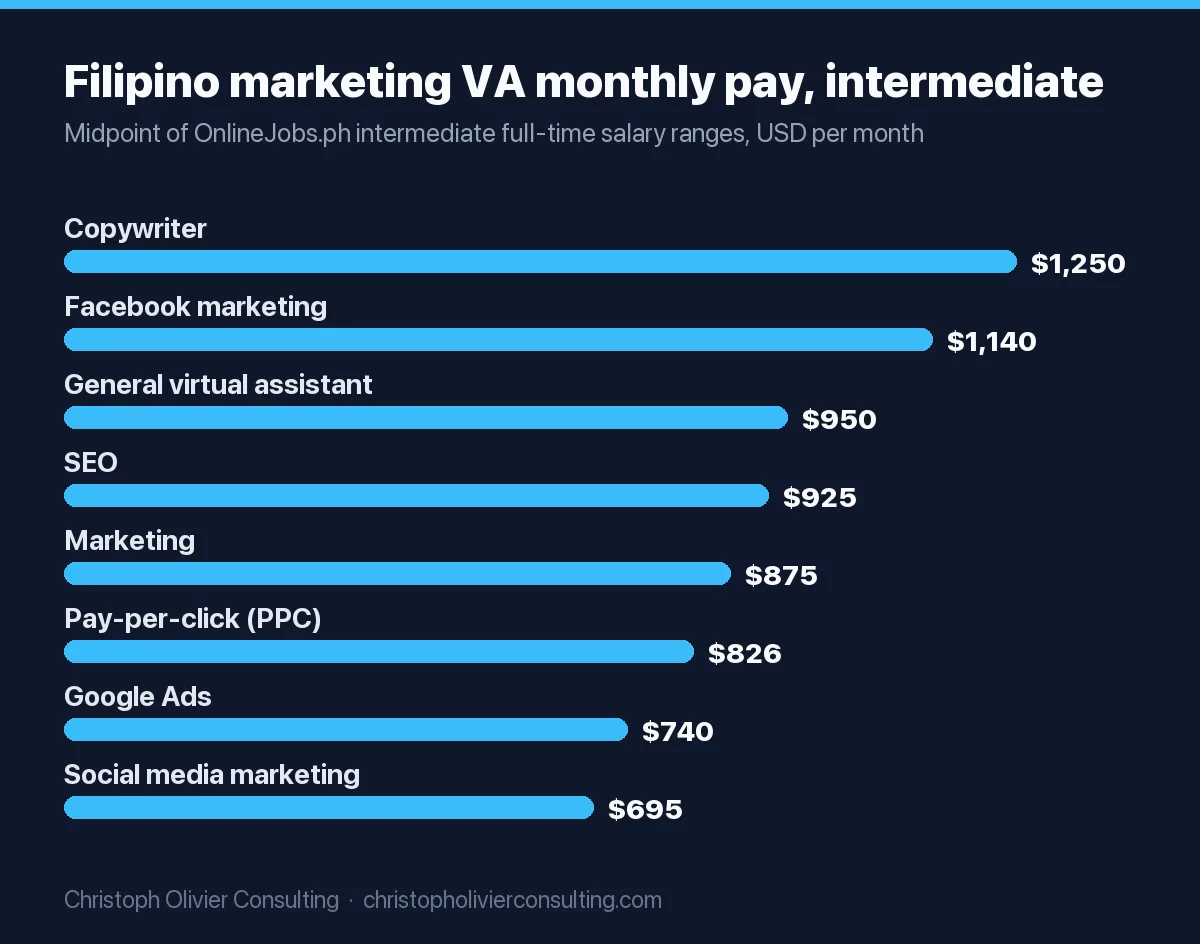
| OnlineJobs.ph salary guide (updated July 10, 2026) | Philippines, direct hire | Marketing VA: $6 to $9/hr intermediate, $9 to $13 expert; full time $750 to $1,000 a month intermediate | $6 to $13 | You recruit, contract and manage; pay is negotiated |
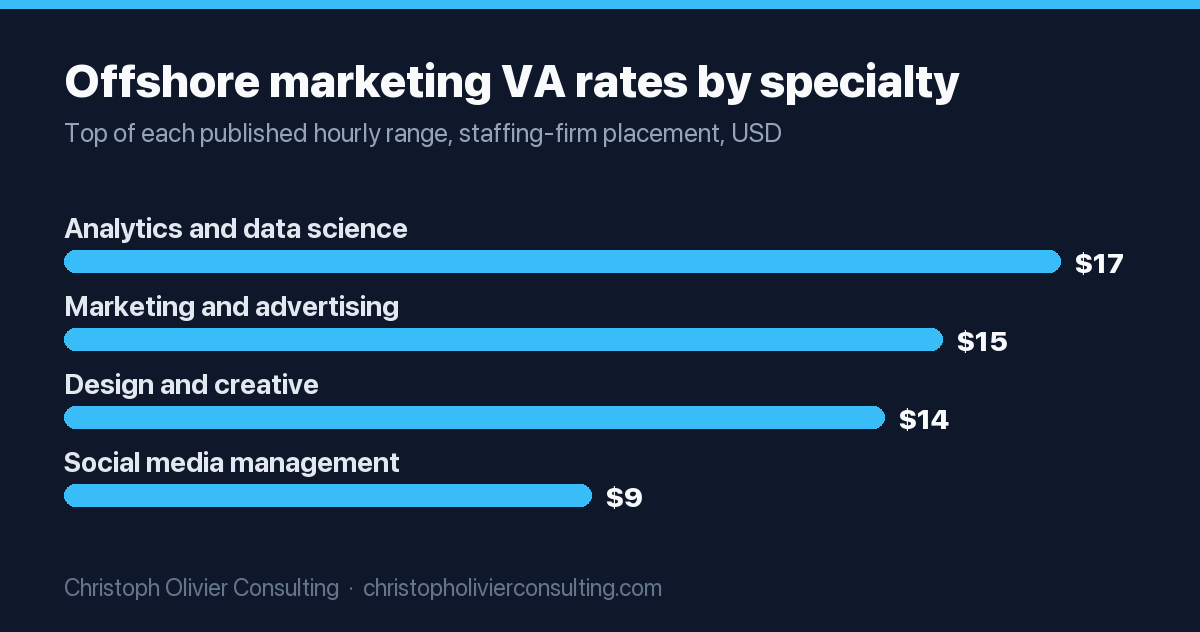
| VA Masters | Offshore, staffing firm | Social media $7.50 to $9/hr; marketing and advertising $8.50 to $15/hr; analytics $9.50 to $17/hr | $7.50 to $17 | No setup or recruitment fee; first candidates “usually within 2 business days” |
| Upwork | North America, freelance marketplace | Marketing VA $20 to $35+/hr; all VAs average $18 to $35/hr | $20 to $35+ | Rates are for freelancers with 1,000+ hours and a 90% success rate; client fees on top (next section) |
| Wing Assistant | Global or US-based, managed | Digital marketing assistant from $1,299/month part time (80 hours) or $1,999/month full time (160 hours) | $16.24 part time; $12.49 full time | Free replacement and a Customer Success Manager listed; price varies by coverage hours and bilingual needs |
| Time etc | US-based, managed | $390 (10 hours), $760 (20), $1,480 (40), $2,160 (60) per month | $39 to $36 | No setup fee; cancel anytime; unused hours roll over on the 20 hour plans and up |
| Prialto | Managed, US and UK time zones | $1,600 per 55-hour unit per month on its plan card | About $29 | 90-day minimum; $250 setup fee waived on a 1-year agreement; built for executive support, not marketing specifically |
| Belay | US-based, managed | Not published | Quote only | Month to month; “support typically begins at 45 hours a month”; offers a dedicated Marketing Assistant service |
Two patterns are worth knowing. Specialty moves price more than title: on OnlineJobs.ph the intermediate hourly range is $5 to $8 for social media marketing but $8 to $10 for Google Ads and PPC work. And managed providers sell blocks, so the effective rate depends on how many of the hours you actually use. A Wing part-time plan used for 40 hours costs the same $1,299, which works out to $32.48 an hour.
Staffing-firm pricing shows the same specialty premium. VA Masters’ published ranges top out at $9 an hour for social media work and $17 for analytics:
Platform and payment fees that change the real cost
The rate is not the bill. Each route adds its own fees, and they are easy to miss when you compare a profile rate with a managed plan.
- Upwork. On the free Basic plan you pay a Client Marketplace Fee of up to 7.99% on every payment, cut to 3% if you are in the US and pay from a qualifying bank account. Each new contract also carries a one-time Contract Initiation Fee of $0.99 to $14.99, charged again even when you rehire someone on a new contract.
- OnlineJobs.ph. The free account lets you post and read applications but not contact anyone. Pro costs $69 a month or $299 a year (contact 75 workers a month, 3 job posts); Premium costs $99 a month or $349 a year (500 contacts, 10 posts, background data checks). There is no salary markup, and you can cancel once you have hired.
- Paying a Filipino VA. OnlineJobs.ph’s EasyPay is free. Paid through Payoneer from a bank account, there is no transfer fee; a credit card adds 3% to 4%. The worker pays a 2% currency conversion fee when withdrawing to a local bank, so agree up front whether the salary includes it.
- Managed plans. Prialto adds a $250 setup fee in month one unless you sign for a year, and commits you to 90 days. Wing’s plans are fixed blocks of 80 or 160 hours. Time etc has no setup fee and rolls unused hours forward on plans of 20 hours and up.
Worked example: 40 hours on Upwork at $25 an hour is $1,000 of work, plus $79.90 at 7.99%, plus up to $14.99 for the contract. First month: up to $1,094.89. From a qualifying US bank account, the fee drops to $30, for a first month of up to $1,044.99.
VA vs freelancer vs agency: the cost math for one weekly workflow
To compare like with like, price one concrete workload: three LinkedIn posts and one newsletter a week, routine comment replies, one blog post published a week and a Friday metrics report. Assume about 40 hours a month once the SOP is stable; swap in your own time log if you have one.
| Option | Monthly cost for about 40 hours | What you still have to supply |
|---|---|---|
| Direct-hire Filipino marketing VA, intermediate (OnlineJobs.ph) | $240 to $360, plus $69 for one month of Pro while recruiting | Recruiting, contract, SOPs, review |
| Offshore staffing firm, marketing and advertising VA (VA Masters) | $340 to $600 | SOPs, review |
| North American marketing VA on Upwork | $800 to $1,400, plus up to 7.99% and a contract fee | Screening, SOPs, review |
| Managed part-time plan (Wing) | $1,299 for an 80-hour block | SOPs, review |
| Managed US plan (Time etc, 40 hours) | $1,480 | SOPs, review |
| Freelance social media manager on Upwork (median $14 to $35 an hour) | $560 to $1,400, plus fees | Usually covers social only; email and reporting priced separately |
| Agency package (LYFE Marketing’s published entry tier) | From $750 for 12 posts a month on Facebook and Instagram | No LinkedIn, newsletter or blog publishing in that tier |
For context, WebFX’s 2026 pricing guide puts typical social media management retainers at $500 to $5,000 a month, and the BLS median pay for market research analysts and marketing specialists was $37.87 an hour in May 2025, before benefits.
The math says a VA is the cheapest way to buy this workload, by a wide margin. What it does not show is who writes the posts’ substance and decides what goes out. A VA executes your calendar; a freelancer brings channel skill; an agency brings a team and its own process. If you need someone who can actually run a channel, the guides to hiring a freelance digital marketer and a digital marketing specialist cover those roles, and our breakdown of social media management pricing compares agency packages in more depth.
Access and security setup: the exact roles to give a marketing VA
Every platform a marketing VA touches supports named users with limited roles. Use them. Never share the owner login, and never give the top role “to save time.”
| Platform | Where to set it | Give the VA | Never give |
|---|---|---|---|
| Google Ads | Admin, Access and security, plus (+) button | Read-only for reporting. Standard only for campaign edits to your spec; note Standard can also edit billing information and make payments on postpay accounts | Admin, which can give access, change access levels and add payment methods |
| Google Analytics 4 | Admin, Property, Property access management | Viewer, plus the No Revenue Metrics or No Cost Metrics restriction if they don’t need those numbers. Marketer only if they build audiences or key events | Administrator or Editor |
| Meta (Facebook Page, Instagram) | Business portfolio settings in Meta Business Suite | Partial access to the business portfolio, then task-based access on the Page: Content, Community activity, Messages and calls, Insights | Full access (formerly full control), which can delete the business portfolio and remove people |
| Meta ad account | Business portfolio settings in Meta Business Suite | View performance for reporting; Manage campaigns for ad ops | Manage ad accounts (settings, finances and permissions) |
| LinkedIn Page | Granted by an existing Super admin | Content admin for posting; Analyst for reporting only | Super admin, which can add and remove admins and deactivate the Page |
| Mailchimp | Profile icon, Account & billing, Settings, Users, Invite A User | Author (Standard or Premium plan); Manager if they send and import (Premium) | Admin, which has the same permissions as the Owner |
| WordPress | Users screen in the WordPress dashboard | Contributor during the trial (writes but cannot publish), then Author or Editor | Administrator |
For any login that can’t have a named user, use a shared password manager instead of a spreadsheet or chat message. CISA recommends passwords of at least 16 characters, unique per account, generated and stored in a password manager. Bitwarden Teams costs $4 per user a month billed annually. Put VA logins in one collection and assign the “View items, hidden passwords” permission so they can autofill without copying. Bitwarden is clear about the limit: hidden fields “limit but don’t prevent access,” so treat every shared credential as known to the VA.
Offboarding takes ten minutes if you set up this way:
- Google Ads: Admin, Access and security, then Remove access in the Actions column.
- GA4, Meta, LinkedIn, Mailchimp and WordPress: remove the named user from each.
- Password manager: remove the VA from the collection, then rotate every password in it.
- Scheduler and design tools: transfer ownership of any drafts and templates the VA created.
Paid trial task brief for a digital marketing VA (copy and send)
Send the same brief to your top three candidates and pay each one for three hours at their quoted rate. The trial mirrors the weekly workflow below, and it contains one planted problem to test judgment.
Paid trial: 3 hours, due within 48 hours of receipt.
Inputs: (1) this published blog post: [URL]; (2) our brand rules: [5 bullet points on tone, words we never use, emoji policy]; (3) last month’s GA4 traffic export: [CSV]; (4) this event detail: [webinar title, date, registration link].
Deliverables, in one shared Google Doc:
- Three LinkedIn posts drawn from the blog post, 80 to 150 words each, each with a different hook. Include the link with UTM tags: utm_source=linkedin, utm_medium=social, utm_campaign=[name we give you].
- One newsletter draft: subject line, preview text, a 120 to 200 word body promoting the blog post and the event, and the footer elements a commercial email needs.
- A five-line report from the CSV: total sessions, change against the prior month, top three pages, one thing that looks unusual, and one question you would ask us.
- A short list of anything in this brief that was unclear or looked wrong.
Plant one problem in the inputs, such as a registration link that returns a 404 or an event date that conflicts with the blog post. The best candidates flag it before they finish. Score each submission out of 20:
| Criterion | 0 points | 2 points | 4 points |
|---|---|---|---|
| Instructions followed | Missing a deliverable | All delivered, some specs ignored (length, UTM format) | Every spec met |
| Accuracy | Broken links, typos or wrong numbers from the CSV | One minor slip | Clean; UTMs correct on every link |
| Brand voice | Generic or breaks a brand rule | On rules, reads like a template | Sounds like you; three distinct hooks |
| Judgment | Planted problem missed | Noticed but not raised clearly | Flagged with a proposed fix |
| Communication and timing | Late with no notice | On time, no questions or notes | On time, concise questions, newsletter footer includes postal address and unsubscribe |
My rule of thumb: hire at 15 or more, and never hire a zero on accuracy, however strong the writing. Accuracy is the job.
SOP template: the weekly social and email workflow
Hand this to your VA on day one and edit it together after week two. It assumes a content bank (a shared folder or tracker where your team drops ideas, notes and photos) and a content calendar. If you don’t have a calendar yet, build one first with this content calendar guide.
- Monday, drafting (about 2 hours). Pull three items from the content bank and this week’s blog post. Draft three LinkedIn posts and the newsletter in the tracker. Mark each draft “ready for review.”
- Tuesday, approval (owner, 20 minutes). Owner approves or edits by end of day. Anything not approved by Wednesday 10 a.m. slips a week; the VA does not publish unapproved copy.
- Wednesday, scheduling (about 1 hour). Schedule approved posts natively in LinkedIn and Meta Business Suite. Pass/fail checks before each one: link opens, UTM tags present (GA4 says to always use utm_source, utm_medium and utm_campaign), image alt text added, no client names without written permission.
- Thursday, newsletter (about 2 hours). Build from the template. Send a test to two inboxes (one Gmail, one Outlook) and check: every link works, the subject line matches the content, and the footer carries your physical postal address and a working opt-out, both required under the FTC’s CAN-SPAM guide. Owner approves; VA schedules.
- Friday, report (about 1 hour). Fill one row per week in the reporting sheet: website sessions, LinkedIn impressions and followers gained, newsletter open and click rate, form fills, and new unsubscribes. Add one line on anything that moved more than 20% week over week (a default threshold; set your own). No interpretation required; that’s your job.
- Daily, community (15 minutes). Reply to routine comments and messages from the reply guide. Escalate within two business hours anything that is a complaint, a question about fees, a request for advice, a press inquiry or a job applicant.
- Monthly, hygiene (about 1 hour). Remove bounced contacts and log new unsubscribes. The FTC requires opt-outs to be honored within 10 business days, so the VA confirms the platform processed every one.
Once this runs cleanly for a month, look at which steps software can take over. The Friday report and list hygiene are usually the first candidates.
When a marketing VA is the wrong hire
A virtual marketing assistant is the wrong first hire when nobody has decided what the marketing should say. If you can’t name the two channels that produced your last ten clients, or the VA’s brief would be “help us grow on social,” you will pay for an efficient assistant executing an empty calendar.
The same goes for regulated firms without a reviewer in place. Under rules like FINRA 2210, every retail communication still needs a qualified approver, so the VA’s speed is capped by your review time. Fix that bottleneck first.
If the honest gap is strategy rather than hours, start with someone who owns the plan, such as fractional CMO services, and add a VA once there is a calendar to run. If you want a second opinion on what to delegate and what to keep, you can book a consultation.
Work with CO Consulting
Senior marketing leadership, without the full-time hire
- One senior owner of strategy, budget, vendors and the weekly scorecard
- Audit first, then a prioritized 90-day plan with measurable milestones
- Weekly team leadership, monthly strategic reviews and quarterly planning
- No guarantees we cannot back up; reporting tied to pipeline
Frequently asked questions
What does a digital marketing virtual assistant do?
A digital marketing virtual assistant runs repeatable execution work from your plan: scheduling approved social posts, building newsletters from a template, publishing blog posts in WordPress, replying to routine comments and pulling a weekly metrics report. They work inside your tools under limited roles. Budgets, offers, positioning, compliance review and what the marketing should say stay with you or a senior marketer.
How much does a digital marketing VA cost per hour?
Published 2026 rates run from about $6 to $9 an hour for an intermediate Filipino marketing VA hired directly through OnlineJobs.ph, $8.50 to $15 through an offshore staffing firm such as VA Masters, $20 to $35 or more for an experienced North American VA on Upwork before fees, and $36 to $39 an hour on Time etc's US-based plans. Analytics and ads work costs more than social posting.
Is a virtual assistant for digital marketing cheaper than an agency?
Usually, yes. About 40 hours a month of social, newsletter and reporting work costs roughly $340 to $600 through an offshore staffing firm, or $1,480 on a US managed plan. LYFE Marketing's published entry tier starts at $750 a month for 12 Facebook and Instagram posts only. The trade off: an agency brings its own process and skills, while a VA needs your calendar, SOPs and review.
What access should I give a marketing virtual assistant?
Give named logins with the lowest role that fits the task: Read-only in Google Ads, Viewer in GA4, partial access with specific tasks such as Content in Meta, Content admin on a LinkedIn Page, Author in Mailchimp and Author or Editor in WordPress. Never give Google Ads Admin, Meta full access or Mailchimp Admin. Share any remaining logins through a password manager and rotate them when the engagement ends.
Can a virtual marketing assistant handle marketing analytics?
A virtual marketing assistant can reliably pull numbers every week: sessions, top pages, ad spend, email clicks and form fills, using GA4 Viewer and Google Ads Read-only access. VA Masters prices GA4 and analytics specialists at $9.50 to $17 an hour. Interpreting the numbers and deciding what to change should stay with you or a senior marketer, at least until the VA has a track record.
Where do I hire a digital marketing VA?
Four routes cover most hires: OnlineJobs.ph for direct Filipino hires ($69 a month Pro plan to contact candidates), offshore staffing firms that recruit and shortlist for you, Upwork for freelance VAs with a 7.99% client fee on the Basic plan, and managed providers such as Wing, Time etc, Prialto or Belay, which match you with an assistant and handle replacement.
How do I test a digital marketing virtual assistant before hiring?
Run a paid three hour trial using real inputs: one blog post, your brand rules, a GA4 export and an event detail. Ask for three LinkedIn posts with UTM tags, a newsletter draft, a five line report and a list of anything unclear. Plant one problem, such as a broken link, and score five criteria out of 20. Never hire someone who scores zero on accuracy.
More Fractional CMO guides