

A website content audit is a spreadsheet with one row per indexable URL, filled with crawl, Search Console and GA4 data, that ends with exactly one decision per row: keep, update, consolidate, redirect, noindex or delete. You can build it in a day for a site under 500 URLs with free tools, and the hard part is not the data pull but the decision rules. This guide gives you the exact exports, a copy-ready sheet with formulas, the thresholds I start from, and what Google itself says about pruning.
Everything below is built for a small or mid-size service business site (50 to 5,000 URLs). Larger sites follow the same steps but need the API routes noted in each step.
What you need before you start (and what it costs)
| Tool | What it gives the audit | Cost (USD) | Limit that matters |
|---|---|---|---|
| Screaming Frog SEO Spider | Every crawlable URL with status, indexability, titles, word count, inlinks, near duplicates | Free up to 500 URLs; $279 per licence per year (1 to 4 licences) | The free version marks Google Analytics integration, Search Console integration and near duplicate content as paid features |
| Google Search Console | Clicks, impressions, CTR, position per page and per query; index status; linking sites | Free | 16 months of history; 1,000 rows per export from the interface |
| Google Analytics 4 | Organic sessions and key events (leads) per landing page | Free | Key events only count if you marked the lead events as key events |
| Google Sheets | The audit file, lookups and decision formulas | Free | Works comfortably to roughly tens of thousands of rows |
If the site has unresolved crawl or indexing problems, fix those first. A content decision on a page Google cannot crawl is wasted effort, which is why the order you run an SEO audit in puts technical checks ahead of content.
Step 1: Crawl the site and keep only the columns that drive decisions
The crawl is your master URL list. Set it up so it also pulls Search Console and GA4 data in the same pass if you have a licence.
- Open Screaming Frog, paste the homepage URL, and before you press Start go to Configuration > Content > Duplicates and enable near duplicates. Screaming Frog’s configuration guide says it flags near duplicates at a 90% similarity match by default, and you can lower that threshold.
- With a paid licence, connect Configuration > API Access > Google Search Console. The default pull is the last 30 days of clicks, impressions, CTR and position, so open the Search Analytics tab and change the date range to the last 12 months. Tick “Crawl New URLs Discovered In Google Search Console” on the General tab to surface orphan pages.
- Connect Configuration > API Access > Google Analytics 4 with the same 12-month range.
- Optional: on the URL Inspection tab, enable URL Inspection. The same guide states it returns index status for up to 2,000 URLs per property per day.
- Run the crawl, then run Crawl Analysis > Start from the top menu. Near duplicate and orphan filters stay empty until crawl analysis finishes.
- Go to the Internal tab, set the filter to HTML, and click Export.
The export has dozens of columns. Delete everything except these, in this order:
| Keep this Screaming Frog column | Why the audit needs it |
|---|---|
| Address | The join key for every lookup |
| Status Code | Anything not 200 goes to a separate technical fix tab |
| Indexability and Indexability Status | Non-indexable rows leave the content audit (canonicalised, noindex, redirected) |
| Title 1 and H1-1 | Checked against the page’s top query in the quality review |
| Meta Description 1 | Rewrite candidates on pages with impressions but low CTR |
| Canonical Link Element 1 | Spots pages canonicalised somewhere unexpected |
| Word Count | Context only; never a decision rule on its own |
| Crawl Depth | Pages 4+ clicks deep often underperform because nothing links to them |
| Unique Inlinks | Internal link support; feeds the redirect and consolidate decisions |
| Closest Similarity Match | Near-duplicate percentage, the first cannibalization signal (if your export lacks it, take it from the Content tab, Near Duplicates filter) |
Paste the result into a tab called crawl. Then remove rows where Status Code is not 200 or Indexability is “Non-Indexable” and move them to a tech tab.
Step 2: Export Search Console Performance data by page
Search Console gives you up to 16 months of data. Google’s traffic drop guide tells you to “select Last 16 months” in the date filter and notes that to keep more history you can use the Search Analytics API or bulk data exports and store the data yourself. For an audit, use the last 12 complete months so seasonal pages do not look dead.
- Open Performance > Search results.
- Click the date filter and set a custom range, for example 2025-11-01 to 2026-10-31. Keep Search type on Web.
- Open the Pages tab under the chart, then click Export and choose Google Sheets or CSV.
- Paste the pages table into a tab called
gsc: column A page URL, B clicks, C impressions, D CTR, E position.
The trap: Google’s performance data deep dive states that “the maximum you can export through the Search Console user interface is 1,000 rows of data.” If your site has more than about 1,000 pages with impressions, the interface export silently drops the tail, and your audit will mark real pages as zero traffic. The same post says the API (and the Data Studio (formerly Looker Studio) connector) goes to 50,000 rows per day per site per search type, with rowLimit up to 25,000 per request and startRow to page through the rest.
You do not need code to use the API. The searchanalytics.query reference has a “Try it” panel. Enter your property as the siteUrl (for a domain property, sc-domain:example.com) and this request body:
{
  "startDate": "2025-11-01",
  "endDate": "2026-10-31",
  "dimensions": ["page"],
  "type": "web",
  "rowLimit": 25000,
  "startRow": 0
}
If more than 25,000 rows come back, run it again with "startRow": 25000. You will reuse the same request with ["query","page"] for the cannibalization check below.
Two more facts that change how you read the numbers. Anonymized queries are omitted from query tables but included in chart totals, per the same deep dive, so page totals will be higher than the sum of their visible queries. And Google says traffic from AI Overviews and AI Mode is counted in the Performance report under the Web search type, so these numbers already include AI feature appearances.
Step 3: Pull the GA4 landing page report for leads
Search Console tells you who arrived. GA4 tells you whether they became a lead. Google’s Landing page report help gives the current path: Reports > Engagement > Landing page. If it is missing, an Editor can add it back to the left menu.
- Set the same 12-month date range.
- Click Add filter, choose Session default channel group, exactly matches Organic Search, and apply.
- Keep Sessions and Key events in the table (the report includes both by default, and Key events only populate if you have marked your form submit or call events as key events).
- Click the Share this report icon, then Download File, then Download CSV, and paste into a tab called
ga4: column A landing page, B sessions, C key events.
GA4’s Landing page column is a path such as /tax-planning-services/, not a full URL. The formulas below strip the domain so the lookup still matches. One retention caveat: Google’s data retention article says standard properties keep user-level and key event data for 2 or 14 months, and that this setting “does not affect standard aggregated reports”. The Landing page report is a standard report, so a 12-month pull works, but an Exploration on a 2-month property will not.
Step 4: Add linking sites and index status
For backlinks you can stay inside Google. In Search Console go to Links > External links > Top linked pages, which Google’s Links report help describes as the pages with the most backlinks from other sites. Export it into a tab called links with the page URL in column A and the linking sites count in column C. Paid tools such as Ahrefs or Semrush give fuller counts, but for keep or redirect decisions you only need to know whether a page has zero or at least one linking site.
For index status, use the URL Inspection data from the crawl or the Page indexing report. The statuses map almost directly onto actions. Google’s Page indexing report help defines “Duplicate without user-selected canonical” as a page where “Google has chosen the other page as the canonical for this page, and so will not serve this page in Search.” That row is a consolidation candidate before you look at anything else. “Crawled, currently not indexed” usually lands in update or consolidate. If many pages sit in “Discovered, currently not indexed”, look at internal links first; the guide to how Google indexes pages covers the fixes.
The website content audit template: copy-ready spreadsheet layout
Create a tab called audit. Paste the Address column from crawl into column A, then build these columns. Formulas are written for Google Sheets row 2; fill down.
| Col | Header | Source or formula |
|---|---|---|
| A | URL | crawl tab, Address |
| B | Page type | Manual: service, guide, location, case study, news, utility |
| C | Published or last major update | CMS export (WordPress: Tools > Export, or your SEO plugin’s sitemap dates) |
| D | Word count | =IFERROR(VLOOKUP(A2,crawl!$A:$L,9,FALSE),"") (set 9 to your Word Count column number) |
| E | Unique inlinks | =IFERROR(VLOOKUP(A2,crawl!$A:$L,11,FALSE),0) |
| F | Closest similarity % | =IFERROR(VLOOKUP(A2,crawl!$A:$L,12,FALSE),"") |
| G | Clicks (12 mo) | =IFERROR(VLOOKUP(A2,gsc!$A:$E,2,FALSE),0) |
| H | Impressions (12 mo) | =IFERROR(VLOOKUP(A2,gsc!$A:$E,3,FALSE),0) |
| I | Avg position | =IFERROR(VLOOKUP(A2,gsc!$A:$E,5,FALSE),"") |
| J | Organic sessions | =IFERROR(VLOOKUP(REGEXREPLACE(A2,"^https?://[^/]+",""),ga4!$A:$C,2,FALSE),0) |
| K | Key events (leads) | =IFERROR(VLOOKUP(REGEXREPLACE(A2,"^https?://[^/]+",""),ga4!$A:$C,3,FALSE),0) |
| L | Linking sites | =IFERROR(VLOOKUP(A2,links!$A:$C,3,FALSE),0) |
| M | Index status | URL Inspection or Page indexing report |
| N | Quality score (0 to 12) | The per-page review form below |
| O | Cannibalization partner | Stronger competing URL, filled only on the weaker URL |
| P | Business value (1 to 3) | 3 service, pricing or contact-adjacent; 2 guides that feed them; 1 everything else |
| Q | Suggested action | Decision formula below |
| R | Final action | Human override of Q, with a reason in the Notes column |
| S | Target URL | Merge or redirect destination |
| T | Priority score | Priority formula below |
| U | Owner | Manual |
| V | Date shipped | Manual |
| W | Clicks 90 days after | Search Console, same 90-day window before and after |
| X | Notes | For example “sales sends this in proposals” |
Trailing slashes and http versus https break VLOOKUPs more than anything else. If a lookup returns 0 for a page you know gets traffic, compare the two URL strings character by character.
Decision rules: keep, update, consolidate, redirect, noindex or delete
These thresholds are rules of thumb I use as a starting point on a 12-month window for service business sites. They are not Google rules. Adjust them to your site’s size, and let a human override any row.
| Action | Rule of thumb (12 months) | What you actually do |
|---|---|---|
| Hold | Published or majorly updated less than 6 months ago | Leave it and recheck next cycle. Ahrefs’ content audit process uses the same 6-month “time to succeed” check. |
| Keep | Clicks in the site’s top 20%, or at least 1 key event, and quality score 10 or more | Fix broken links or stale facts only. Do not change the date if the content did not change. |
| Update | 100+ impressions with average position 4 to 30, or quality score 6 to 9 | Rewrite for the top queries the page already gets, refresh facts, rewrite title and meta description |
| Consolidate | Cannibalization flag, or Closest Similarity Match 90%+ with another indexable page | Move the best material into the stronger URL, 301 the weaker one, update internal links |
| Redirect | Under 10 clicks, quality 5 or less, and at least 1 linking site or a close live replacement | 301 to the closest relevant page, never the homepage by default |
| Noindex | Page type is utility: thank-you, login, internal search, gated asset confirmation, thin tag archives | Add a noindex meta tag; do not block it in robots.txt |
| Delete | Under 10 clicks, under 100 impressions, 0 linking sites, 0 key events, quality 5 or less, business value 1 | Return 404 or 410 and remove internal links to it |
Paste this into Q2 to get the suggested action automatically. The order of the conditions is the order of precedence:
=IFS(
 B2="utility","NOINDEX",
 TODAY()-C2<183,"HOLD",
 O2<>"","CONSOLIDATE",
 AND(OR(AND(G2>0,G2>=PERCENTILE($G$2:$G,0.8)),K2>=1),N2>=10),"KEEP",
 AND(G2<10,H2<100,L2=0,K2=0,N2<=5,P2=1),"DELETE",
 AND(G2<10,N2<=5),"REDIRECT",
 TRUE,"UPDATE")
And this into T2 for the priority score (impact times business value divided by effort):
=IF(OR(R2="",R2="KEEP",R2="HOLD"),"",
 ROUND(IF(H2>=1000,3,IF(H2>=100,2,1))*P2
 /IFS(R2="CONSOLIDATE",3,R2="UPDATE",2,TRUE,1),1))
Sort the sheet by T descending and work top down. A service page with modest impressions usually outranks a busier blog post because business value multiplies the score.
What Google actually says about deleting and consolidating content
Here is the honest version: deleting content is not a ranking factor in itself. Google’s own documentation is more cautious about pruning than most audit guides.
- Google’s core updates guidance: “Deleting content is a last resort, and only to be considered if you think the content can’t be salvaged.” It adds that if you are considering deleting entire sections, “that’s likely a sign those sections were created for search engines first, and not people. If that’s the case for your site, then deleting the unhelpful content can help the good content on your site perform better.”
- Google’s helpful content guidance lists this as a warning sign: “Are you adding a lot of new content or removing a lot of older content primarily because you believe it will help your search rankings overall by somehow making your site seem “fresh?” (No, it won’t)”. It also flags “changing the date of pages to make them seem fresh when the content has not substantially changed.”
- Google’s Search Liaison, posting on 8 and 9 August 2023 (quoted by Search Engine Roundtable): “Are you deleting content from your site because you somehow believe Google doesn’t like “old” content? That’s not a thing!” and, on a single weak page, “Removing it might mean if you have a massive site that we’re better able to crawl other content on the site. But it doesn’t mean we go “oh, now the whole site is so much better” because of what happens with an individual page.”
The mechanics of each action are documented too:
- Consolidate: Google’s canonicalization guide ranks redirects as “a strong signal that the target of the redirect should become canonical” and rel=”canonical” as a strong signal, and says the methods stack.
- Redirect: the HTTP status codes page calls a 301 a strong signal and a 302 a weak signal. For site moves, Google advises keeping redirects “generally at least 1 year” in its site move guide, which is a sensible minimum for audit redirects too.
- Delete: the same status codes page says “All 4xx errors, except 429, are treated the same” and that indexed URLs returning a 4xx “are removed from the index.” So 404 versus 410 is a preference, not a ranking choice.
- Noindex: Google’s noindex documentation warns that if the page is blocked by robots.txt, “the crawler will never see the noindex rule.”
Practical reading: improve first, merge second, delete last. Delete only pages that help nobody, and expect the benefit to be a cleaner site and less wasted effort, not a sitewide ranking jump.
How to check for keyword cannibalization
Cannibalization is two or more of your URLs splitting impressions for the same query and intent. The interface can check one query at a time (filter Performance by an exact query, then open the Pages tab), but an audit needs every query, so use the API request from Step 2 with "dimensions": ["query","page"].
- Paste the result into a tab called
qp: A query, B page, C clicks, D impressions. - In E2, each URL’s share of that query’s impressions:
=D2/SUMIF($A:$A,A2,$D:$D) - In F2, the flag:
=IF(AND(SUMIF($A:$A,A2,$D:$D)>=50,COUNTIFS($A:$A,A2,$E:$E,">=0.1")>=2),"CHECK","") - Filter F to CHECK. Rule of thumb: a query with 50+ impressions where two or more URLs each take 10% or more of them is worth a human look.
- For each flagged pair, Google the query and look at the top results. If both of your pages answer the same question for the same reader, write the stronger URL (more clicks, more linking sites) into column O of the weaker one. If one is a service page and one is a how-to guide, the intents differ: keep both and sharpen each.
Then stop new overlaps by assigning one primary keyword per URL in a keyword map. When several thin posts each cover a slice of one topic, the cleaner fix is often one hub page with supporting spokes, which is the model in our pillar page strategy guide.
The per-page content audit form (quality and copy review)
Data tells you where to look. This form is how you score what you find, and it fills column N. Score each line 1 for pass, 0 for fail. It takes about 5 minutes per page once you have the Search Console top query in front of you. Lines 1 to 6 are drawn from Google’s helpful content self-assessment questions, which ask, for example, whether content provides “a substantial, complete, or comprehensive description of the topic” and “insightful analysis or interesting information that is beyond the obvious.”
| # | Check | Pass if |
|---|---|---|
| 1 | Direct answer | The first 100 words answer the page’s top Search Console query |
| 2 | Title and H1 match demand | Title 1 or H1-1 uses the wording of the top 1 to 3 queries |
| 3 | Current facts | Every price, law, date and statistic has a source dated within the last 12 months, or is timeless |
| 4 | Intent match | Same format as the top 3 results for the top query (guide, list, tool, service page) |
| 5 | Beyond the obvious | Contains at least one thing the top 3 results lack: data, a template, a worked example, real prices |
| 6 | Who wrote it | A named author with relevant experience is visible on the page |
| 7 | Sources | Claims link to primary sources, not to other blogs summarizing them |
| 8 | Reader-first copy | In the first 150 words, “you/your” appears at least as often as “we/our” |
| 9 | One clear next step | Service pages: one primary call to action visible without scrolling. Guides: a relevant link onward to a service or related guide |
| 10 | Internal support | 3 or more Unique Inlinks from related pages |
| 11 | Not a near duplicate | Closest Similarity Match below 90% |
| 12 | Indexed | URL Inspection shows “URL is on Google” |
Lines 8 and 9 are the website copy audit part. They are thresholds of my own, not industry standards, but they catch the most common service-site problem: pages that describe the firm instead of the client’s problem. A score of 10 to 12 supports keep, 6 to 9 means update, 5 or less sends the page to redirect or delete unless business value overrides it.
Worked example: a content audit on 10 URLs
Expect most rows in your sheet to show little or no search traffic. When Ahrefs analyzed about 14 billion pages, it found 96.55% get zero traffic from Google and 1.94% get 1 to 10 visits a month. Zeros are normal; the decision rules exist to sort them.
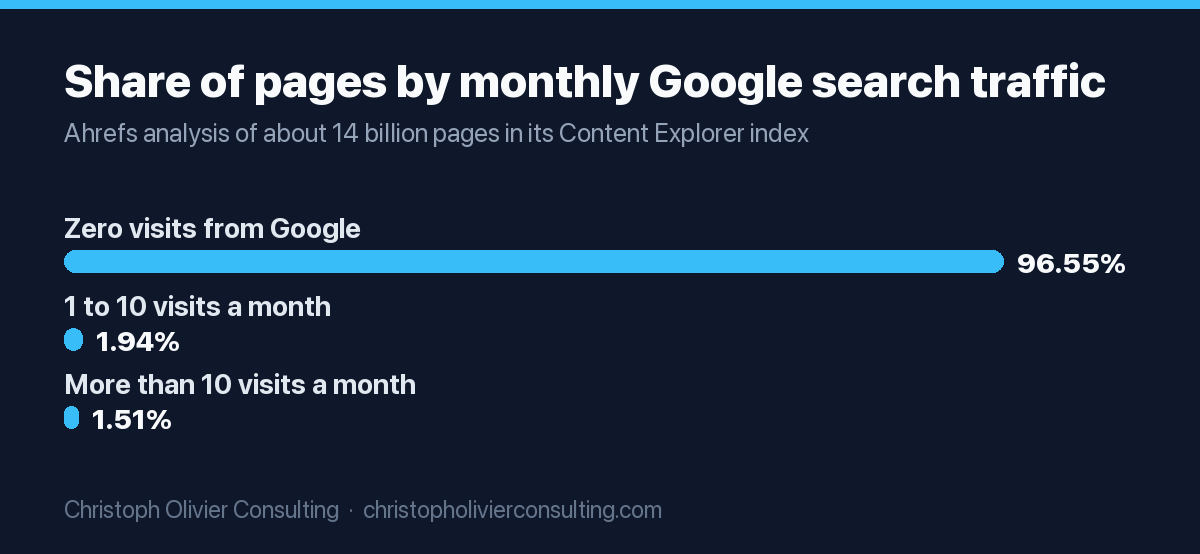
Below is a hypothetical accounting firm’s sheet, run on 1 November 2026. The numbers are illustrative, not client data. Each row shows the formula’s suggested action and the final call.
| URL | Clicks | Impr. | Pos. | Leads | Links | Quality | Value | Action | Priority |
|---|---|---|---|---|---|---|---|---|---|
| /tax-planning-services/ | 310 | 9,800 | 9.4 | 14 | 3 | 7 | 3 | Update | 3 × 3 ÷ 2 = 4.5 |
| /blog/estimated-tax-deadlines/ | 2,400 | 61,000 | 4.1 | 2 | 11 | 10 | 2 | Keep | none |
| /blog/s-corp-vs-llc/ | 520 | 18,400 | 14.8 | 3 | 4 | 8 | 2 | Update | 3 × 2 ÷ 2 = 3.0 |
| /blog/llc-or-s-corp/ | 120 | 7,900 | 18.2 | 0 | 1 | 6 | 2 | Consolidate into /s-corp-vs-llc/ | 3 × 2 ÷ 3 = 2.0 |
| /bookkeeping-services/ | 40 | 2,100 | 22.5 | 5 | 0 | 6 | 3 | Update | 3 × 3 ÷ 2 = 4.5 |
| /blog/2019-tax-law-changes/ | 4 | 310 | 41.0 | 0 | 2 | 3 | 1 | Redirect to /blog/tax-law-changes/ | 2 × 1 ÷ 1 = 2.0 |
| /blog/office-holiday-party-2019/ | 0 | 12 | 63.0 | 0 | 0 | 2 | 1 | Delete (410) | 1 × 1 ÷ 1 = 1.0 |
| /thank-you/ | 6 | 140 | 28.0 | 0 | 0 | n/a | 1 | Noindex | 2 × 1 ÷ 1 = 2.0 |
| /blog/1099-contractor-guide/ | 9 | 1,600 | 12.3 | 0 | 0 | 4 | 2 | Update (override) | 3 × 2 ÷ 2 = 3.0 |
| /blog/r-and-d-credit-explained/ (published Aug 2026) | 3 | 450 | 35.0 | 0 | 0 | 8 | 2 | Hold | none |
How the rules played out:
- Two pages tie at 4.5: both service pages. The bookkeeping page has weak search numbers but 5 leads from 40 clicks, so its business value carries it to the top.
- The S corp pair: the qp tab showed both URLs taking more than 10% of impressions for “s corp vs llc”. The stronger URL gets updated with the best material from the weaker one, and the weaker one is 301 redirected.
- The 1099 guide is an override. The formula said redirect (9 clicks, quality 4), but 1,600 impressions at position 12.3 is real demand on a topic the firm sells. A human changed column R to Update and noted why.
- The 2019 tax law page has 2 linking sites, so it redirects to the current version instead of returning a 404.
- The R&D credit post is under 6 months old, so it holds regardless of its numbers.
Your 30/60/90 day action plan
| Window | Do this | Done when |
|---|---|---|
| Days 1 to 30 | Build the sheet (Steps 1 to 4), run the cannibalization check, score the top 50 URLs by impressions with the form, ship every noindex and the top 10 updates by priority score | Every row has a final action; top 10 updates live with column V dated |
| Days 31 to 60 | Ship consolidations (merge, 301, update internal links that pointed at the old URL), then redirects and deletes; resubmit the XML sitemap; inspect the merged URLs in Search Console | No internal links point at redirected or deleted URLs (recrawl and check the Response Codes tab) |
| Days 61 to 90 | Fill column W for the first batch; compare the 90 days before and after for each changed URL; turn content gaps the audit found into new briefs | A one-page result summary and the next quarter’s list |
Ship in batches of 10 to 20 pages and log the date of each, otherwise you will not know which change did what. If you want a cleaner read than before and after, the method for running an SEO test shows how to set up a control group of similar pages you leave untouched. Topics the audit shows you are missing go into your content roadmap, not the fix list.
How often to run a website content audit
Run the full sheet once a year and a light pass on your top 50 pages by impressions every quarter. Semrush’s content audit guide suggests quarterly as a default and twice a year for small sites, and recommends waiting at least two months before judging the impact of changes. Also run a targeted audit after any sharp drop: Google’s core updates guidance tells you to “evaluate the pages that were most impacted” against its self-assessment questions, which is this same form applied to a shorter list.
Keep last year’s sheet. The second audit is faster and more useful than the first, because column W shows you which kinds of updates moved the numbers on your site. If you would rather work through the sheet with someone who has done it on service business sites, you can book a consultation.
Frequently asked questions
How do you do a website content audit?
Crawl the site with Screaming Frog and export the Internal HTML tab. Add 12 months of Search Console clicks, impressions and position by page, GA4 organic sessions and key events from the Landing page report, and linking sites from the Links report. Score each page's quality, check for cannibalization, then give every URL one action: keep, update, consolidate, redirect, noindex or delete. Prioritize by impact, business value and effort.
What should a website content audit template include?
One row per indexable URL with page type, publish date, word count, unique inlinks, near-duplicate similarity, 12-month clicks, impressions and average position, organic sessions, key events, linking sites, index status, a quality score, a cannibalization partner, business value, suggested and final action, target URL, priority score, owner, date shipped and clicks 90 days after. Use VLOOKUP tabs for crawl, Search Console and GA4 data.
Is there a content audit form I can use for each page?
Yes. Score 12 pass or fail checks: direct answer in the first 100 words, title matching top queries, current sourced facts, intent match, something the top results lack, a named author, primary sources, reader-first copy, one clear next step, three or more internal links, under 90% similarity to another page, and indexed status. 10 to 12 supports keep, 6 to 9 update, 5 or less redirect or delete.
Does deleting old content improve SEO?
Not by itself. Google's helpful content guidance says removing a lot of older content to make a site seem fresh will not help rankings, and its core updates guidance calls deleting content a last resort. Google's Search Liaison said in August 2023 that deleting content because it is old is not a thing. Delete pages that help nobody, and improve or merge the rest.
How do I find keyword cannibalization in a content audit?
Pull Search Console data with both query and page dimensions through the Search Analytics API, since the interface exports only 1,000 rows. For each query, calculate each URL's share of impressions. Flag queries with 50 or more impressions where two or more of your URLs each take 10% or more. Then check intent: if both pages answer the same question, merge the weaker into the stronger with a 301.
What is a website copy audit?
A website copy audit reviews the words on key pages rather than their search data. Check that the opening answers the visitor's question, that the headline uses the words people search, that the copy talks about the reader's problem more than the firm, and that each service page has one clear call to action visible without scrolling. It fits into the same sheet as the content audit quality score.
How often should you do a website content audit?
Run a full audit once a year and a lighter quarterly review of your top 50 pages by impressions. Run a targeted audit after any sharp traffic drop, starting with the pages that lost the most visibility. Wait at least two months after shipping changes before judging results, and compare the same 90-day window before and after for each changed URL.
More SEO guides
- SEO Audit Checklist: 26 Critical Fixes
- SEO Audit Guide: The Exact Order to Run One (and What to Fix First)
- SEO Content Plan: From Keyword List to a Dated Publishing Calendar
- Corporate SEO: How Search Works at Enterprise Scale
- WordPress SEO in 2026: Complete Setup
- Answer Engine Optimization: Complete 2026 Guide
- All SEO guides →