
Last reviewed: October 2026
Online market research tools are the software and data sources that let you answer market questions without hiring a research agency: survey platforms (SurveyMonkey, Google Forms, Typeform, Pollfish), free government data (Census Bureau, BLS), search demand tools (Google Trends, Keyword Planner), competitive and audience intelligence (Similarweb, Semrush, GWI, Statista), and social listening and qualitative tools (Sprout Social, Brandwatch, UserTesting, Wynter). Most small and mid-sized firms can answer their first questions with free tools and pay for a panel or data subscription only when a specific decision justifies the cost.
This guide sorts 18 tools by job, with pricing checked on each vendor’s own page in October 2026, then gives owners of service firms a five-step research plan, a worked example and a brief template.
What online market research tools do: the six jobs
Market research tools fall into six jobs: asking people (surveys), counting markets (government and syndicated data), measuring demand (search data), watching competitors (traffic and keyword intelligence), listening to conversations (social listening), and understanding why (qualitative testing and interviews). Pick the job first, then the tool. Buying a tool before you define the question is the most common waste.
No single platform does all six well:
- Surveys answer “what do people say they want, prefer or would pay?”
- Market sizing data answers “how many potential buyers exist, where, and how much do they spend?”
- Search demand answers “are people actively looking for this, and is interest growing?”
- Competitive intelligence answers “who already owns this demand and how do they get traffic?”
- Social listening answers “what are people saying, unprompted, about a brand or category?”
- Qualitative research answers “why do buyers choose, hesitate or leave?”
Surveys and interviews are primary research; the rest is secondary data someone else already collected. Start with secondary data, which is faster and often free, and use primary research to fill the gaps.
Best online market research tools compared: 2026 pricing
The best market research tools for a small firm are usually the free ones: Census Business Builder, County Business Patterns, Google Trends and Google Forms cover market sizing, demand and basic surveys at no cost. Paid tools earn their place when you need a recruited survey audience, competitor traffic estimates, syndicated consumer data or tested messaging.
Where a vendor localizes prices or quotes on request, the table says so rather than guessing.
| Tool | Job | Free option | Paid entry point (Oct 2026) | Best for |
|---|---|---|---|---|
| Google Forms | Surveys | Free with a Google account | None needed | Surveying your own clients and list |
| SurveyMonkey | Surveys | Basic: unlimited surveys, 10 questions per survey | Region-priced; Standard includes 1,000 responses per month | Templates, logic, built-in analysis |
| Typeform | Surveys | Free plan with limited monthly responses | Basic $28/month billed annually ($39 monthly), 100 responses per month | Polished, conversational forms |
| Pollfish | Survey panel | Free to build surveys | From $0.95 per response, no subscription | Reaching consumers you do not know |
| Census Business Builder | Market sizing | Free | Free | Local demographic and business counts |
| County Business Patterns | Market sizing | Free | Free | Counting businesses by industry and county |
| American Community Survey | Market sizing | Free | Free | Household demographics, income, housing |
| BLS Consumer Expenditure Surveys | Market sizing | Free | Free | What households spend by category |
| Google Trends | Search demand | Free | Free | Relative interest, seasonality, regions |
| Google Keyword Planner | Search demand | Free inside Google Ads (billing info required) | Free | Search volume estimates and ad costs |
| Similarweb | Competitive | Free Website Traffic Checker | Researcher plan $199/month billed monthly, less billed annually | Competitor traffic and channel mix |
| Semrush | Competitive | Free account: 10 reports per day | Region-priced paid plans | Competitor keywords and content gaps |
| GWI | Audience data | Free: 10 Agent Spark prompts per month | Plus $150/user/month or $1,500/user/year | Consumer attitudes and media habits |
| Statista | Secondary data | Basic: free statistics only | Starter $199/month billed annually | Fast, citable industry statistics |
| Sprout Social | Social listening | 30-day free trial | Essentials $79/seat/month annually; Listening is a paid add-on (Standard and up) | Firms already managing social in one place |
| Brandwatch | Social listening | Demo | Quote only | Large-scale consumer intelligence |
| UserTesting | Qualitative | One free test | Quote only | Watching real people use your site |
| Wynter | Message testing (B2B) | Pay-as-you-go tests | Pro $20,000/year; pay-as-you-go tests cost 50% more | Testing B2B messaging with target buyers |
Sources: vendor pricing pages for Typeform, Pollfish, Similarweb, Semrush, GWI, Statista, Sprout Social, UserTesting, Brandwatch and Wynter. Prices change often, so confirm before you buy.
Survey tools: SurveyMonkey, Google Forms, Typeform and Pollfish
Survey tools split into two groups. Form builders (Google Forms, SurveyMonkey, Typeform) help you question people you can already reach, such as clients and email subscribers. Panel tools (Pollfish) also supply the respondents, so you can survey people who have never heard of you. Choose by who you need to hear from.
Google Forms
Google Forms is the right default for surveying your own clients. It is free, responses land in Google Sheets, and nobody needs training. You give up advanced logic, branded design and built-in analysis.
SurveyMonkey
SurveyMonkey’s free Basic plan allows unlimited surveys but caps each survey at 10 questions, according to its pricing page. Paid individual plans remove the question cap and include response allowances: 1,000 responses per month on Standard, 15,000 per year on Advantage and 40,000 per year on Premier. SurveyMonkey shows prices in local currency, so check the current US figure for your account.
Typeform
Typeform shows one question at a time, which suits short client feedback and intake forms. Its pricing page lists Basic at $39 per month ($28 per month billed annually) with 100 responses per month, Plus at $79 ($56 annually) with 1,000 responses, and Business at $129 ($91 annually) with 10,000 responses.
Pollfish
Pollfish sells access to respondents. Its pricing page lists DIY surveys from $0.95 per response with no subscription, with targeting costs on top: screening questions add $0.50 to $5.75 each and audience quotas add $0.55 to $2.20 each. Full-service projects start at $5,000 per project per market. Consumer panels are a weak fit when your buyer is a narrow professional audience such as CFOs or practice owners.
How many survey responses do you need?
For a simple random sample, about 400 responses gives a margin of error near plus or minus 5 points at 95% confidence, and about 1,000 gives roughly plus or minus 3. Below 100 responses, treat results as directional. Margins grow fast when you slice by subgroup, so plan sample size around the smallest group you need to report.
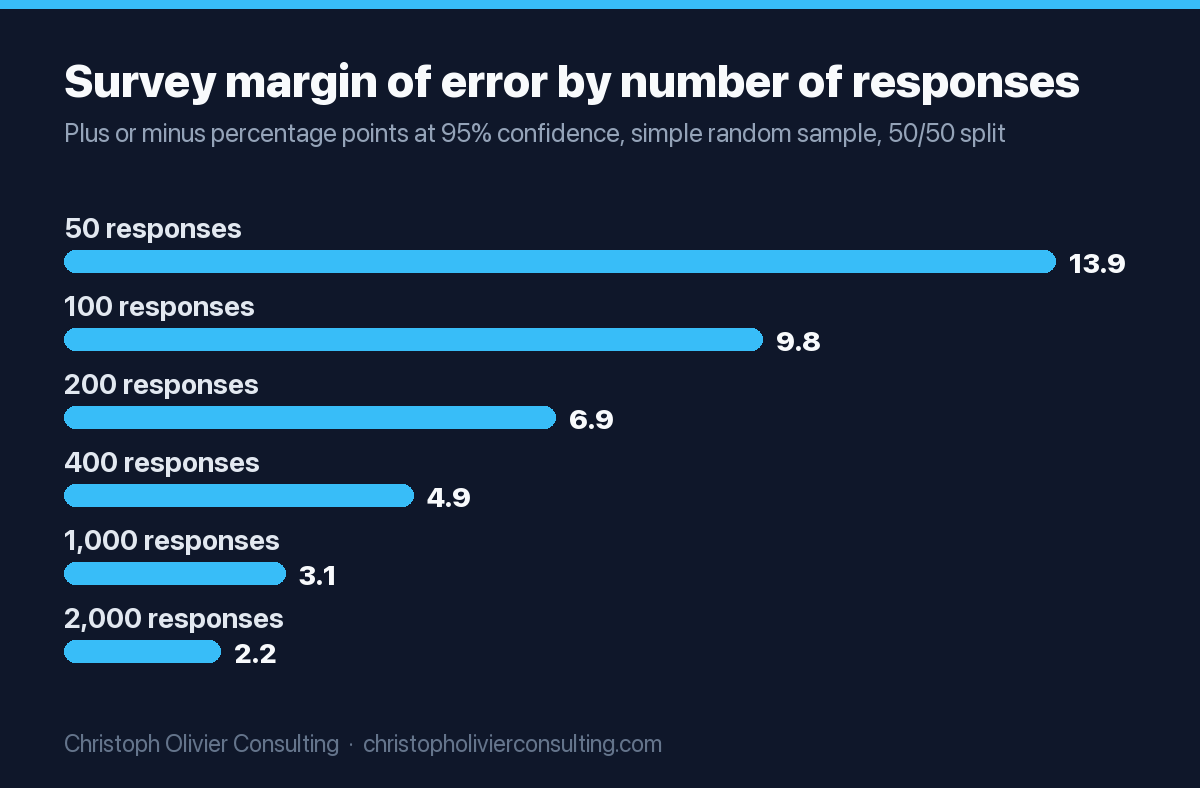
The Pew Research Center explains that a simple random sample of 1,067 cases has a margin of error of plus or minus 3 points, and that a subgroup of roughly 160 cases in the same survey carries plus or minus 8 points. 300 responses looks solid until you split them five ways.
Two caveats. Margin of error formulas assume a random sample; client lists and opt-in panels are not random, so the number covers sampling noise, not bias. And a small survey of the right people beats a large survey of the wrong ones.
Survey panel quality: the bogus respondent problem
Online opt-in panels are fast and cheap, but some respondents answer insincerely to collect rewards. Pew Research Center found these “bogus respondents” tend to say yes to almost anything, which inflates rare attitudes and behaviors. Screening helps, but no single method fixes it, so build quality checks into every panel survey you run.
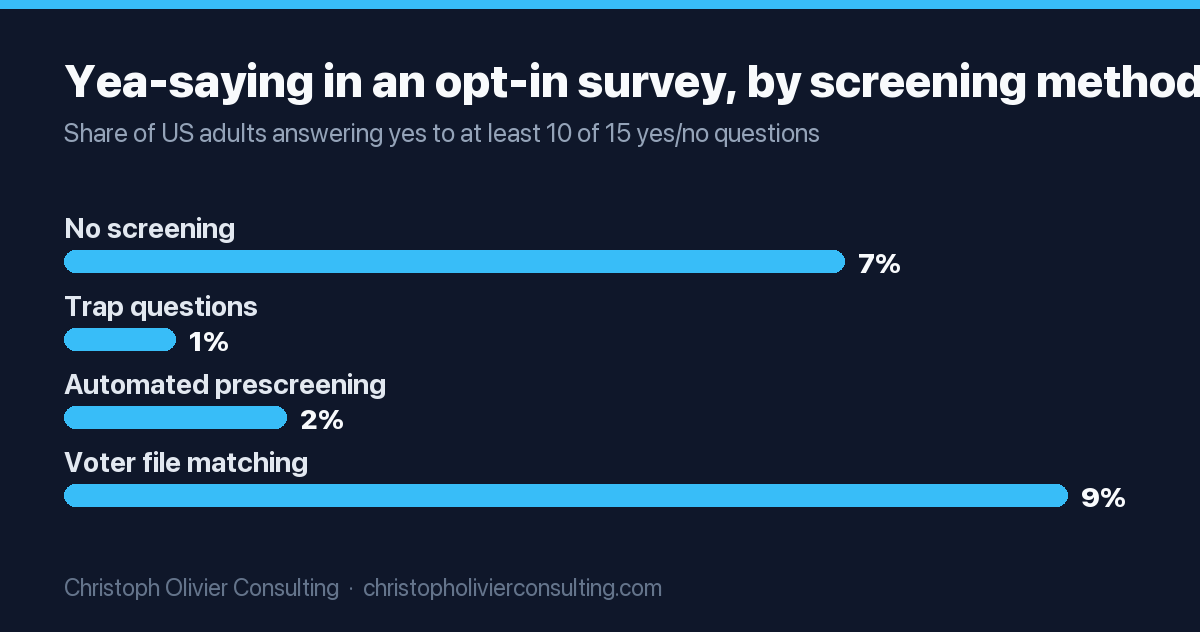
In a study published in August 2026, Pew surveyed 11,114 US adults through opt-in sources and tested three screening methods. Before screening, 7% of all adults answered “yes” to at least 10 of 15 yes/no questions. Trap questions cut that to 1% and automated prescreening to 2%, while voter file matching raised it to 9% by removing valid cases. Standard speeder and straightliner checks missed most bogus respondents.
If you ask a panel “Would you use a service like this?”, yea-sayers push the answer up. Use these survey design rules:
- Add one or two trap questions, such as a made-up brand or an impossible behavior, and drop anyone who claims it.
- Include at least one open-ended question and read the answers. Copy-pasted or nonsense text is a red flag.
- Ask about past behavior (“In the last 12 months, did you hire…”) rather than future intent (“Would you hire…”).
- Field a small soft launch, review the data, then release the full sample.
Free market research tools from the US government
The strongest free market research tools for US service businesses come from the Census Bureau and the Bureau of Labor Statistics. Census Business Builder, County Business Patterns and the American Community Survey tell you how many target households or businesses exist in an area. The BLS Consumer Expenditure Surveys show what households spend. All are free and citable.
Census Business Builder is the easiest entry point. It packages selected Census demographic and economic data into maps, dashboards and downloadable reports, so you can pick a location and business type without building tables by hand. When you need raw counts, go to the underlying datasets:
| Free source | What it measures | Latest data (Oct 2026) | Example question it answers |
|---|---|---|---|
| County Business Patterns | Establishments, employment, first-quarter and annual payroll by industry, size class and area | 2023 reference year | How many dental practices or law offices are in my county, and how large are they? |
| American Community Survey | Ongoing yearly survey of people and housing: income, education, employment, housing tenure | Released every year | How many homeowners over 55 live in my service area? |
| BLS Consumer Expenditure Surveys | Household spending, income and demographics | 2024 data, released December 19, 2025 | How much do households spend on the category I serve? |
| Census Business Builder | Selected demographic and economic data in a map and report tool | Version 5.12 (current tool) | What does the market look like around a new office location? |
For scale, the BLS reports average annual expenditures of $78,535 per consumer unit in 2024, with housing and transportation over half of it. Use national averages as a sanity check, not as your local number.
Government data lags, uses standard industry codes that may not match your niche, and counts businesses and households, not ready buyers. Pair it with search demand data.
Search demand tools: Google Trends and Keyword Planner
Google Trends and Google Keyword Planner are free market research tools for measuring demand. Trends shows relative search interest over time and by region on a 0 to 100 scale. Keyword Planner estimates monthly searches and advertising costs. Together they show whether people are looking for what you sell and when.
Read Trends correctly. Google’s Trends help page explains that it uses a sample of searches, divides each data point by total searches in that place and time, and scales results from 0 to 100. A score of 100 means peak relative popularity, not a search count. Very low-volume searches are filtered out, so niche B2B terms often show no data.
Keyword Planner fills that gap with estimates of monthly searches and the cost to target each keyword. It lives inside Google Ads, and Google says you must complete account setup, including billing information, to access it.
Uses for a service firm:
- Compare two ways buyers describe your service (“fractional CFO” vs “outsourced CFO”) before you name a page or offer.
- Spot seasonality so you time campaigns before demand peaks, not during them.
- Compare interest across metro areas before choosing where to expand.
Competitive and audience intelligence: Similarweb, Semrush, GWI and Statista
Competitive intelligence tools estimate how rivals get traffic and which keywords they rank for, while audience data tools describe what buyers think, watch and buy. Similarweb and Semrush cover competitors; GWI and Statista cover audiences and industries. All four have a free entry point, which is usually enough for a first look.
Similarweb estimates website traffic and channel mix. Its free Website Traffic Checker handles quick lookups, and its self-serve competitive intelligence plan for researchers is listed at $199 per month billed monthly, with a lower rate billed annually and three months of historical data on that tier. Treat its traffic numbers as modeled estimates for comparing rivals, not exact counts.
Semrush shows which keywords competitors rank for and where content gaps exist. A free account allows 10 reports per day across its core tools. If competitor search visibility is your main question, our comparison of SEO competitive analysis tools goes deeper on Semrush and its alternatives, and the competitive analysis guide shows how to turn the data into positioning decisions.
GWI runs large consumer surveys and sells access to the results. Its free tier includes 10 Agent Spark prompts per month, and Plus costs $150 per user per month or $1,500 per user per year. It suits consumer-facing firms.
Statista aggregates statistics from many publishers. A free Basic account shows free statistics only. The Starter account lists at $199 per month billed annually for premium statistics. Always click through to the original source before citing a Statista number.
Social listening and qualitative research tools
Social listening tools track what people say about a brand or category online, and qualitative tools show why people behave the way they do. For most service firms, the highest-value qualitative tool is free: structured interviews with recent clients and lost prospects.
Social listening: Sprout Social and Brandwatch
Sprout Social’s pricing page lists Essentials at $79 per seat per month billed annually ($99 monthly), with Standard at $199, Professional at $299 and Advanced at $399 per seat per month. Listening is a paid add-on available on Standard and up. Brandwatch publishes no prices and asks for a demo. Many B2B professional services generate little public conversation, so test with free platform search first.
Qualitative: UserTesting, Wynter and customer interviews
UserTesting records real people using your website and talking through what they see. It quotes custom pricing but offers one free test. Wynter tests B2B messaging with panels of target buyers; its Pro plan is $20,000 per year, pay-as-you-go tests cost 50% more per test, and results arrive in 12 to 48 hours.
Before paying for either, run eight to twelve interviews yourself. Ask recent clients what triggered the search and what nearly stopped them; ask lost prospects what the winner did differently. These answers also sharpen your customer segmentation, because buyers who share a trigger usually share a message.
A 5-step lean market research plan for a service business
A lean research plan answers one decision, uses free secondary data first, then adds a small amount of primary research to close the gaps. Most service firms can run it in two to four weeks with free tools and a modest panel budget, which is enough to make a go or no-go call with eyes open.
- Write the decision, not the topic. “Should we launch a fractional CFO service for dental practices in Maricopa County this year?” beats “research the dental market.” Name an owner and a deadline.
- Size the market with free data. Count target businesses or households in your area with County Business Patterns or Census Business Builder.
- Check demand. Compare buyer phrasings and regions in Google Trends, then pull search volume and click cost estimates from Keyword Planner.
- Map competitors. Use the Semrush free account and Similarweb’s free checker to see who already captures the demand, how they position, and which channels feed them.
- Talk to buyers, then survey if needed. Interview eight to twelve buyers, then write a short survey to quantify what you heard, on your own list or a panel.
Worked example (illustrative)
Take a hypothetical 15-person accounting firm weighing that dental CFO offer. It pulls the County Business Patterns count of dental offices in its county, filtered to employment size classes large enough to afford an outsourced CFO. It compares “fractional CFO” and “outsourced CFO” in Google Trends, profiles the three firms ranking for the winning phrase, and interviews ten practice owners from its referral network.
The firm skips a consumer panel, because general panels reach dentists poorly. The output is a one-page memo: market count, demand trend, competitor gaps, top buying triggers and a recommendation. Tool cost can stay at zero; the real cost is partner time.
Template: market research brief and tool checklist
A one-page research brief keeps a project tied to a decision and stops tool shopping from becoming the project. Fill it in before you open any tool, then use the checklist to pick the cheapest tool that answers each question.
Market research brief
- Decision: What will we decide, by when, and who decides?
- Options on the table: Go, no-go, or a smaller test?
- Key questions (max 5): Market size, demand trend, competitor gap, buyer triggers, price tolerance.
- Evidence that would change our mind: Write it down before you look.
- Sources per question: Free data first, then paid only where free cannot answer.
- Primary research: Number of interviews, survey audience, sample size target, quality checks.
- Budget and timeline: Tool spend, panel spend, staff hours.
- Output: One-page memo with a recommendation.
Tool selection checklist
- Can a free government source or Google tool answer this question?
- Do we need to reach people we do not already know? If not, skip the panel.
- Is the paid tool’s data a modeled estimate or measured? Have we noted that in the memo?
- Have we built trap questions and an open-ended check into any panel survey?
Once the research turns into campaigns, measurement becomes the next job. Our guides to marketing analytics tools and digital marketing analytics cover how to track whether the market you found actually converts.
On budget: start free, pay per project (a Pollfish sample, one month of Similarweb), and move to an annual plan for Statista, GWI or Wynter only after a tool has informed real decisions at least twice. In my experience, the expensive mistake is rarely the wrong tool; it is research with no decision attached and a subscription that renews after the project ends.
If you want a second set of eyes on a market decision or a research plan before you spend on tools, you can book a consultation and we will scope the smallest study that answers it.
Frequently asked questions
What are online market research tools?
Online market research tools are software and data sources that help you answer market questions without a research agency. They cover surveys (Google Forms, SurveyMonkey, Typeform, Pollfish), market sizing (Census and BLS data), search demand (Google Trends, Keyword Planner), competitor intelligence (Similarweb, Semrush), audience data (GWI, Statista), social listening and qualitative testing.
What are the best free market research tools?
The strongest free options are Google Forms for surveying your own clients, Google Trends and Keyword Planner for search demand, and Census Business Builder, County Business Patterns, the American Community Survey and the BLS Consumer Expenditure Surveys for market sizing. Semrush, Similarweb, GWI and Statista also have free tiers that are enough for a first look.
How much do market research tools cost?
Costs range from free to six figures. As of October 2026, Typeform starts at $28 per month billed annually, Pollfish charges from $0.95 per response, GWI Plus is $150 per user per month, Statista Starter lists at $199 per month billed annually, and Wynter Pro is $20,000 per year. Brandwatch and UserTesting quote on request.
How many survey responses do I need for market research?
For a simple random sample, about 400 responses gives a margin of error near plus or minus 5 points at 95% confidence, and about 1,000 gives roughly plus or minus 3. Plan around the smallest subgroup you need to report, because margins widen quickly when you split results. Opt-in panels also carry bias that margin of error does not capture.
Are online survey panels reliable?
They can be useful, but quality varies. A 2026 Pew Research Center study found that bogus respondents in opt-in samples tend to answer yes to almost anything, which inflates rare behaviors. Trap questions and automated prescreening reduced the problem, while standard speeder and straightliner checks missed most of it. Build quality checks into every panel survey.
Can a small service business do market research without an agency?
Yes, in most cases. Define the decision first, size the market with free Census data, check demand in Google Trends and Keyword Planner, profile competitors with free tiers of Semrush and Similarweb, and interview eight to twelve buyers. Many firms can make a confident go or no-go call this way in a few weeks with little or no tool spend.
More Analytics & Attribution guides
- Marketing Analytics Tools: A Practical Guide to Attribution and ROI
- Email Open Rates 2026: Benchmarks & Strategy
- GA4 Setup: A Practical Walkthrough
- Conversion Rate Benchmarks by Industry
- AI Search Analytics: How to Measure Visibility and Traffic From AI Search
- Call Tracking and Marketing Attribution for HVAC Companies: Know Which Ads Book Jobs
- All Analytics & Attribution guides →