

A CRM sales funnel is your sales funnel run as records inside a CRM: every lead is a record with a stage, every stage has fields that must be filled to enter it, an automation that fires on entry, and a written rule for leaving it. The funnel is the model of how buyers move from first contact to signed client; the CRM is what moves real people through that model and reports how many convert from one stage to the next, so you can see exactly where they stop.
So the CRM’s job in the sales funnel is not storage. It is enforcement and measurement. Below: the full stage table (lead to MQL to SQL to opportunity stages to closed won or lost to customer and expansion) with the CRM object, required fields, automation and exit criteria at each step; the six types of CRM funnel with an example pipeline for each; click-by-click setup in HubSpot, Pipedrive and Salesforce from each vendor’s own documentation; what each CRM costs to run a funnel; the conversion and velocity formulas with a worked example; and a pass/fail funnel audit.
The stages of a CRM sales funnel: object, required fields, automation and exit criteria
Most “CRM funnel” guides stop at awareness, interest, decision, action. A CRM cannot run on those words, because nobody can prove a lead is “interested.” It runs on stages that change when the buyer does something you can check. The stage names and rules below are the same ones used in our inbound sales process (lead through SQL) and our sales pipeline forecasting guide (the opportunity stages), so marketing, sales and the forecast all count the same thing.
| Funnel stage | CRM object and stage value (HubSpot / Pipedrive / Salesforce) | Required to enter | Automation on entry | Exit criterion (move only when true) |
|---|---|---|---|---|
| 1. Lead | Contact, Lifecycle stage = Lead / Lead in the Leads Inbox / Lead, Lead Status = Open | Email, original source, request type, service interest | Enrichment (company size, industry, title), fit and intent scoring, owner assigned within 1 minute | Fit score 40+ and intent score 40+ (MQL), or disqualified with a reason |
| 2. MQL | Contact, Lifecycle stage = Marketing qualified lead / Lead with an “MQL” label / Lead, Lead Status = Contacted (or a custom MQL value) | Fit score, intent score, owner, first touch date-time | Tier 1 hand-raisers: call within 5 minutes; Tier 2: personal reply within 1 business hour; up to 6 calls and 5 emails over about 2 weeks | Discovery call held, need and timeline confirmed, next meeting booked (SQL). Unresponsive or bad timing: back to nurture |
| 3. SQL, opportunity stage “Discovery held” | Contact, Lifecycle stage = Sales qualified lead, then Opportunity once the deal exists / lead converted to a deal / Lead Status = Qualified, then converted to Account, Contact and Opportunity | Need, budget range, decision process and timeline (the four discovery fields); amount estimate; close date | Deal created in the first stage; lifecycle set to Opportunity automatically; task to book the scope call | Scope call held with the decision maker present |
| 4. Scoped | Deal / Deal / Opportunity, Stage = Scoped | Decision maker contact role set on the deal | Proposal task with a due date; inactivity alert after 7 days | Proposal walked through live, not just emailed |
| 5. Proposal reviewed | Deal / Deal / Opportunity, Stage = Proposal reviewed | Review meeting logged; amount equals the proposal total | Forecast category Best Case; follow-up task 2 business days after the review | Verbal yes; open items are terms, not whether to buy |
| 6. Negotiation | Deal / Deal / Opportunity, Stage = Negotiation | Redline or written list of open terms attached | Forecast category Commit; manager notified | Signature requested from the named signer |
| 7. Contract sent | Deal / Deal / Opportunity, Stage = Contract sent | E-signature envelope sent; signer name | Reminder if unsigned after 3 business days | Signed (won) or lost with a reason |
| 8. Closed won / Closed lost | Deal won or lost / Deal won or lost / Opportunity Stage = Closed Won or Closed Lost | Won: contract start date, closed won reason. Lost: loss reason from a picklist, never free text | Won: contact lifecycle set to Customer, onboarding pipeline record created. Lost: lead returns to nurture | Onboarding kickoff held |
| 9. Customer and expansion | Lifecycle stage = Customer, then Evangelist / onboarding pipeline / Account with a new Opportunity for each upsell | Expansion deals marked Deal type = Existing Business (HubSpot) or kept in their own pipeline or sales process | Renewal and check-in tasks on a calendar, not memory | Expansion deal opened, or renewal signed |
Where the rules come from. The MQL threshold, the response tiers and the SQL definition are the written SLA from our inbound guide. The 7-day inactivity alert rests on Ebsta and Pavilion’s 2024 B2B Sales Benchmarks (4.2 million opportunities, 530 companies): “more than 7 days of inactivity (with no future activity) reduces win rates by 65%.” The vendor values are documented: HubSpot’s lifecycle stage article (updated July 17, 2026) defines an Opportunity as a contact associated with a deal and a Customer as a record with at least one closed deal, and Salesforce’s Lead Implementation Guide says default Lead Status values include “Open, Contacted, and Qualified” and that you convert a qualified lead into an account, contact and opportunity.
The task timings in the automation column (2 and 3 business days) are my starting points, not published benchmarks. Two rules make this table work. First, the stage is a fact, not an opinion: if two managers would put the same deal in different stages, the exit criterion is too vague. Second, the lifecycle stage on the contact and the deal stage on the opportunity are separate fields. Contacts measure the marketing side of the funnel (lead to SQL); deals measure the sales side (SQL to closed). Keep both, and link every deal to at least one contact, or your funnel report has a hole in the middle.
Types of CRM funnels for marketing and sales, with an example pipeline for each
Lists of “types of CRM funnels” usually name AIDA, omnichannel, upsell and retention funnels. AIDA is a buyer-psychology model and omnichannel is a channel strategy; neither is something you build in a CRM. The useful way to sort CRM funnels is by what moves through them, because that decides the object, the stages and the number you report. A small firm typically needs the first three; partner and recruiting funnels come later.
| Funnel type | What moves through it | Example pipeline (stages in order) | CRM object | The one number to report |
|---|---|---|---|---|
| 1. Sales pipeline | Deals worth money | Discovery held, Scoped, Proposal reviewed, Negotiation, Contract sent, Closed won, Closed lost | Deal or Opportunity | Win rate and pipeline velocity |
| 2. Marketing or lifecycle funnel | People and companies | Subscriber, Lead, Marketing qualified lead, Sales qualified lead, Opportunity, Customer, Evangelist (HubSpot’s default lifecycle stages) | Contact and Company, Lifecycle stage field | Lead to MQL and MQL to SQL rates by source |
| 3. Customer onboarding funnel | New clients after the signature | Kickoff booked, Kickoff held, Documents or data received, First deliverable sent, Live, Handed to account manager | A second deal pipeline (or a ticket pipeline in HubSpot) | Median days from Closed won to Live |
| 4. Expansion and renewal funnel | Upsells, cross-sells and renewals for existing clients | Renewal due in 90 days, Review meeting held, Expansion proposed, Renewed or expanded, Churned | Deal with Deal type = Existing Business, in its own pipeline | Net revenue retained per quarter |
| 5. Partner (referral) funnel | Referral partners: CPAs, attorneys, agencies | Partner identified, Intro meeting held, Agreement signed, First referral received, Active (1+ referral a quarter), Dormant | Company record in a partner pipeline, with a “Referred by” property on every referred deal | Referred deals won per active partner |
| 6. Recruiting funnel | Candidates | Applied, Phone screen, Interview, Work sample, Offer made, Hired, Declined | A separate pipeline restricted to hiring managers (HubSpot custom object pipelines need Enterprise) | Applicants per hire and days to offer |
Keep each funnel in its own pipeline. Mixing candidates or partners into the sales pipeline corrupts win rate and velocity, because they never close as revenue. Plan limits matter here: per HubSpot’s pipeline article (updated September 29, 2026), Free accounts get only the default deal pipeline, Starter allows 15 custom pipelines, Professional 100 and Enterprise 350 on seat-based pricing. Zoho lists “Multiple sales pipelines” from its Standard edition on its pricing page, and Pipedrive lets you add a pipeline from the pipeline dropdown with “+ New pipeline.” If the funnel is mostly landing pages and checkout rather than conversations, you are shopping for a different tool category, and our comparison of sales funnel software with 2026 prices covers the page builders and all-in-one platforms.
How to set up a sales funnel in HubSpot: lifecycle stages plus a deal pipeline
HubSpot splits the funnel across two settings screens: lifecycle stages on contacts for the marketing half, and a deal pipeline for the sales half. Paths below are from HubSpot’s knowledge base, checked November 1, 2026.
- Edit the lifecycle stages. Settings icon, then Data Management, Objects, choose Contacts, then the Lifecycle Stage tab, per HubSpot’s customization article. Click “Add stage” for any custom stage. Super Admin permission is required. Keep the defaults unless you have a reason; every report and integration expects them.
- Tie lifecycle stage to deals. On the same Lifecycle Stage tab, open Automate and switch on “Set lifecycle stage when a deal is created” (choose Opportunity) and “Set lifecycle stage when a deal is won” (choose Customer). Both are available on all plans, per HubSpot’s lifecycle sync article (updated September 9, 2026). If the won setting is off, Close date and Days to close on the contact do not update.
- Build the deal pipeline. Settings, Data Management, Objects, Deals, the Pipelines tab, then click the pipeline name to add, rename, reorder or delete stages. The default pipeline ships with Appointment scheduled (20%), Qualified to buy (40%), Presentation scheduled (60%), Decision maker bought-in (80%), Contract sent (90%), Closed won and Closed lost. Rename them to the stages in the table above. HubSpot requires both a Won and a Lost stage for sales reports to process deals correctly.
- Make stage fields required. In a stage row, hover over “Conditional logic rules,” click “Add rule,” add the stage’s evidence property and tick Required. Per HubSpot, “users cannot create or update the record until they set a value for it.” This is the exit criterion, enforced by software.
- Automate the handoffs. Workflows that set property values need Professional or Enterprise, per the lifecycle article. On Free or Starter, the deal-based lifecycle settings in step 2 still do most of the work.
- Know the one-way rule. HubSpot’s lifecycle stage “can only be moved forward” by imports, forms, the API, the Salesforce integration and workflows. To recycle an SQL back to Lead, clear the field first (manually or with a workflow), then set the earlier value. Forgetting this is why recycled leads stay stuck at SQL.
How to set up pipelines and stages in Pipedrive
Pipedrive is deal-first. Unqualified leads sit in the Leads Inbox, which Pipedrive’s Leads Inbox article (updated September 23, 2026) calls “a dedicated space to store and organize your unqualified leads,” and they enter the pipeline only when you convert them to deals.
- Create the pipeline. Click the pipeline name to open the dropdown and select “+ New pipeline.” You start with “a sample five-stage pipeline that you can edit,” per Pipedrive’s pipeline stages article (updated September 3, 2026). Only users with deal admin permissions can set up and edit pipelines.
- Edit the stages. Open the dropdown, click the pencil icon next to the pipeline, rename the sample stages, and hover between stages and click “+” to insert one. Deleting a stage deletes the deals in it, so move them first.
- Set stage probability. Once you have closed-deal history, set a probability per stage. If you also turn on deal probability, the per-deal value overrides the stage value.
- Turn on rotting. In the same pencil view, toggle “Rotting in (days)” for each stage and enter 7 to match the inactivity rule above. Per Pipedrive’s rotting article, marking activities done, adding notes or files and linked emails reset the clock, but “the rotting feature disregards the next activity date,” so a deal with an activity booked for next month can still go red.
- Convert leads at SQL. In the Leads Inbox, convert a lead once discovery is held: choose the pipeline, visibility and value, then save. Use lead labels for MQL status before that point.
- Enforce fields on the right plan. Required and pipeline-specific fields sit on Premium, along with LeadBooster lead routing and custom scoring models, per Pipedrive’s pricing page. Growth has automations and nurturing sequences but cannot block a rep from skipping a field.
How to set up Lead Status and Opportunity Stages in Salesforce
Salesforce runs the two halves of the funnel on two objects: the Lead (with Lead Status) until qualification, then Account, Contact and Opportunity (with Stage) after conversion.
- Edit Lead Status values. In Lightning Experience: Setup, Object Manager, Lead, Fields & Relationships, click Edit next to Lead Status, then edit or add values, per Salesforce’s Lead Implementation Guide. Salesforce assigns the default Lead Status value to every web-to-lead record, so make your default the Lead stage.
- Map fields before anyone converts. From the Lead fields area, click Map Lead Fields and map each custom lead field (fit score, intent score, request type) to an Account, Contact or Opportunity field. Unmapped custom fields do not convert, and the guide warns you “cannot change information on converted leads.”
- Enforce rules at conversion. In Lead Settings, the “Enforce Validation and Triggers from Lead Convert” checkbox makes conversion respect required fields and validation rules. Use it so an SQL cannot become an opportunity with blank discovery fields.
- Build the Opportunity Stages. Setup, Object Manager, Opportunity, Fields & Relationships, Stage. In “Opportunity Stages Picklist Values,” click New and give each stage a probability, a forecast category and a type (Open, or closed), as shown in Salesforce’s Trailhead project on stages and sales processes. Use Reorder to put them in funnel order.
- Create a sales process per funnel. Setup, Quick Find “Sales Processes,” New, start from Master, then remove the stages this funnel does not use. Assign it to a record type, which is how a new-business pipeline and an expansion pipeline get different stages on the same Opportunity object.
- Report the funnel. The guide lists standard reports in the Lead Reports folder, including Lead Lifetime (“the life of a lead from creation to closure”), Lead Status, Leads by Source and Lead History, which together give you the lead-side conversion and time-in-stage view.
What a funnel CRM costs: prices for running the stages above
The cost line that matters is the plan where the funnel gets enforced: required fields per stage, more than one pipeline and stage-based automation. Prices are USD per seat per month on annual billing unless noted, read on each vendor’s US pricing page on November 1, 2026 (Pipedrive from its September 13, 2026 US page; see the caveat below).
| CRM and plan | Price | What it adds to the funnel | 5 seats, 1 year (my arithmetic) |
|---|---|---|---|
| HubSpot free tools | $0, up to 2 users and 1,000 contacts | Lifecycle stages, lifecycle sync with deals, the default deal pipeline only | Not possible: 2-user cap |
| HubSpot Sales Hub Starter | $7 for new customers ($10 monthly; $20 list) | Up to 15 custom pipelines (onboarding, partner, expansion) | $420 (at the $20 list price: $1,200) |
| HubSpot Sales Hub Professional | $90 ($100 monthly), plus $1,500 one-time required onboarding | 100 custom pipelines, workflows that set property values, funnel reports | $5,400 plus $1,500 = $6,900 in year one |
| Pipedrive Lite / Growth | $14 / $39 | Growth: automations, nurturing sequences, full email sync | $840 / $2,340 |
| Pipedrive Premium / Ultimate | $59 / $79 | Premium: required and pipeline-specific fields, LeadBooster routing, custom scoring | $3,540 / $4,740 |
| Salesforce Starter Suite | $25, billed monthly or annually | Leads, opportunities and stages on the platform you would grow into | $1,500 |
| Salesforce Pro Suite | $100, annual contract required | The next tier on the same platform; annual contract only | $6,000 |
| Zoho CRM Free | $0, “forever free, for 3 users” | Workflow automation; multiple pipelines start on Standard | Not possible: 3-user cap |
The pattern: the cheapest way to run more than one funnel is HubSpot Starter at the new-customer price, but stage automation through workflows waits for Professional. On Pipedrive, automation starts on Growth, while required fields, which are how you stop reps skipping an exit criterion, wait for Premium. These are the same figures used in our CRM for startups guide, which runs the 3-year math with startup discounts, and our client management app comparison, which covers the portal and invoicing tools that take over after Closed won. If your records are mostly clients rather than deals, the field schema in our guide to client database software is the better starting point.
Funnel conversion formulas and pipeline velocity, with a worked example
Every rate below is a count of records that reached the next stage divided by the records that reached this one, in the same period. Measure each by lead source and by rep. The definitions match our pipeline marketing guide word for word, so marketing and sales report one number.
| Metric | Formula | Public benchmark |
|---|---|---|
| Lead to MQL | MQLs created ÷ leads created | 31% across all industries; 56% for client referrals, 29% for PPC (First Page Sage, updated August 1, 2025) |
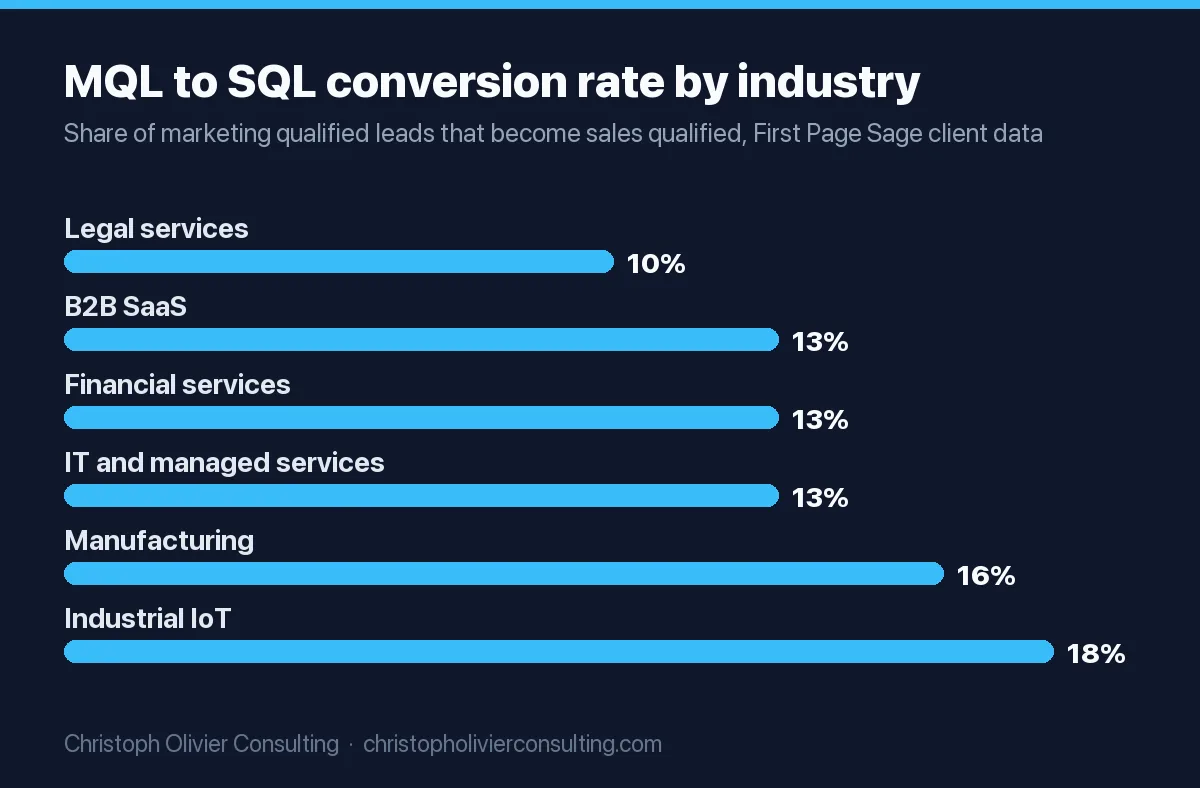
| MQL to SQL | SQLs ÷ MQLs | 10% (legal services) to 18% (industrial IoT); 13% for B2B SaaS, financial services and IT services (First Page Sage, 2019 to 2025 client data) |
| SQL to opportunity | Opportunities created ÷ SQLs | 100% by definition if you create the deal at SQL, as the stage table does. If you create it later (at Scoped), measure Scoped ÷ SQLs and set your own baseline |
| Win rate | Deals won ÷ (deals won + deals lost) in the period; exclude open deals | SQL to closed won: 12% (B2B SaaS), 16% (financial services), 19% (legal services), 20% (IT and managed services) (First Page Sage) |
| Pipeline velocity | (Opportunities × win rate × average deal size) ÷ sales cycle length in days | Salesforce’s example (March 12, 2024): (150 × 0.25 × $1,000) ÷ 30 = $1,250 a day |
| Pipeline coverage | Open qualified pipeline for the period ÷ remaining target for the period | Required coverage is about 1 ÷ win rate: 4x at a 25% win rate |
First Page Sage is an SEO agency reporting its own client data without sample sizes, so treat these as placeholders until you have 12 months of your own funnel.
Worked example (hypothetical numbers). A 6-person advisory firm with an $18,000 average engagement and a 75-day sales cycle pulls one quarter from its CRM:
- 400 leads created, 124 MQLs: 124 ÷ 400 = 31%, on the benchmark.
- 8 SQLs: 8 ÷ 124 = 6.5%, below even the 10% low end. This is the leak.
- 3 deals won and 9 lost in the quarter: 3 ÷ (3 + 9) = 25% win rate.
- 20 open opportunities: velocity = (20 × 0.25 × $18,000) ÷ 75 = $1,200 a day, about $109,200 over a 91-day quarter.
- Coverage: 20 × $18,000 = $360,000 open against a $150,000 remaining target is 2.4x, short of the 4x a 25% win rate needs.
The fix is not more traffic. Lifting MQL to SQL to 13% turns the same 124 MQLs into about 16 SQLs, roughly 8 more opportunities a quarter, which at a 25% win rate and $18,000 is about 2 more wins and $36,000 more bookings once the cycle catches up. Start with speed to first touch and the follow-up cadence in stage 2, because that is where the CRM shows the drop.
Funnel lead tracking: the fields that make the funnel measurable
A funnel report is only as good as the timestamps behind it. Set these up before you trust any conversion rate:
- Original source on 100% of records, as a picklist. Without it you cannot see that referrals convert to MQL at nearly twice the PPC rate.
- Stage entry dates. HubSpot writes “Became a [stage] date” properties when a lifecycle stage is set; latest-time and cumulative-time-in-stage calculated properties need Professional or Enterprise, per its lifecycle article. In Salesforce, the Lead History and Lead Lifetime reports do this job on the lead side.
- First touch date-time, so speed to lead is a number, not a feeling.
- Loss and disqualification reasons as picklists. “Other” and free text cannot be reported.
- A funnel report that counts sequence. In HubSpot: Reporting, Reports, Create report, Funnels, Contacts, add Lead, MQL, SQL, Opportunity and Customer, and choose “All” (contacts that moved through every selected stage) rather than “Any,” per HubSpot’s funnel report article. Funnel reports need a Professional or Enterprise hub.
CRM funnel audit checklist: 10 pass/fail tests
Run this on the last 90 days of data. The first failing test, in this order, is where to start; later rates are not trustworthy until earlier tests pass.
| Test | Pass | Fail means |
|---|---|---|
| 1. Every contact has a lifecycle stage and a source | 100% filled | Leads entering by import or inbox with no stage; fix capture first |
| 2. Stage definitions are written | Two managers put the same 10 deals in the same stages without talking | Exit criteria are opinions; rewrite them as buyer actions |
| 3. Required fields at stage entry | Each opportunity stage has at least one required evidence field | Reps can skip fields; turn on conditional stage properties, Pipedrive Premium fields or Salesforce validation |
| 4. No unassigned leads | Zero leads without an owner | Routing has no fallback owner |
| 5. Speed to first touch | Tier 1 hand-raisers called within 5 minutes in business hours | The MQL to SQL leak in the example above |
| 6. Every deal has a contact | 100% of open deals linked to at least one contact | Lifecycle never reaches Opportunity or Customer; source is lost |
| 7. Lifecycle syncs with deals | Deal created sets Opportunity; deal won sets Customer | The marketing and sales halves of the funnel disagree |
| 8. Won and lost both exist, with reasons | Every closed lost deal has a picklist reason | Win rate and loss analysis are guesswork |
| 9. No rotting deals | No open deal with 7+ days of inactivity and no dated next step | Win rates fall about 65% on these, per Ebsta and Pavilion |
| 10. One funnel per pipeline | Sales, onboarding, partner and recruiting records in separate pipelines | Win rate and velocity include records that can never close as revenue |
If a test fails and you are not sure whether the fix is the CRM setup or the process behind it, you can book a consultation and we will walk through the funnel stage by stage.
Frequently asked questions
What is a CRM sales funnel?
A CRM sales funnel is your sales funnel run as records in a CRM. Each lead is a record with a stage, each stage has required fields, an automation and an exit rule, and the CRM reports how many records convert from one stage to the next. The funnel is the model; the CRM moves real buyers through it and shows where they drop off.
What is the role of a CRM in the sales funnel?
The CRM enforces and measures the funnel. It assigns every lead an owner and a stage, blocks a stage change until the evidence fields are filled, fires follow-up tasks and alerts on stage entry, flags deals with 7 or more days of inactivity, and reports conversion between stages, such as lead to MQL and MQL to SQL, by source and by rep.
What are the stages of the CRM sales funnel?
A practical set is Lead, MQL, SQL, then opportunity stages Discovery held, Scoped, Proposal reviewed, Negotiation and Contract sent, then Closed won or Closed lost, then Customer and expansion. Contacts carry the lead to SQL stages in a lifecycle field; deals or opportunities carry the stages after SQL. Each stage should change only when the buyer does something you can check.
What are the types of CRM funnels for marketing?
Sort them by what moves through them: a sales pipeline (deals), a marketing or lifecycle funnel (contacts from subscriber to customer), a customer onboarding funnel, an expansion and renewal funnel, a partner referral funnel and a recruiting funnel. AIDA and omnichannel are buyer models and channel strategies, not CRM objects. Keep each funnel in its own pipeline so win rates stay clean.
How do you track leads through a funnel in a CRM?
Give every record an original source picklist, a first touch date-time and a stage entry date for each stage. HubSpot writes Became a stage date properties and offers time-in-stage properties on Professional; Salesforce has Lead History and Lead Lifetime reports. Then build a funnel report that counts contacts who passed through every stage in order, not any stage.
Is a CRM funnel the same as a sales pipeline?
No. The funnel covers people from first contact to customer, usually on the contact's lifecycle stage, and is read as conversion rates between stages. The pipeline covers qualified deals from SQL to closed, on the deal or opportunity stage, and is read as value, win rate and velocity. A CRM should hold both and link every deal to a contact.
How much does a CRM cost to run a sales funnel?
For 5 seats on annual billing: HubSpot Sales Hub Starter at the $7 new-customer price is $420 a year, Pipedrive Growth $2,340 and Premium $3,540 (Premium adds required fields), Salesforce Starter Suite $1,500, and HubSpot Sales Hub Professional $5,400 plus a $1,500 onboarding fee. HubSpot's free tools stop at 2 users and Zoho CRM Free at 3.
More Funnels, Conversion & Email guides
- Facebook Ads That Actually Convert
- Funnel Management: The Weekly Operating System That Keeps a Funnel Healthy
- Funnel Marketing Agency: What They Do, When to Hire One, and How to Choose
- Funnel Visualization: How to Build and Read a Funnel Chart
- Instagram Marketing in 2026: Reels & Conversion
- Landing Page Optimization: CRO Checklist
- All Funnels, Conversion & Email guides →