

Building a high-value lead database means four things: every record fits your ideal customer profile, has an email that passed verification within the last 90 days, carries a source and legal-basis field you could show a regulator, and sits in a schema your CRM can import without remapping. Using vendors’ published November 2026 prices, a first build of 2,000 contacts costs about $0.36 to $0.75 per verified contact, depending on whether you pull from a self-serve database or pay a research team to hand-build the list.
This page gives you the parts: vendor prices, free public sources, a copy-ready field schema, verification costs, the legal rule attached to each field, what database building services charge, and the per-contact math.
The five tests a high-value lead database must pass
A large list and a valuable list are different things. Score every list you build or buy against these five tests before a single email goes out. Fail any one and the list costs you more than it earns.
| Test | Pass | Fail | Field that proves it |
|---|---|---|---|
| Fit | Every record matches your ICP filters (industry code, headcount band, region, title) and is tiered A, B or C | A national pull you plan to “segment later” | naics_code, employee_range, icp_tier |
| Reachability | Email verified as valid in the last 90 days; phone typed as mobile or landline | Vendor says “verified” and you never ran your own check | email_verification_result, email_verified_date, phone_type |
| Legal usability | You can name where each record came from and the basis you rely on to contact it | A spreadsheet from a contractor with no source column | source, source_detail, legal_basis |
| Freshness | A re-verification date is scheduled for every record | Last checked “when we bought it” | email_verified_date, acquired_date |
| Ownership | Your data license lets you keep and use the records for your own outreach | The list was exported from someone else’s seat on a tool whose terms forbid sharing | source_record_id, data vendor contract |
The ownership test is the one buyers skip. Apollo’s pricing page states that its plans are for internal business use only and that using Apollo data to share with customers or resell is not permitted under standard terms. Ask any agency that offers to “build your database” which license the data comes from.
Paid B2B data vendors and their 2026 US prices
Every price below was read on the vendor’s own pricing page on November 1, 2026, in US dollars. Most tools sell credits, and a phone number costs several times what an email costs, so compare credits per record, not seats.
| Vendor | Plans and US price | What a credit buys | Best use in a database build |
|---|---|---|---|
| Apollo | Free $0 (900 credits a year); Basic $49; Professional $79; Organization $119 (minimum 3 seats). Per seat per month, billed annually. Basic includes 30,000 credits per seat per year, Professional 48,000, Organization 72,000 | Email 1 credit; phone number 8 credits; enrichment 1 to 8 credits | Bulk email coverage at the lowest cost per record |
| Lusha | Free (40 credits a month); Starter $49.90 a month, or $449.10 a year (400 credits a month); Pro $69.90 a month, or $629.10 a year (600 credits a month); Premium $399.90 a month, or $3,599.10 a year (3,400 credits a month); Scale by quote | Verified email 1 credit; phone number 5 credits | Mobile numbers at a lower credit cost than Apollo |
| UpLead | Essentials $99 a month (170 credits) or $74 a month billed annually (2,040 credits a year); Plus $199 a month (400 credits) or $149 a month billed annually (4,800 a year); Professional by quote | 1 credit gives one contact’s email and mobile direct dial; extra credits $0.60 (Essentials) or $0.50 (Plus) | Small, exact lists where you want email and mobile in one charge; UpLead states a 95% email accuracy rate |
| Clay | Free (100 data credits and 500 actions a month); Launch $167 a month billed annually or $185 monthly (2,500 data credits a month); Growth $446 a month billed annually or $495 monthly (6,000 data credits a month); Enterprise custom | Data credits start at $0.05 each and buy data from 150+ providers; actions cost under $0.01 each; no charge when an enrichment finds nothing | Waterfall enrichment: try several providers per record and pay only for hits |
| LinkedIn Sales Navigator | Core $119.99 a month or $1,079.88 a year per license; Advanced $159.99 a month or $1,799.88 a year | Seat license, not data credits | Finding the right person and checking current title and employer |
| ZoomInfo | Quote only. API access is “priced on usage, not seats”; warehouse delivery is “contracted per dataset” | Not published | Enterprise coverage and data delivered straight to a warehouse |
| Cognism | Quote only. Standard and Pro plans are both listed with 5 seats; Pro adds higher-quality mobile data, on-demand mobile verification and intent data | 1 credit per revealed contact; allocation per seat not published | Teams with EU and UK contacts in scope |
| Seamless.AI | Quote only; free signup available. The pricing form asks for monthly volume in bands from “up to 1,000” to “25,000+” contacts | Not published | Get a quote alongside one of the published-price tools for comparison |
One more cost to know: Apollo charges 8 credits for a phone number, Lusha 5, and UpLead includes the mobile in the single contact credit. If your outreach is phone-first, that difference matters more than the seat price.
Free and public sources most lead lists ignore
Government and regulator files give you the “who” for free, often more completely than a commercial database in a narrow vertical. They rarely give you the “how to reach,” so you pair them with an enrichment tool.
| Source | What you get | Format and access | Good for |
|---|---|---|---|
| State licensing boards (example: Texas TDLR) | License type, number, expiration date, county, licensee name, business name; the file format also lists address and phone columns | CSV, updated every day, downloadable without an account | Trades and licensed professions: A/C contractors, electricians, cosmetology shops, tow companies |
| SEC EDGAR APIs | Every filer’s filing history, names, tickers, and XBRL financial facts | JSON; no API key; the SEC’s fair access rule is 10 requests per second with a declared User-Agent | Public companies, funds, and triggers such as a new filing |
| SEC Form ADV data | Registered and exempt reporting investment advisers, Form ADV Items 1 to 11 (identifying information, advisory business) | Monthly ZIP of a spreadsheet; the October 2026 file was posted October 2, 2026 | Anyone selling to RIAs and wealth firms |
| Census County Business Patterns | Counts of establishments with paid employees, employment and payroll, by industry and employment size; latest data year is 2023 | Downloads and API | Sizing your universe so you know what share of it your list covers |
| Industry and association directories | Member firms, often with a named principal and specialty | Web pages; check each directory’s terms before you copy anything | Niches no vendor covers well |
A worked example of what a licensing file really contains. The Texas “Airconditioning Contractors” CSV downloaded on November 1, 2026 held 20,477 licenses and 19,269 distinct business names, with 3,046 in Harris County alone. Its phone and street address columns were empty on every row. So the file is a complete, current universe of licensed A/C contractors in Texas, and a list with zero ways to contact them. That is the right way to use public data: it defines who belongs in the database, and an enrichment tool fills in emails and phones against that list.
Use Census County Business Patterns the same way: compare the number of establishments in your industry code and state with the number of companies in your database. That ratio is your coverage, and it tells you whether a vendor is thin in your segment before you pay for a year.
Copy-ready lead database field schema (CSV headers)
Columns shared with the client record use the same names as the client database field schema and CSV mapping, so a lead that becomes a client moves over without remapping. The prospect-only columns are added around them.
lead_id,first_name,last_name,email,mobile_phone,direct_phone,phone_type,job_title,company_name,company_domain,street,city,state,postal_code,country,naics_code,employee_range,icp_tier,lifecycle_stage,owner_email,source,source_detail,source_record_id,acquired_date,email_verification_result,email_verified_date,verification_tool,legal_basis,email_marketing_status,email_opt_out_date,sms_consent,sms_consent_timestamp,consent_text_version,consent_source_url,do_not_call,do_not_call_date,last_contact_date,next_step,next_step_due| Added column | Allowed values | Why it exists |
|---|---|---|
| lead_id | Unique, never reused | Mirrors client_id; survives merges and re-imports |
| direct_phone, phone_type | Number with country code; mobile, landline, unknown | Mobile numbers carry TCPA rules that landlines do not (see the legal table below) |
| naics_code, employee_range | 6-digit NAICS; 1-9, 10-49, 50-249, 250+ | Lets you match records to Census counts and to your ICP |
| icp_tier | A, B, C | Decides which records get phone research, which get email only |
| source, source_detail, source_record_id | Vendor, file or form; plan or file name; the vendor’s or registry’s ID | GDPR Article 14 requires telling an EU contact where the data came from |
| acquired_date | YYYY-MM-DD | Starts the decay clock |
| email_verification_result, email_verified_date, verification_tool | valid, invalid, catch-all, unknown, do-not-mail; date; tool name | Only “valid” records go into sequences; the date triggers re-checks |
| legal_basis | consent, legitimate_interest, existing_customer, none | Records marked none never enter a campaign |
Dedupe on company_domain plus email before import, and lowercase every email. Two vendors will often return the same person with different title spellings; keep the one with the newest email_verified_date.
Enrichment and email verification: order of work and prices
Enrich in a fixed order so you only pay for expensive data on records that deserve it.
- Load the seed list (licensing file, EDGAR or Form ADV pull, or vendor export) with company_name, company_domain and state filled.
- Tier every company A, B or C against your ICP before you buy a single contact.
- Find the decision maker and email for A and B companies. Use one database, or a Clay waterfall across several so you pay only for hits.
- Buy phone numbers for A-tier only, and set phone_type on each.
- Verify every email with a separate tool, even if the vendor calls it verified, and write the result and date into the record.
- Import only rows with email_verification_result = valid and a legal_basis other than none.
| Verification tool | Published price | Cost per email | Terms to know |
|---|---|---|---|
| NeverBounce pay as you go | $8 per 1,000 credits | $0.008 | Credits expire 12 months after purchase |
| NeverBounce Growth | $49 a month for up to 10,000 emails | $0.0049 at full use | Syncs with your CRM and charges only for new, unique emails |
| ZeroBounce pay as you go | From $39 for 2,000 emails (the minimum purchase) | $0.0195 | No credits charged for “unknown” results; 100 free verifications a month with a business domain |
| ZeroBounce ONE subscription | From $99 a month, 10,000-credit minimum | $0.0099 at 10,000 | Unused credits roll over; annual billing saves 20%; Email Finder uses 20 credits per successful lookup |
Catch-all domains accept every address, so a verifier cannot confirm the mailbox exists. Keep catch-all records in a separate, lower-volume send rather than mixing them into your main sequence.
How fast a lead database decays
The most useful dated figure comes from ZeroBounce’s Email List Decay Report for 2026, based on more than 11 billion addresses its software processed from January to December 2025. Its headline: at least 23% of an email list decays within one year, down from 28% in 2024. Only 62% of the emails submitted in 2025 came back valid. These are all lists sent to ZeroBounce, not B2B-only data, so treat them as a floor for business contacts who change jobs.
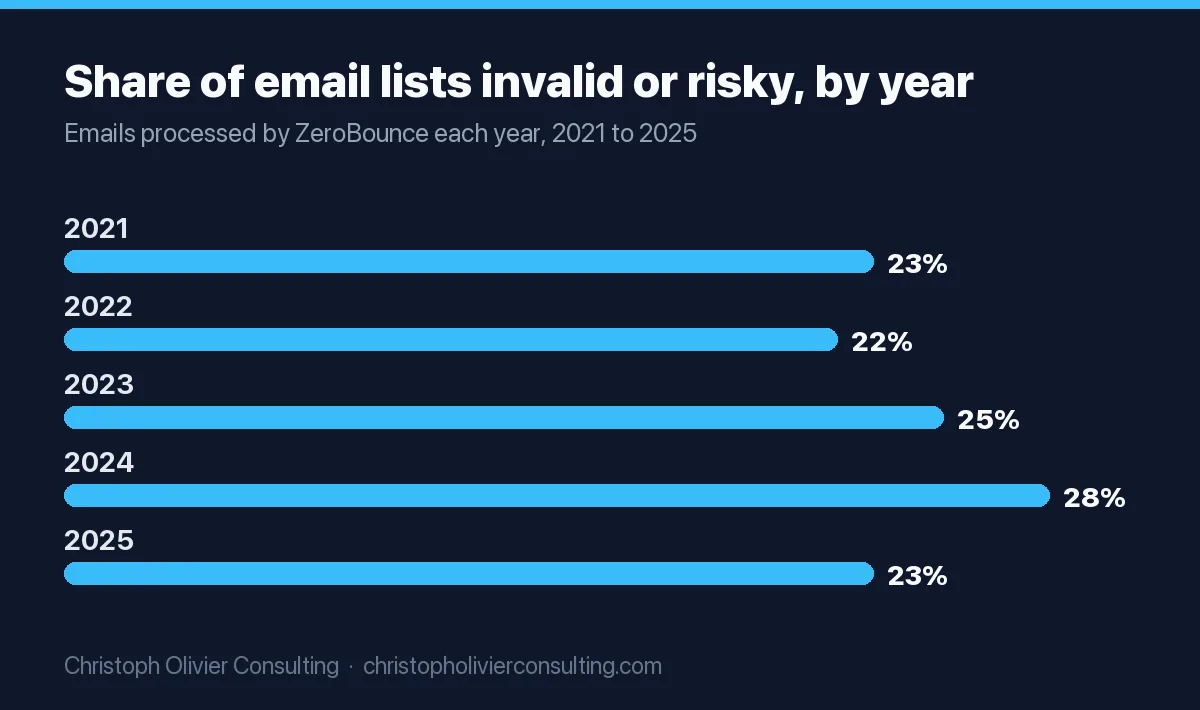
The math for your build: at 23% a year, a 2,000-contact list loses about 460 deliverable addresses in twelve months. Re-verifying all 2,000 every quarter with NeverBounce pay as you go costs 2,000 x $0.008 x 4 = $64 a year. That is cheaper than the damage a 10% bounce rate does to your sending domain, so schedule it.
Legal rules for each part of the database
The law attaches to the record and the channel, not to whether you bought or built the list. This is general information, not legal advice.
| Rule | Who it covers | What it requires | Penalty or exposure |
|---|---|---|---|
| CAN-SPAM (US email) | All commercial email. The FTC: “The law makes no exception for business-to-business email.” | Honest headers and subject lines, identify the message as an ad, a valid physical postal address, a working opt-out honored within 10 business days | Up to $53,088 per violating email; the company promoted and the sender can both be liable |
| GDPR (EU contacts) | Personal data of people in the EU | Recital 47: direct marketing “may be regarded as carried out for a legitimate interest.” Article 14: when you did not collect the data from the person, tell them within one month, or at the latest at your first message, including the source | Document a legitimate interest assessment per campaign; put the source and privacy notice link in the first email |
| UK PECR regulation 22 | Marketing email in the UK | The prior-consent rule for marketing email is scoped to “individual subscribers” | Check whether a contact is an individual subscriber before relying on the corporate route |
| CCPA / CPRA (California) | Businesses with $26.625 million or more in gross revenue, or that buy, sell or share data on 100,000+ California residents or households, or earn 50%+ of revenue from selling or sharing it | The California Privacy Protection Agency confirms the business-to-business exemption expired December 31, 2022, so since January 1, 2023 your California business contacts are covered personal information | Handle privacy requests from California business contacts the same way you handle consumers’ requests |
| TCPA (US mobile numbers) | Calls and texts to mobile numbers | 47 U.S.C. 227(b): autodialed or prerecorded calls to a cell number need prior express consent; 47 CFR 64.1200(a)(2): telemarketing ones need prior express written consent, a signed agreement naming the number. Do-not-call rules also apply to wireless numbers (64.1200(e)) | $500 per violation, up to three times that if willful or knowing |
This is why the schema carries phone_type, do_not_call and sms_consent_timestamp. A bought mobile number has no consent attached, so keep it out of autodialers, prerecorded messages and text campaigns, and scrub it against do-not-call lists before anyone calls it. The 2025 and 2026 changes to TCPA consent revocation are tracked in our SMS marketing statistics and consent rules.
Lead generation and database building services: published prices
Few database building services publish a rate card. These do, or say plainly that they quote.
| Provider and service | Published price | What you get | Watch for |
|---|---|---|---|
| Reach Marketing B2B list building | $0.35 per contact, no commitment | Compiled data: name, business, postal and email address, phone, firmographics; 90% accuracy guarantee | The page labels the data “Not Verified,” so budget for your own verification |
| Coldlytics Contact Research | 5 credits per hand-sourced contact (5 more for a direct dial). Starter $49 a month for 250 credits, Growth $99 for 750, Pro $299 for 2,500 | Lists built to your brief, delivered in 24 hours; each email checked with ZeroBounce at reveal and charged only if valid | Works out to about $0.60 to $0.98 per researched contact on included credits |
| Cognism, ZoomInfo, Seamless.AI data services | Quote only | Cognism lists CRM enrichment and data-as-a-service; ZoomInfo contracts warehouse delivery per dataset | Get the refresh terms in writing, not only the record count |
| Outbound agencies | Bundled into a monthly retainer | List building plus the SDRs and sending | Who keeps the data when the contract ends; compare the bundles in our breakdown of outbound lead generation agency prices |
Before you sign with any service, run a 200-record acceptance test. My thresholds: reject the sample if more than 5% of emails come back invalid on your own verifier, if fewer than 23 of 25 spot-checked titles match the person’s current LinkedIn profile, or if any record falls outside your ICP filters. Those numbers are my judgment, not an industry standard, but a vendor that fails them on 200 records will not pass on 20,000.
Cost per verified contact: the math for a 2,000-contact build
Formula: (data cost + verification cost + your hours x your hourly rate) / verified contacts. The table assumes 2,000 contacts, mobile numbers for the top 500, NeverBounce pay as you go for verification ($16 for 2,000), and an 85% pass rate on self-serve data. The 85% is an assumption for the example; replace it with the pass rate from your own 200-record test. Labor is left out because it depends on your rate.
| Route | Data cost | Credits used | Verified contacts | Cost per verified contact |
|---|---|---|---|---|
| Apollo Basic, 1 seat, annual | $588 ($49 x 12) | 6,000 of 30,000 (2,000 emails + 500 phones x 8) | 1,700 | ($588 + $16) / 1,700 = $0.36 |
| Lusha Pro, annual | $629.10 | 4,500 of 7,200 (2,000 + 500 phones x 5) | 1,700 | ($629.10 + $16) / 1,700 = $0.38 |
| Reach Marketing compiled list | $700 (2,000 x $0.35) | Pay per contact | 1,700 | ($700 + $16) / 1,700 = $0.42 |
| UpLead Essentials, annual | $888 ($74 x 12) | 2,000 of 2,040 (email and mobile in one credit) | 1,700 | ($888 + $16) / 1,700 = $0.53 |
| Coldlytics Contact Research on Pro | $1,495 (5 months x $299) | 12,500 (2,000 x 5 + 500 dials x 5) | 2,000 (charged only for valid emails) | $1,495 / 2,000 = $0.75 |
Three things the table shows. First, seat tools get cheaper the more of their credits you use: if you spent all 30,000 Apollo Basic credits on emails, the data cost falls to $588 / 30,000 = about $0.02 per email. Second, the hand-researched route costs about twice as much per contact but is the one that works when your niche is thin in every database, such as the Texas A/C contractors above. Third, verification is the cheapest line on every route, so there is no reason to skip it.
To decide how many contacts you need in the first place, work backward from your reply and meeting rates using the benchmarks in our lead generation statistics.
A 30-day plan for building the database
- Days 1 to 5: define and size. Write the ICP as filters (NAICS codes, states, headcount band, titles). Pull the Census County Business Patterns count for those codes and states, and any licensing or Form ADV file that applies. That is your universe.
- Days 6 to 10: test vendors. Pull a 200-record sample from one or two vendors inside your exact filters and run the acceptance test above. Keep the vendor that passes at the lowest cost per verified contact.
- Days 11 to 20: build. Tier companies, find contacts for A and B tiers, buy mobiles for A tier only, verify every email, set phone_type and legal_basis.
- Days 21 to 25: import. Load into your CRM with the CSV headers above, add your suppression list (past opt-outs, clients, competitors) first, and block any row with legal_basis = none.
- Days 26 to 30: put it to work. Hand the A tier to whoever runs outreach. If that person does not exist yet, the cost and timing math is in our guide on when to hire an SDR, which uses the same Apollo and Sales Navigator prices.
- Every 90 days after: re-verify all emails, archive records that fail twice, and re-run the coverage ratio against the Census count.
Bought data is the fast start, not the long-term asset. Every form fill, webinar registration and reply should write into the same schema with source and consent captured at the moment of entry; our first-party data strategy guide covers how to set that capture up. If you want help designing the schema, the vendor test or the outreach that follows, you can book a consultation.
Frequently asked questions
How do you build a high value lead database?
Define your ICP as filters, size the universe with Census County Business Patterns or a licensing file, test a 200-record vendor sample, then enrich only ICP-fit companies. Verify every email with a separate tool, record the source and legal basis on each row, import with a fixed CSV schema, and re-verify every 90 days. Fit, verified reachability, legal usability, freshness and data ownership are what make it high value.
What do lead generation and database building services cost?
Published prices are rare. Reach Marketing lists B2B list building at $0.35 per contact for compiled, unverified data with a 90% accuracy guarantee. Coldlytics charges 5 credits per hand-researched contact, about $0.60 to $0.98 each on its $49 to $299 monthly plans. ZoomInfo, Cognism and Seamless.AI quote data services individually, and outbound agencies bundle list building into a retainer.
How much does a B2B lead database cost per verified contact?
For a 2,000-contact build with mobile numbers for the top 500, published November 2026 prices work out to about $0.36 per verified contact on Apollo Basic, $0.38 on Lusha Pro, $0.42 for a Reach Marketing compiled list, $0.53 on UpLead Essentials and $0.75 for Coldlytics hand research. Those figures assume 85% pass verification on self-serve data; use your own sample's pass rate.
What fields should a lead generation database have?
At minimum: name, email, mobile and direct phone with a phone_type, job title, company name and domain, address, NAICS code, employee range and ICP tier. Then add source, source_detail, acquired_date, email_verification_result, email_verified_date, legal_basis, opt-out and do-not-call flags, and consent timestamps. Keep shared columns named like your client records so converted leads import without remapping.
How fast does a lead database go out of date?
ZeroBounce's Email List Decay Report for 2026, based on more than 11 billion addresses processed in 2025, found at least 23% of an email list decays within a year, down from 28% in 2024. At that rate a 2,000-contact list loses about 460 deliverable addresses a year. Re-verifying all 2,000 quarterly with NeverBounce pay as you go costs about $64 a year.
Is it legal to email a purchased B2B lead list?
In the US, CAN-SPAM makes no exception for business email but permits it if you use honest headers, identify the ad, include a postal address and honor opt-outs within 10 business days. For EU contacts you need a documented legitimate interest and must tell people the data source by your first message. California B2B contacts lost their CCPA exemption after December 31, 2022. This is general information, not legal advice.
What free sources can I use to build a lead database?
State licensing boards such as Texas TDLR publish daily CSV files of licensees, SEC EDGAR offers free filing and company data APIs with no key, the SEC posts monthly Form ADV files on investment advisers, and Census County Business Patterns counts establishments by industry. These give you who to target; you still need an enrichment tool for emails and phones.
More Growth, Strategy & Sales guides
- AI Chatbots for Lead Capture & Sales
- ChatGPT for Lead Generation: Complete System
- How to Get Free B2B Leads (And When Free Stops Working)
- How to Choose a Lead Provider (Types, Vetting, and Red Flags)
- Lead Generation Strategies That Compound
- Lead Magnets That Convert: B2B vs DTC
- All Lead Generation guides →