

A CPA email blast is one message sent to a segment of your client or prospect list, delivered to each person individually from an email platform, never as one group email with everyone in the To or CC line. The blasts that get opened at an accounting firm are tied to IRS deadlines: about a dozen a year, each going only to the clients that deadline affects. Below you get the 2027 send calendar with the dates already worked out, five copy-ready blast templates with subject lines, the segmentation rules an accountant’s list is subject to, a compliance pass/fail check, and verified prices for the tools firms send from.
One rule makes email marketing for CPAs different from every other industry. Under the IRS preparer regulations, a client’s “name, address, or identifying number” furnished for return preparation is tax return information (Treas. Reg. 301.7216-1(b)(3)). So your client email list is regulated data, and what you may send to it depends on how you built each segment. That is covered in the segmentation section. If you want these sends to fire automatically from your practice management software instead of as one-off blasts, the trigger-by-trigger build specs are in our guide to marketing automation for accounting firms; this page stays with the blasts, the copy and the list.
The 2027 CPA email calendar: 12 blasts tied to IRS deadlines
The deadline column comes from the rules, not from memory. IRS Publication 509 puts Form 1040 on the 15th day of the 4th month after year end, Forms 1065 and 1120-S on the 15th day of the 3rd month, and gives an automatic 6-month extension with Form 4868 (individuals) or Form 7004 (businesses). Estimated payments are due April 15, June 15, September 15 and January 15 of the following year, per the IRS estimated tax FAQ. Form 1099-NEC is due January 31, per the 2026 Instructions for Forms 1099-MISC and 1099-NEC. When a date lands on a weekend or legal holiday, it moves to the next business day, which is why the January 31, 2027 deadline (a Sunday) becomes Monday, February 1.
Send dates are firm choices: mostly Tuesdays, 10 to 14 days before the deadline, early enough for a client to act and late enough to feel real.
| Send date | Blast | Segment | Deadline it serves |
|---|---|---|---|
| Tue, Nov 10, 2026 | Year-end planning checklist (template 3) | Individuals, business owners | Thu, Dec 31, 2026 (tax year end) |
| Tue, Dec 8, 2026 | Last call for year-end moves, holiday office hours | All clients | Thu, Dec 31, 2026 |
| Tue, Jan 5, 2027 | Season kickoff: what changed for 2026 returns, how to send documents | All clients | Thu, Apr 15, 2027 |
| Fri, Jan 8, 2027 | Fourth 2026 estimated payment | Clients who pay estimates | Fri, Jan 15, 2027 |
| Tue, Jan 19, 2027 | 1099 threshold change and contractor list request (template 1) | Business clients with contractors | Mon, Feb 1, 2027 |
| Mon, Mar 1, 2027 | Partnership and S corporation deadline | Form 1065 and 1120-S clients | Mon, Mar 15, 2027 |
| Tue, Mar 30, 2027 | Final 1040 push: documents, 2026 IRA contributions, extensions (template 2) | Individuals | Thu, Apr 15, 2027 |
| Tue, May 11, 2027 | Advisory offer (template 5) | Clients with a signed 7216 use consent only | None (post-season) |
| Tue, Jun 8, 2027 | Second 2027 estimated payment | Clients who pay estimates | Tue, Jun 15, 2027 |
| Tue, Aug 31, 2027 | Extended business returns and third estimate | Extended 1065 and 1120-S clients, estimate payers | Wed, Sep 15, 2027 |
| Tue, Sep 28, 2027 | Extended 1040 final call (template 4) | Individuals on extension | Fri, Oct 15, 2027 |
| Tue, Nov 9, 2027 | Year-end planning checklist for 2027 | Individuals, business owners | Fri, Dec 31, 2027 |
Three notes before you schedule. First, the 2027 edition of Publication 509 was not posted on November 1, 2026, and the IRS postpones deadlines for declared disaster areas, so re-check each row a week before it sends. Second, January 15, 2028 falls on a Saturday, so the fourth 2027 estimate date is left off until the IRS publishes it. Third, if your practice management software already sends estimate reminders to tagged clients, drop the January 8 and June 8 rows rather than emailing twice. Between February 1 and April 15, send nothing except deadline emails; that rule is built into the filing-season windows of our accounting firm marketing plan template, which this calendar slots into.
Copy-ready CPA email blast templates
Each template has two subject lines to A/B test, a preheader (the preview text after the subject line), the body and the segment it goes to. Merge fields are in [brackets]. Sign every blast from a named person, not “The Team”, and keep each one to a single idea and a single link. Under 150 words is the target; clients read these on a phone between meetings.
1. Tax law change alert (business clients)
This example is built on a real change. For tax years beginning after 2025, the minimum reporting threshold for Form 1099-NEC rose to $2,000 from the $600 in the April 2025 instructions, and the current instructions say to enter nonemployee compensation “of $2,000 or more” (IRS instructions, What’s New). Most small business owners have not heard.
Subject A: The 1099 threshold just went from $600 to $2,000
Subject B: [First name], fewer 1099s to file for 2026
Preheader: What changed, who still needs a 1099, and the Feb 1 deadlineHi [First name],
One change that affects [Company name] this January: for payments made in 2026, you generally file Form 1099-NEC only for a contractor you paid $2,000 or more. Last year the line was $600.
What to do: send us a list of every contractor you paid in 2026, with the total for each and their W-9. We will tell you which ones need a form. The filing deadline is Monday, February 1, 2027, because January 31 falls on a Sunday.
Upload the list here: [portal link]. Questions? Reply and I will answer.
[Name], [Title], [Firm name]
Segment: business clients (entity classification and return form number only). A tax update like this is “tax information” for educational purposes, which the IRS allows you to send to your client list without consent (Treas. Reg. 301.7216-2(n)).
2. Deadline reminder (individuals, late March)
Subject A: 16 days to April 15: what we still need from you
Subject B: [First name], your 2026 return: last call for documents
Preheader: Plus the one 2026 deduction you can still make in AprilHi [First name],
Your 2026 return is due Thursday, April 15, 2027. If anything is still missing, upload it this week: [portal link].
One thing you can still do for 2026: contribute to an IRA. The 2026 limit is $7,500, or $8,600 if you are 50 or older (IRS), and contributions for a year can be made up to the return’s due date, not including extensions (Publication 590-A). Whether it is deductible depends on your income and workplace plan, so reply before you contribute and we will check.
If we cannot finish by April 15, we will file an extension. An extension gives you more time to file, not to pay.
[Preparer name], [Firm name]
Segment: Form 1040 clients. The last line is the IRS’s own warning: “An extension of time to file is not an extension of time to pay” (IRS, When to file). Count the subject line days from the send date: March 30 to April 15 is 16 days.
3. Year-end planning (November)
Subject A: 7 weeks left to make 2026 moves
Subject B: Your 2026 year-end tax checklist (3 items)
Preheader: New retirement limits, your January estimate, and one question for youHi [First name],
Three things to check before December 31:
- Retirement deferrals. The 2026 401(k) limit is $24,500, or $32,500 if you are 50 or older, and $35,750 if you are 60 to 63 (IRS, IR-2025-111). If you contribute a fixed percentage, check whether it reaches the new cap.
- Your fourth estimated payment. It is due Friday, January 15, 2027. If your income rose this year, the amount may need to change.
- Anything unusual this year. A home sale, a new business, a large bonus or an inheritance changes your return. Reply with one line and we will flag what to do before year end.
[Name], [Firm name]
Segment: individuals and business owners. The $35,750 figure is the $24,500 limit plus the $11,250 catch-up for ages 60 to 63 in the same IRS release. Keep the call to action a reply, not a booking link for a paid planning meeting, when the email goes to your no-consent client list: the 7216 list rule covers tax information and “tax return preparation services”, and whether separately billed tax planning counts as the latter is a question for your counsel. Send the booking-link version to clients with a use consent on file.
4. Extension notice (late September)
Subject A: Your extended 2026 return is due Friday, October 15
Subject B: [First name], 17 days to your extension deadline
Preheader: Here is what we still need, and the date we need it byHi [First name],
In April we filed an extension for your 2026 return. That extension runs out on Friday, October 15, 2027.
We are still missing: [missing items]. To file on time we need them by Friday, October 1. Upload here: [portal link].
If something is holding you up, like a late K-1, reply and tell me. We can usually work around one missing document if we know about it now.
[Preparer name], [Firm name]
Segment: individuals with a Form 4868 on file. Keep this email free of offers. The FTC treats a message whose content “delivers goods or services as part of a transaction that the recipient already has agreed to” as transactional, and adding a promotion can turn it into a commercial message with the full CAN-SPAM duties (FTC CAN-SPAM guide).
5. Advisory offer (May, consent-tagged clients only)
Subject A: A fixed-fee planning session before 2027 gets away
Subject B: [First name], want a midyear look at your 2027 taxes?
Preheader: 45 minutes, a fixed fee, and a written list of next stepsHi [First name],
Filing season is done, which makes now the cheapest time to plan for next April. We are offering a 45-minute [service name] session for [fixed fee]. You leave with a written list of what to change this year and who on our team will do it.
Pick a time: [booking link]. If now is not the moment, ignore this and we will check in at year end.
[Partner name], [Firm name]
Segment: only clients who signed a 7216 consent to use their tax return information for marketing, plus contacts who came to you through a non-tax engagement such as bookkeeping. The no-consent list “may not be used to solicit any service or product other than tax return preparation services” (301.7216-2(n)). Put a real fee in the email: the AICPA treats a fee representation as misleading when a substantial increase was likely and you did not say so (AICPA Code 1.600.010).
Subject lines a CPA firm should never send
| Subject line | Why it fails | Rule |
|---|---|---|
| “Our clients saved an average of $6,800 last year” | Advertises a statistic built from refund, credit or deduction amounts, even if averaged and anonymous | 301.7216-2(o); the IRS example bars advertising the average refund clients received |
| “We’ll cut your tax bill in half” | Creates “false or unjustified expectations of favorable results” | AICPA Code 1.600.010(a) |
| “Your refund is ready” (on a newsletter) | Subject line does not reflect the content of the message | CAN-SPAM, deceptive subject lines |
| “For our clients earning over $500k” | Tells every reader you sorted them by return data, which is a “use” of tax return information that needs consent | 301.7216-1(b)(4) |
| “IRS notice: action required” (on marketing) | Mimics an IRS notice; misleading, and trains clients to trust look-alike phishing | CAN-SPAM header and subject rules; AICPA 1.600.010(d) |
How to segment a CPA email list: individual, business and high-net-worth clients
Segmenting is where accountants get into trouble without noticing. Under 301.7216-2(n), you may keep a separate list containing only names, mailing addresses, email addresses, phone numbers, taxpayer entity classification and income tax return form number, and use it without consent to send tax information, general business or economic information for educational purposes, or offers of more tax return preparation. The regulation’s own Example 1 has a preparer filter that list by zip code and by return form number to send state tax updates only to the clients they affect. Filtering on anything else from the return, such as income, refund size or a capital gain, means you “refer to, or rely upon” tax return information (301.7216-1(b)(4)), which needs a signed consent first.
Here is how that maps to the segments most firms want.
| Segment | Built from | 7216 consent needed? | What you can send it |
|---|---|---|---|
| Individual clients | Return form number (Form 1040) | No | Tax updates, deadline reminders, return-prep offers |
| Business clients by entity | Entity classification and form number (1065, 1120-S, 1120) | No | Entity deadlines, 1099 and payroll reminders, tax updates |
| Clients in one state | Mailing address or zip code | No (the IRS’s Example 1) | State tax updates |
| High-net-worth clients | Income, gains or other figures from the return | Yes, a signed use consent | Planning offers, advisory, the template 5 blast |
| Clients with Schedule C or Schedule E income | Schedules inside the return | Treat as yes. The rule names the return form number, not schedules; confirm with counsel | Industry-specific tips once consent is on file |
| Bookkeeping, payroll or CFO clients | Data from that engagement, not from return preparation | 7216 does not reach information collected outside return preparation; AICPA confidentiality still applies | Offers for those services |
| Prospects | Website forms, webinars, referral introductions | No, until they engage you for return preparation | The nurture sequence below; full CAN-SPAM duties apply |
The practical fix for high-net-worth segmentation is a consent tag. Ask for the use consent at onboarding or in the organizer packet, never after you hand over the completed return for signature, which 301.7216-3(b)(2) bars for unrelated solicitation. A consent that states no duration lasts one year from signing, and if a client declines you cannot ask again for a substantially similar purpose. Tag the account when it is signed, and build every advisory segment from that tag. The copy-ready consent form with the mandatory Rev. Proc. 2013-14 statements is in the automation guide linked at the top of this page.
What it costs to get wrong: a civil penalty of $250 for each improper disclosure or use, capped at $10,000 per calendar year (IRC 6713), and for knowing or reckless conduct a misdemeanor with a fine up to $1,000 ($100,000 where 6713(b) applies), up to a year in prison, or both (IRC 7216).
AICPA confidentiality: where your list lives and who sees it
The AICPA’s Confidential Client Information Rule is one sentence: “A member in public practice shall not disclose any confidential client information without the specific consent of the client” (AICPA Code 1.700.001, updated for releases through July 2026). Three parts of the Code bear directly on an email blast.
- Client names can be confidential. Interpretation 1.700.090 says disclosing a client’s name is fine only if the name itself does not reveal confidential information, and gives the example of a bankruptcy practice. A group email with 300 addresses in the To line discloses every name to every recipient. Send through a platform that delivers one message per person.
- Your email platform is a third-party service provider. Under 1.700.040, before you disclose confidential client information to one, you either sign an agreement that obliges it to keep the information confidential (with reasonable assurance that it has procedures to do so) or get the client’s specific consent. Read your email vendor’s data processing terms before you upload the client list.
- Exporting the list has a 7216 angle too. The 301.7216-2(n) list may not be transferred “to any other person” except in a sale of the practice. Whether uploading it to an email platform counts as a transfer is not addressed in the regulation, so ask your counsel. The conservative path is to send client blasts from the practice management system where the data already lives, and keep the separate email tool for prospects and consented contacts.
One TaxDome setting matters here: in TaxDome’s bulk email, “Account shortcodes mode” sends one email per account with all linked contacts CC’d, while “Contact shortcodes mode” sends a separate email to each person. For a business account where the owner and the office manager are both linked, pick the mode deliberately.
CAN-SPAM and Gmail/Yahoo bulk sender rules: a pass/fail check
Run this before the first blast and again whenever you change email tools. CAN-SPAM covers commercial email; the Gmail and Yahoo rules decide whether it reaches the inbox at all.
| Check | Pass if | Source |
|---|---|---|
| Honest From, Reply-to and subject | The sender name is your firm or a named person at it, and the subject matches the content | FTC |
| Ad disclosure | Commercial messages say clearly and conspicuously that they are an advertisement | FTC |
| Postal address | Every commercial email shows your valid physical postal address | FTC |
| Opt-out | Works for at least 30 days after sending, honored within 10 business days | FTC |
| Unsubscribe speed for big inboxes | Honored within 2 days (Yahoo requirement); Google asks for 48 hours | Yahoo, Google FAQ |
| One-click unsubscribe | Marketing emails carry a List-Unsubscribe header with one-click (RFC 8058 POST) plus a visible link in the body | Google, Yahoo |
| Authentication | SPF and DKIM on your sending domain, DMARC published at p=none or stricter, From domain aligned with SPF or DKIM | Google, Yahoo |
| Spam complaint rate | Below 0.3% in Google Postmaster Tools; Google’s guidance is to stay below 0.1% | Google, Yahoo |
Google’s stricter tier applies to “bulk senders”: close to 5,000 or more messages to personal Gmail accounts in 24 hours, counted across your primary domain and its subdomains. Once you hit it, you are a bulk sender permanently, and Google says it began ramping up enforcement on non-compliant traffic in November 2025 (Google sender FAQ). Most firms never reach 5,000 in a day, but the email platforms enforce authentication for everyone, so set it up once. The DNS steps are in our email deliverability guide. The stakes on the CAN-SPAM side: the FTC lists penalties of up to $53,088 for each email that violates the Act.
Email marketing tools CPA firms use, with prices
You have two places to send from: the practice management software you already pay for, or a dedicated email platform. Prices below are USD list prices from each vendor’s pricing page on November 1, 2026, before taxes and add-ons.
| Tool | Price (USD) | Bulk email facts that matter |
|---|---|---|
| TaxDome | Essentials $800 per seat per year (solo users only), Pro $1,000, Business $1,200 on a 1-year commitment; $750, $950, $1,150 on 2 years | Bulk email from Clients > Accounts; every email is sent individually. Default cap of 400 emails per team member per day, adjustable from 1 to 10,000. TaxDome itself recommends a dedicated service such as Mailchimp “for guaranteed delivery” |
| Canopy | Standard $74, Plus $109, Premium $149 per user per month, billed annually | Bulk Email from the Client List, capped at 250 bulk emails per day; larger sends go out 250 a day until done. Warns you about clients who unsubscribed |
| Karbon | Team from $59 per user per month, billed annually | No bulk email from Segments: Karbon’s help center says to export the contacts and use a mail merge tool |
| Mailchimp | Free (250 contacts, 500 sends a month); Essentials from $13 and Standard from $20 a month at 500 contacts; Premium from $350 a month at 10,000 contacts | Price rises with contacts; overages apply above the contact or send limit |
| Constant Contact | Lite from $12, Standard from $35, Premium from $80 a month; $10.20, $29.75 and $68 billed annually | Monthly sends are 10 times your contact tier; Lite is $25.50 a month billed annually at 501 to 1,000 contacts. Extra sends cost $0.002 each |
| ActiveCampaign | Starter $15, Plus $49, Pro $79, Enterprise $145 a month, billed yearly, at 1,000 contacts | 10,000 sends a month on Starter and Plus, 12,000 on Pro, 15,000 on Enterprise |
Worked example: a firm with 650 clients and 250 prospects. Sending a deadline blast to all 650 clients from Canopy takes three days (250, 250, then 150). From TaxDome at the default 400 a day it takes two days, unless one person raises the cap; TaxDome advises setting it 100 below your mailbox provider’s limit, and its help page lists Gmail at 500 a day and about 2,000 on a paid plan. That is fine for a two-week deadline reminder and wrong for a time-sensitive law change. The 250 prospects need an email platform with sequences either way: ActiveCampaign Starter covers 1,000 contacts for $15 a month billed yearly ($180 a year), and Constant Contact Lite covers the same tier for $25.50 a month billed annually ($306 a year).
My recommendation for most firms under 1,000 clients: send client deadline and tax-update blasts from the practice management system, and keep the email platform for prospects and consent-tagged clients. That keeps client data where it already lives and avoids the export question above. If you want a second opinion on how your own lists should split, you can book a consultation.
Email marketing for CPA lead nurturing: a 4-email sequence for prospects
Prospects are the one list you can market to freely, because a website sign-up or webinar registration is not information furnished for return preparation. CAN-SPAM’s full duties apply, since every message is commercial. Once a prospect sends you last year’s return for a quote, treat what they sent as tax return information. Inbound marketing for accounting firms mostly comes down to this: a useful sign-up offer, then a short sequence that earns the call. Where those sign-ups come from is covered in our guide to lead generation for CPA firms.
- Day 0, deliver what they asked for. Subject: “Your [checklist name] is attached.” The checklist or guide, plus two sentences on who you work with (“owner-run businesses in [city] with 5 to 50 employees”) so they can rule themselves in or out.
- Day 3, one specific problem. Subject: “The 1099 change most owners will miss.” Teach one thing in under 200 words, such as the $600 to $2,000 threshold change above. If you use a scenario, label it hypothetical; a real client story needs that client’s written consent.
- Day 7, how you price. Subject: “What a [service] costs at [Firm name].” Give your fee or fee range and what drives it up. Under AICPA 1.600.010(c), a quoted fee is misleading if a substantial increase was likely and you did not say so, so name the usual reasons a fee rises.
- Day 14, the direct ask. Subject: “15 minutes to see if we’re a fit?” One sentence, one booking link, and a plain way out: “If the timing is wrong, reply ‘later’ and I’ll check back in September.”
After day 14, move non-responders to your monthly tax-news email and stop the sequence. Prospects who book exit it automatically. For the design and layout side of that monthly email, study these email newsletter examples; for a CPA firm the best ones read like a short note from one partner, not a magazine.
CPA email benchmarks: what accounting and financial services emails get
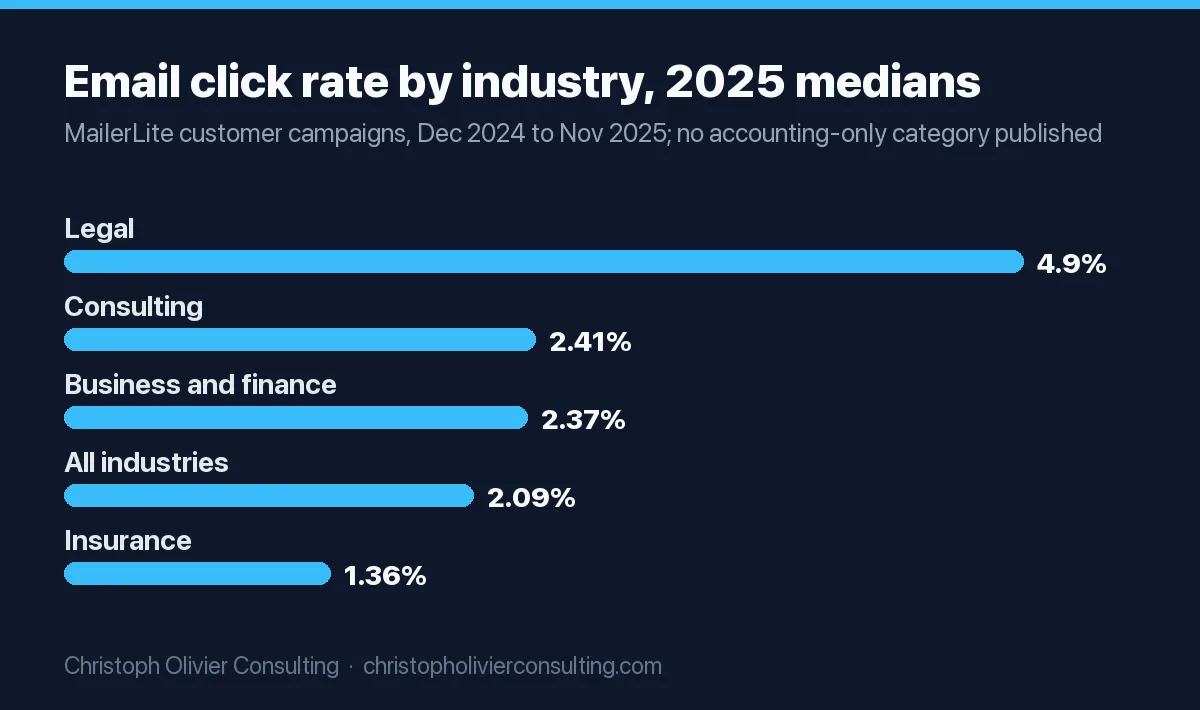
No major email vendor publishes an “accounting” row, so the closest public benchmarks are business and finance and the neighboring professional services categories. Treat them as rough guides, and note that Apple’s Mail Privacy Protection inflates open rates; Mailchimp warns that it may affect open-rate accuracy.
| Source and category | Open rate | Click rate | Unsubscribe rate |
|---|---|---|---|
| MailerLite, Business and finance | 43.34% | 2.37% | 0.16% |
| MailerLite, Legal | 42.58% | 4.90% | 0.09% |
| MailerLite, Consulting | 45.96% | 2.41% | 0.23% |
| MailerLite, Insurance | 44.40% | 1.36% | 0.27% |
| MailerLite, all industries | 43.46% | 2.09% | 0.22% |
| Mailchimp, Business and finance | 31.35% | 2.78% | 0.15% |
| Mailchimp, all users | 35.63% | 2.62% | 0.22% |
MailerLite figures are medians from more than 3.6 million campaigns sent by 181,000 accounts between December 2024 and November 2025 (MailerLite benchmarks). Mailchimp’s were last updated in December 2023 (Mailchimp benchmarks). Do not compare across the two vendors; they measure different customer bases.
For a CPA firm, the numbers that matter more than opens are the ones you can count in your own systems: organizer and document uploads within 7 days of a deadline blast, replies to the year-end email, booked calls from the advisory offer and the prospect sequence, and unsubscribes per send. If one blast’s unsubscribe rate is several times your normal, the segment was wrong, not the subject line.
Frequently asked questions
What is a CPA email blast?
A CPA email blast is one message sent to a segment of your client or prospect list, delivered to each recipient individually from an email platform or your practice management software. It should never be a single email with every client in the To or CC line, because that discloses client names to each other. The blasts that work for accounting firms are tied to IRS deadlines and go only to the clients each deadline affects.
How often should a CPA firm send email blasts?
About 12 a year works for most firms: one for each IRS deadline that affects a segment (January 15, February 1, March 15, April 15, June 15, September 15, October 15), two for year-end planning, a season kickoff and a post-season offer. Between February 1 and April 15, send only deadline emails. If your software already sends automated estimate reminders, skip those blasts.
Can I email my tax clients without their consent?
Yes, within limits. Treas. Reg. 301.7216-2(n) lets you keep a list of client names, addresses, email addresses, phone numbers, entity type and return form number, and use it without consent to send tax information, general business or economic information, or offers of more tax return preparation. Offers for other services, or segments built from income or other return figures, need a signed 7216 consent first.
Can a CPA firm segment clients by income for email marketing?
Only with consent. Filtering clients by income, capital gains, refund size or other figures from their return is a use of tax return information under 301.7216-1(b)(4), which requires a signed, dated consent obtained before the use. Without consent you can segment by return form number, entity classification and mailing address, which covers individual, business and state-level segments.
What is the best email marketing software for accountants?
It depends on what you send. Client deadline blasts can go from practice management software you already pay for: TaxDome sends bulk email at a default 400 per team member per day and Canopy at 250 per day, while Karbon has no bulk send. For prospect nurture and newsletters, a dedicated platform such as Mailchimp (from $13 a month), Constant Contact (from $12) or ActiveCampaign (from $15 billed yearly) fits better.
What open rate should an accounting firm expect from email marketing?
No major vendor publishes an accounting-only benchmark. MailerLite's Business and finance median for December 2024 to November 2025 was a 43.34% open rate and a 2.37% click rate; Mailchimp's Business and finance figures, last updated December 2023, were 31.35% and 2.78%. Apple Mail Privacy Protection inflates opens, so track clicks, replies, uploads and booked calls instead.
Do CAN-SPAM rules apply to emails sent to existing CPA clients?
They apply to any commercial email, including newsletters and offers sent to clients: honest headers and subject lines, an ad disclosure, your postal address and an opt-out honored within 10 business days. A deadline reminder about an engagement the client already agreed to can be transactional, but adding a promotion can make it commercial. Gmail and Yahoo add authentication and one-click unsubscribe rules.
More marketing guides for cpa
- Facebook Ads for Accounting Firms: A Practical, Compliant Playbook
- Lead Generation for CPA and Accounting Firms
- How Accounting Firms Get Cited and Recommended by AI Search
- How Much Should Accounting Firms Spend on Marketing
- Marketing KPIs for Accounting Firms: What CPAs Should Track
- CRM and Client Follow-Up for CPA and Accounting Firms