

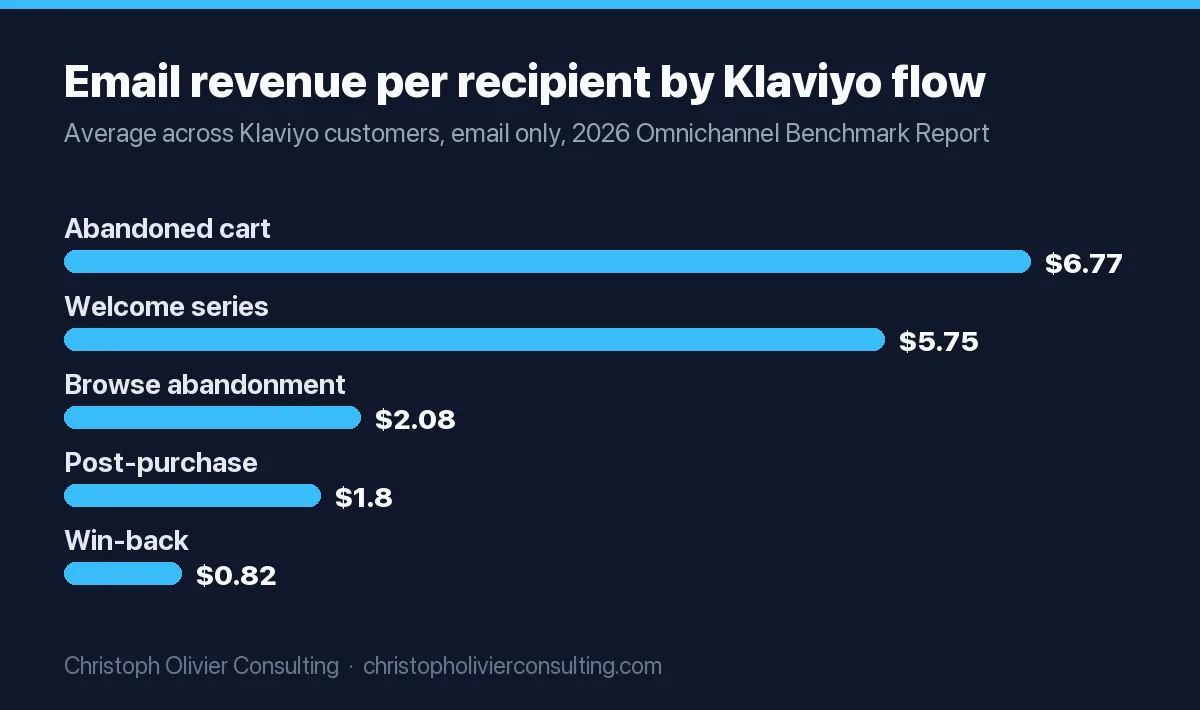
Ecommerce email flows are automated sequences that fire on a shopper’s behavior: a signup, a product view, an abandoned cart, an order, a restock, a lapse. A complete program runs 12 of them, from welcome to sunset. In Klaviyo’s 2026 benchmarks, abandoned cart is the top earner at $6.77 revenue per recipient on average, followed by the welcome series at $5.75, and Klaviyo’s email benchmarks show flows producing nearly 41% of email revenue from 5.3% of sends.
Below is the full flow map with trigger, first-send timing, email count and the benchmark for each one, a build-order calculator, then a detailed replenishment section: the timing formula by SKU, a worked example, setup in Klaviyo and Shopify, segmentation and the inbox rules every flow has to meet.
The 12 ecommerce email flows: trigger, timing, emails and 2026 benchmark
Every flow below has one trigger, one job and one exit condition. Trigger names in quotes are the exact Klaviyo or Shopify labels from their help centers. Benchmarks are email revenue per recipient (RPR) from Klaviyo’s 2026 Omnichannel Benchmark Report (110,000+ customers), shown as average and top 10%. Where Klaviyo publishes no figure for a flow, the table says so rather than borrowing a number from an agency blog. Timings with no platform named are starting points to test against your own data.
| Flow | Trigger | First send | Emails | 2026 benchmark | Exit when |
|---|---|---|---|---|---|
| Welcome series | “Added to list” (Klaviyo); “Welcome new subscribers” templates (Shopify Messaging) | Immediately | 3 to 5 | RPR $5.75 avg, $13.27 top 10%; click rate 6.5%, the highest of any flow (Klaviyo) | First order |
| Browse abandonment | “Viewed Product”, no cart | 2 to 4 hours | 1 to 2 | RPR $2.08 avg, $4.32 top 10% (Klaviyo) | Adds to cart or buys |
| Cart abandonment | “Added to Cart” (Shopify needs “Track behavioral events” on) | 4 hours in Klaviyo’s pre-built flow | 2 to 3 | RPR $6.77 avg, $13.70 top 10% (Klaviyo) | Places order |
| Checkout abandonment | “Started Checkout” | 2 to 4 hours, second at 20 to 48 hours (Klaviyo) | 2 to 3 | Klaviyo’s benchmark does not split checkout from cart | Places order |
| Post-purchase | “Placed Order” | On delivery, not on order | 2 to 4 | RPR $1.80 avg, $2.77 top 10% (Klaviyo) | Second order or review left |
| Replenishment | “Placed Order” + trigger filter “Items contains” [SKU] | Supply days minus buffer (formula below) | 2 reminders + 1 incentive | No Klaviyo 2026 figure published | Reorders that SKU |
| Cross-sell | “Placed Order” (Omnisend “Cross-Sell” preset; Shopify “Upsell customers after their first purchase”) | After the first product has been used | 1 to 2 | No Klaviyo 2026 figure published | Buys a second category |
| Win-back | “Customer joined segment”: no order in 60 days (Shopify template default) | On joining the lapsed segment | 2 to 3 | RPR $0.82 avg, $1.60 top 10%; click rate 2.8% (Klaviyo) | Orders, or moves to sunset |
| Sunset | Klaviyo “Sunset (Email)” segment: 180+ days on list, 5+ emails received, zero opens, clicks, site visits or orders | On joining the segment | 1 to 3, then a 3-day grace period | Not a revenue flow: it protects deliverability | Engages, or is suppressed |
| Back in stock | “Subscribed to Back in Stock” + “Back in stock” delay | When inventory passes your restock minimum | Usually 1 (Klaviyo) | 6.46% conversion, the highest of any automation type (Omnisend 2026) | Buys |
| Price drop | “Price drop” trigger, set as $ or % drop; 30-day lookback by default, 1 to 90 days | When the price changes | 1 | No published benchmark | Buys |
| VIP / loyalty | “Customer joined segment” (Shopify “Welcome VIP customers” needs a VIP segment) | On joining the VIP segment | 1, then milestone emails | No published benchmark | Drops out of the segment |
Sources for the trigger names and settings: Klaviyo help center articles on flow triggers and filters, abandoned cart flows, back in stock, price drop and sunset flows; Shopify’s marketing automations and Customer joined segment pages; Omnisend’s pre-built workflows list.
Two reading notes. First, RPR is the fairest cross-flow comparison because it bakes in clicks, conversion and order value, but Klaviyo does not say whether it divides by flow recipients or message recipients, so compare your numbers inside one platform only. Second, the abandoned cart sequence itself (what each of the three emails says, and when) lives in our abandoned cart email guide. This page covers how the flows fit together.
Which ecommerce email flows to build first: the RPR calculator
The right build order is not a universal list. It is eligible recipients per month multiplied by the flow’s RPR. A store with heavy browse traffic and a thin signup form should build browse abandonment before polishing the welcome series. Here is the math for an illustrative store, using Klaviyo’s 2026 averages. The recipient counts are made up for the example; swap in your own from your analytics.
| Flow | Eligible recipients / month (example) | Klaviyo avg RPR | Expected revenue / month | At top-10% RPR |
|---|---|---|---|---|
| Cart + checkout abandonment | 2,800 | $6.77 | $18,956 | $38,360 |
| Welcome series | 2,000 | $5.75 | $11,500 | $26,540 |
| Browse abandonment | 5,000 | $2.08 | $10,400 | $21,600 |
| Post-purchase | 1,500 | $1.80 | $2,700 | $4,155 |
| Win-back | 3,000 | $0.82 | $2,460 | $4,800 |
Three things fall out of this. Browse abandonment has a third of cart’s RPR but can rival the welcome series in total because the audience is bigger. Post-purchase and win-back look small, yet they are the flows that create second orders, which is where customer lifetime value is made, so judge them on repeat rate as well as attributed revenue. And the gap between the two right-hand columns, $11,200 to $19,404 a month for each of the three biggest flows in this example, is what better timing, copy and segmentation are worth. The 2,800 cart recipients match the worked example on our cart abandonment statistics page, so the two sets of numbers line up.
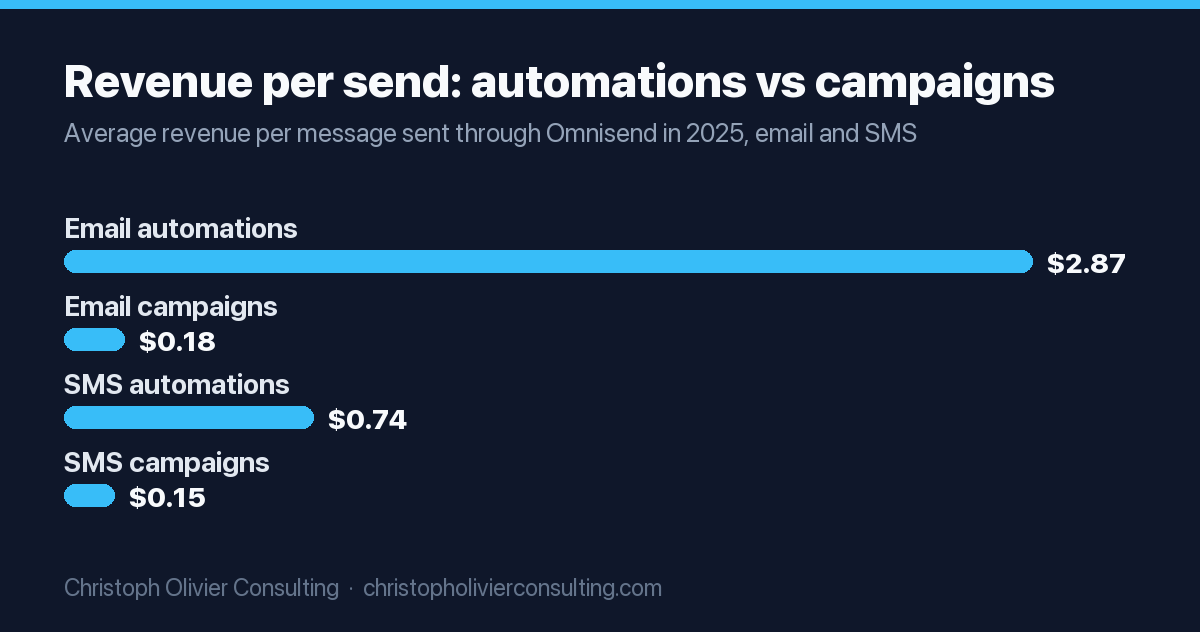
The same pattern shows up in Omnisend’s data from 27 billion emails sent by 150,000 brands in 2025: automations were 2% of sends but 30% of email revenue, at $2.87 per send against $0.18 for campaigns, and abandoned cart plus welcome drove 76% of all automation orders.
Ecommerce replenishment emails: the timing formula
A replenishment email reminds a customer to reorder a consumable just before they run out. It is the most timing-sensitive flow you will build: too early and it reads as nagging, too late and they have already bought elsewhere. One flat 30-day reminder for your whole catalog is not a replenishment program. Timing has to be set per SKU, and per pack size.
Klaviyo’s own guidance gives the anchor: for a supplement with a 30-day supply, send the first reminder about 25 days after the customer enters the flow, a second about 3 days later, then one follow-up with an incentive after the projected cycle. That example implies a 5-day buffer. Here is the general formula behind it:
Send day = (units bought × uses per unit ÷ uses per day) − (shipping days + buffer days)
Shipping days is your typical order-to-door time. Buffer days is the margin you want them to have left when the reorder lands, usually 1 to 3. Then check the formula against what customers actually do: export orders for that SKU, find each customer’s gap between consecutive orders of it, and take the median. If the median gap is well away from the formula’s answer, trust the data. People skip doses, share products and stockpile.
Worked example: three SKUs, one store
| SKU (illustrative) | Supply math | Supply days | Shipping + buffer | Formula send day | Median observed reorder gap | Day to use |
|---|---|---|---|---|---|---|
| Supplement, 60 capsules, 2 a day | 60 ÷ 2 | 30 | 3 + 2 | 25 | 29 | 25 (data agrees) |
| Same supplement, 2-bottle bundle | 120 ÷ 2 | 60 | 3 + 2 | 55 | 58 | 55 |
| Coffee, 340 g bag, 20 g per brew, 1 brew a day | 340 ÷ 20 | 17 | 2 + 1 | 14 | 24 | 21 (data says people stretch it) |
The median for the first row comes from nine sample reorder gaps: 22, 26, 27, 28, 29, 31, 33, 38 and 45 days. Sorted, the fifth value is 29. Notice the long tail: the 38 and 45 day customers will get the reminder early, which is why the second email and the “Buy Again” button matter more than perfect day one timing. For the coffee, the data overrules the formula by a week, so you would send at day 21, three days before the median gap.
Two rules keep this from breaking. Build a separate flow, or at least a separate trigger filter, per pack size, because the bundle buyer runs out 30 days later than the single-bottle buyer. And exclude anyone on a subscription for that SKU: they do not need reminding, and a reorder prompt can confuse them into a duplicate order.
How to set up a replenishment flow in Klaviyo
These are the steps and labels from Klaviyo’s help article, last updated October 8, 2026.
- Go to the Flows tab and click “Create Flow”. Under “Browse by goal”, choose “Encourage repeat purchases”, or search for “replenishment”. The pre-built template is available for Shopify and BigCommerce stores. Review its prerequisites and click “Use template”.
- To build from scratch instead, click “Build your own”, name the flow and set the metric trigger to “Placed Order”.
- Add a trigger filter: “Items contains” the product name. One flow per SKU or pack size.
- Check the profile filter “Placed Order zero times since starting this flow”. It stops the reminders once the customer reorders. For product-specific flows, limit it to that product so an unrelated order does not cancel the reminder.
- Add a time delay equal to your send day from the formula, then email 1. Add a 3-day delay and email 2. Add a final email after the projected cycle with the incentive.
- In each email, show the product name and image and a “Buy Again” button. A product block with similar items doubles as a light cross-sell.
- Click “Review and turn on”, select “Live”, click “Update status now”, then “Save”.
Advanced: Klaviyo’s “expected date of next order”
Klaviyo’s predictive analytics adds an “expected date of next order” to profiles you can use as a date-based trigger. It only switches on when you have at least 500 customers who have placed orders, 180 days of order history, orders in the last 30 days and some customers with three or more orders (Klaviyo predictive analytics). Two limits matter. The prediction ignores which products a customer bought, and Klaviyo itself says this flow “shouldn’t replace replenishment flows” when you know your product cycles. Use it for one-time buyers of mixed baskets, and keep SKU-timed flows for your consumables.
How to build a replenishment flow on Shopify (Messaging and Flow)
Shopify Messaging, the built-in email app, has no replenishment template. Its automation templates (under Apps, Messaging, Automations, Create automation) cover abandoned browse, cart and checkout, two welcome options, thank-you, first-purchase upsell, win-back, retail visit, birthday and VIP, per Shopify’s help center. For anything custom, Shopify points you to the Shopify Flow app. A replenishment workflow there looks like this:
- Trigger: “Order paid”.
- Condition: the order’s line items include the replenishable product (one workflow per SKU or pack size).
- Action: “Wait” for your send day. Shopify caps the Wait action at 90 days per workflow, and a workflow with a longer wait cannot be activated, so products with cycles past 90 days need Klaviyo or a different design.
- Action: the marketing email action that Shopify Messaging adds to Flow. Marketing automations send only to customers subscribed to marketing by default, so unsubscribed buyers will be skipped.
Before the email step, add a check that the customer has not reordered. Shopify’s segment syntax handles it: products_purchased MATCHES (id = 1012132033639, date > -25d) finds people who bought that product in the last 25 days. The products_purchased function with date parameters, and relative offsets like -7d, are documented in Shopify’s segment query language reference. Replace the ID with your product’s ID and test the segment on your own store before going live. If you run Shopify with Klaviyo, the Klaviyo flow above is simpler: no 90-day cap, built-in reorder filter. Our Shopify email marketing setup guide covers the integration.
Segmentation rules that stop flows from colliding
A store running 12 flows will put the same person in three of them in one week. Write these rules down before you launch.
| Rule | How to set it | Why |
|---|---|---|
| Every purchase-recovery flow exits on order | Profile filter “Placed Order zero times since starting this flow” on welcome, browse, cart, checkout, replenishment, price drop | Profile filters are rechecked before every send in Klaviyo, so a buyer stops getting reminders |
| Checkout beats cart beats browse | Exclude anyone who “Started Checkout” from the cart flow; exclude cart abandoners from browse | One recovery message per intent level, not three |
| Discounts only for non-buyers | Conditional split on order count before any coupon block | Existing customers should not learn to wait for a first-order code |
| Replenishment skips subscribers | Tag or segment active subscription customers and exclude them | No duplicate orders, no confused customers |
| Win-back lapse window fits your cycle | Shopify’s template defaults to 60 days without an order; set it to 1.5 to 2 times your median repeat gap | A 60-day lapse is wrong for a 30-day consumable and for a once-a-year purchase |
| Win-back non-responders go to sunset | Klaviyo “Sunset (Email)” segment, then set “Unengaged” to true and use “Suppress current members” | Mailing people who never open drags down inbox placement for everyone |
Klaviyo notes that you cannot suppress profiles as a flow action: the sunset flow tags them, and you bulk-suppress the “Unengaged is true” segment from Lists & Segments. Klaviyo suggests the 3-day grace period after the last sunset email for daily senders and 7 to 10 days for stores that send less often.
Deliverability: Gmail, Yahoo and Outlook bulk sender rules for flows
Flows are marketing email, apart from order and shipping confirmations, so they have to meet the mailbox providers’ bulk sender rules. If you send close to 5,000 messages a day to personal Gmail accounts even once, Google treats you as a bulk sender permanently, and since November 2025 it has been ramping up enforcement, including temporary and permanent rejections.
| Requirement | Gmail | Yahoo | Outlook.com |
|---|---|---|---|
| Who counts as bulk | About 5,000+ messages a day to personal Gmail; status never expires | Not defined numerically | More than 5,000 emails a day to Outlook.com, since May 5, 2025 |
| Authentication | SPF and DKIM, plus DMARC (p=none allowed), From domain aligned | SPF and DKIM, DMARC at least p=none and passing, relaxed alignment OK | SPF, DKIM and DMARC fully compliant |
| Unsubscribe | One-click (RFC 8058 headers) plus a visible link; process within 48 hours (recommended) | One-click list-unsubscribe header; honor within 2 days | Not stated in the high-volume requirement |
| Spam rate | Below 0.30%, aim for under 0.10% | Below 0.3% | Not stated |
| If you fail | Delivery disruption, rejections | Not stated | Junk folder, then rejection with “550; 5.7.515” |
Sources: Google sender guidelines, Yahoo sender best practices, Microsoft Outlook.com postmaster policies. Google’s FAQ also confirms transactional messages are exempt from one-click unsubscribe, so keep order confirmations in your transactional stream and every flow on this page in the marketing stream with the header on.
The flows most likely to hurt your spam rate are the ones that reach the least engaged people: win-back, sunset and browse abandonment for anonymous-then-identified visitors. Watch Google Postmaster Tools weekly after launching any of them. For the DNS setup itself, our email deliverability guide walks through SPF, DKIM and DMARC records step by step.
Is your email platform limiting your ecommerce flows? A pass/fail check
Searchers ask this directly, and the honest answer is in the feature gaps. Here is what each platform’s own documentation shows for the flows above, followed by the test.
| Flow capability | Klaviyo | Omnisend | Shopify Messaging |
|---|---|---|---|
| Welcome, cart, checkout, browse | Yes, separate cart and checkout flows | Yes, plus search abandonment on Shopify | Yes (browse, cart, checkout templates) |
| Replenishment template | Yes (Shopify, BigCommerce) | Not in the pre-built list | No; build it in Shopify Flow |
| Cross-sell / upsell | Build from “Placed Order” | “Cross-Sell” preset | “Upsell customers after their first purchase” |
| Back in stock | Native trigger and form | Reported as an automation type in its 2026 report | No template |
| Price drop | Native “Price drop” trigger | Not in the pre-built list | No template |
| Win-back and VIP | Segment triggers | “Customer Reactivation” | Templates on “Customer joined segment” |
| Predictive next-order date | Yes, with 500+ ordering customers | Not documented on the pages checked | No |
Your platform is limiting you if you answer “no” to any of these for a flow you need:
- Trigger: can it start the flow on the exact event (product viewed, cart added, checkout started, restock, price change, date)?
- Product filter: can a trigger filter target one SKU or pack size?
- Exit: does it recheck “has ordered since entering” before every send, not only at entry?
- Delay: can a delay run as long as your longest replenishment cycle? Shopify Flow stops at 90 days.
- Reporting: can you see revenue per recipient by flow and by message, and run a holdout group?
- Compliance: does it send RFC 8058 one-click unsubscribe headers on marketing flows?
One or two “no” answers on flows that matter to your catalog is the signal to compare platforms, and our roundup of the best email marketing software lays out current plans. In my view, the most common real limit is not the platform, though. It is a store running five flows with shared default timing and no exit filters.
How to run ecommerce email flows after launch
Review flows monthly on one sheet: recipients, RPR, click rate, unsubscribe rate and spam complaints for each flow and each message inside it. For the top two or three flows, run a holdout: send to 90% of eligible shoppers, hold back 10% and compare their order rate. Platform attribution credits any order inside its window after an open or click, so the holdout is the only clean read on what a flow adds.
Then work the gap between your RPR and Klaviyo’s top-10% figure, flow by flow. The flow with the biggest gap multiplied by the biggest audience is next month’s project. If you want a second opinion on where email sits in your growth plan, you can book a consultation, and if you want to see sequences laid out message by message for other contexts, these email drip campaign examples carry day-by-day timing you can adapt.
Frequently asked questions
What are the essential ecommerce email flows?
A complete program runs welcome, browse abandonment, cart abandonment, checkout abandonment, post-purchase, replenishment, cross-sell, win-back, sunset, back in stock, price drop and VIP flows. Build them in order of eligible recipients multiplied by revenue per recipient. In Klaviyo's 2026 benchmarks, abandoned cart averages $6.77 per recipient and the welcome series $5.75, so most stores start with those two.
When should an ecommerce replenishment email be sent?
Send it a few days before the customer runs out. Use supply days, meaning units bought times uses per unit divided by uses per day, minus shipping days and a 1 to 3 day buffer. Klaviyo's example is a 30-day supplement reminded at day 25, with a second email 3 days later. Check the result against the median reorder gap for that SKU.
How many emails should each ecommerce email flow have?
Most flows need one to three emails. Welcome series run three to five, cart and checkout abandonment two to three, post-purchase two to four, replenishment two reminders plus one incentive, and back in stock usually one, per Klaviyo. Sunset flows should stay at one to three because they reach your least engaged subscribers.
What is a good revenue per recipient for ecommerce email flows?
Klaviyo's 2026 averages are $6.77 for abandoned cart, $5.75 for welcome, $2.08 for browse abandonment, $1.80 for post-purchase and $0.82 for win-back. The top 10% reach $13.70, $13.27, $4.32, $2.77 and $1.60. Compare your numbers within one platform, since attribution windows and RPR definitions differ.
Can Shopify Email or Shopify Messaging send replenishment emails?
Not from a template. Shopify Messaging's automation templates cover browse, cart and checkout recovery, welcome, thank-you, upsell, win-back, birthday and VIP, but not replenishment. You can build one in Shopify Flow with an Order paid trigger, a product condition and a Wait step, but Wait is capped at 90 days per workflow.
Do ecommerce email flows have to follow Gmail and Yahoo bulk sender rules?
Yes. Flows other than order and shipping confirmations are marketing email. Senders of about 5,000 or more daily messages to Gmail need SPF, DKIM, DMARC, one-click unsubscribe and a spam rate under 0.30%. Yahoo requires unsubscribes honored within 2 days. Outlook.com has required SPF, DKIM and DMARC above 5,000 daily emails since May 5, 2025.
More Funnels & Email guides
- Abandoned Cart Email: The 3-Email Sequence That Recovers Revenue
- Conversion Funnel Optimization Audit
- Welcome Email Sequence: The 5-Email Series You Can Copy
- Marketing Funnel Stages: Awareness to Revenue
- What Is a Sales Funnel? Anatomy & Examples
- Best Landing Page Builder in 2026: How to Choose
- All Funnels & Email guides →