
Last reviewed: October 2026
The most common Google Ads mistakes are settings and measurement errors, not weak ad copy: tracking the wrong conversion (or none at all), leaving Search Partners and the Display Network switched on in Search campaigns, keeping the default “Presence or interest” location option, running broad match without Smart Bidding or negative keywords, and letting auto-applied recommendations edit the account. Each one can be checked in a few minutes inside Google Ads, and most are fixed by changing a single setting.
This guide covers 12 mistakes common in accounts run by professional-service firms and local service businesses such as HVAC companies, law firms and financial advisors. For each one you get the cost, where to check, and the fix, based on Google’s own Help Center. Google renames menus often, so if a path has moved, search the setting name inside your account.
What are the most common Google Ads mistakes?
The most common Google Ads mistakes fall into five groups: measurement (tracking the wrong thing), settings (network and location defaults), keywords (loose matching without guardrails), automation (recommendations and Performance Max running unchecked), and landing pages. Settings and measurement errors cost the most because they quietly affect every click, every day, until someone opens the account and checks.
| # | Mistake | What it costs you | Fix |
|---|---|---|---|
| 1 | No conversion tracking, or the wrong thing tracked | Bidding optimizes toward noise | Track qualified forms, real calls, booked consultations |
| 2 | Micro-actions set as Primary conversions | Smart Bidding buys cheap, useless actions | Set them to “Secondary (observe only)” |
| 3 | No call tracking | Phone leads show as zero conversions | Add call conversions with a minimum call length |
| 4 | Search Partners and Display on in Search campaigns | Spend on placements you did not plan for | Uncheck both; test partners later on purpose |
| 5 | “Presence or interest” location option | Clicks from outside your service area | Switch to “Presence” |
| 6 | Broad match on manual bidding, no negatives | Ads on loosely related searches | Broad only with Smart Bidding and negatives |
| 7 | Ignoring the search terms report | Irrelevant queries keep spending | Review weekly; add negatives |
| 8 | Targets set too early, changed too often | Volatile cost per lead; constant relearning | Set targets on 30 days of data |
| 9 | Too many campaigns, thin budgets | No campaign gets enough data | Consolidate |
| 10 | Auto-applied recommendations left on | Unreviewed keyword and network changes | Turn off targeting, keyword and bid types |
| 11 | Performance Max taking brand searches | Inflated PMax results | Brand exclusions plus an exact match brand campaign |
| 12 | Homepage as the landing page | Lower conversion rate | One page per service that matches the ad |
If you are newer to the platform, our Google Ads strategy guide for 2026 covers account fundamentals. This page is the repair manual.
Why do these mistakes cost service businesses so much?
Service businesses pay some of the highest lead prices in search, so each wasted click hurts more. WordStream by LocaliQ’s search benchmarks put the average cost per lead at $66.69 across industries, but $131.63 for attorneys and legal services and $90.92 for home and home improvement. A setting that leaks even a small share of clicks adds up quickly.
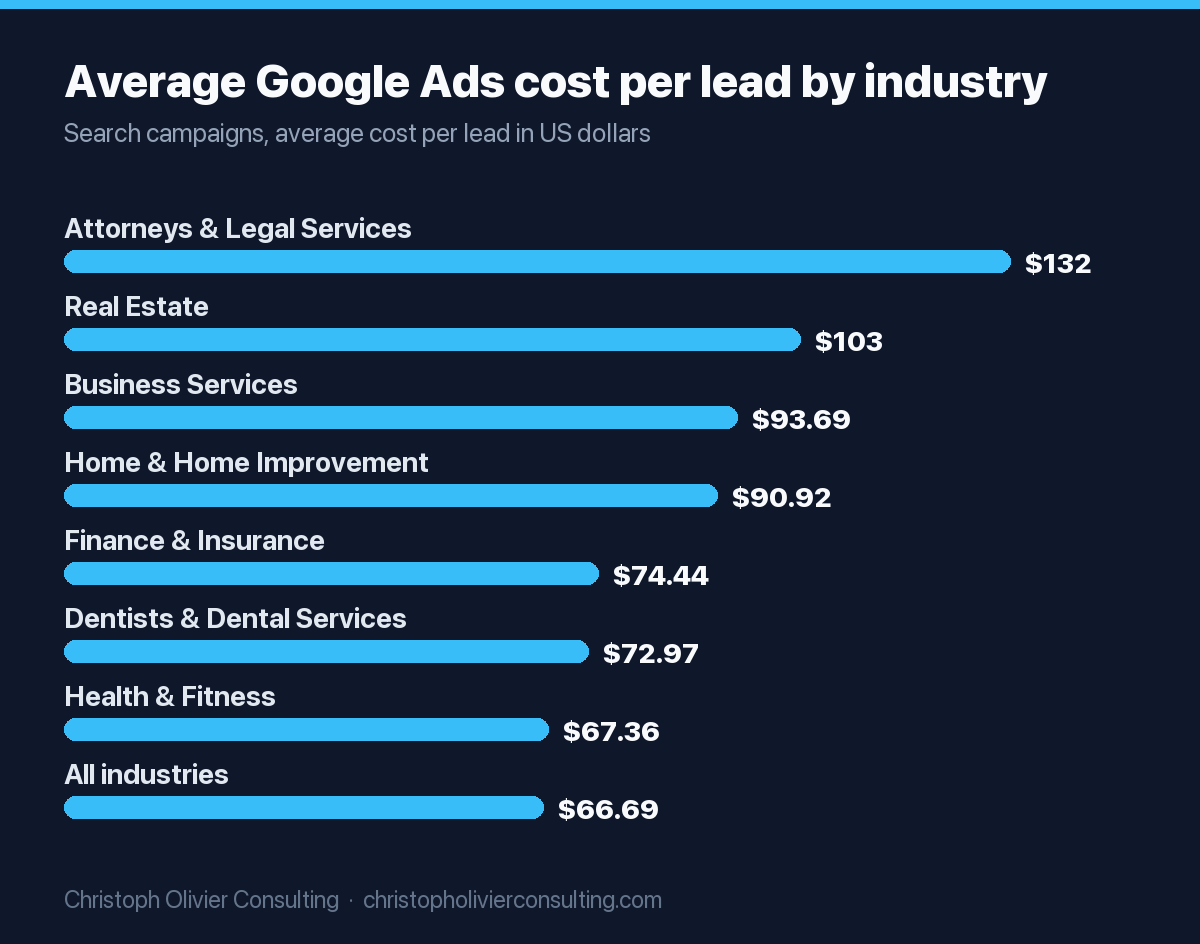
The same WordStream by LocaliQ benchmarks put average cost per click at $9.87 for legal services, $8.33 for home and home improvement and $5.87 for business services. These are averages across their customer campaigns, so your market may differ. For what drives those prices, see how much Google Ads cost in 2026. Volume matters too: a local firm may record dozens of conversions a month, not thousands, so one bad conversion action can steer a large share of automated bidding.
Measurement mistakes: tracking the wrong thing
The most damaging Google Ads mistake is broken measurement. If conversions are missing, double counted, or recording low-value actions like page views, every automated bid strategy optimizes toward the wrong goal. Before touching keywords or ads, confirm that each Primary conversion action represents a real lead: a qualified form, a meaningful call, or a booked consultation.
Mistake 1: No conversion tracking, or tracking the wrong thing
Without reliable conversion data you judge campaigns by clicks, which tells you nothing about clients. Typical culprits: a form counted twice (Google tag plus an Analytics import), a “thank you” tag that fires on every refresh, and button clicks counted as leads.
How to check: go to Goals > Conversions > Summary and review each action, its source and status. Then compare last month’s conversions in Google Ads with real leads in your CRM. If they are far apart, fix tracking first.
Mistake 2: Counting micro-actions as Primary conversions
Google splits conversion actions into two types. Primary actions appear in the “Conversions” column and are used for bidding. Secondary actions are “for observation only” and appear in “All conversions.” If a scroll event or phone-link click is Primary, Smart Bidding will buy more of those cheap actions.
The fix: in Goals > Conversions > Summary, click Edit goal, and under “Conversion action optimization” set each action to Primary or “Secondary (observe only).” Once tracking is clean, Google’s qualified leads and converted leads goals let you import CRM outcomes, so bidding learns from leads “further qualified offline” rather than every form fill.
Mistake 3: No call tracking for a phone-driven business
HVAC companies, plumbers and many law firms get a large share of leads by phone. Untracked calls make the account look weaker than it is and undervalue the keywords that make the phone ring.
Google’s phone call conversion types include calls from ads, calls to your website number through a Google forwarding number, mobile number clicks, and imported calls. You set a minimum call length; pick one that filters hang-ups and wrong numbers, then check it against your call log. Our Google Ads guide for HVAC contractors covers call-heavy setups in more depth.
Network and location settings that leak budget
Two default settings send Search budget to places many service businesses never intended: the Search Partners and Display Network checkboxes, and the “Presence or interest” location option. Both live in campaign settings, take under a minute to review, and should be deliberate choices rather than leftovers from the day the campaign was created.
Mistake 4: Leaving Search Partners and the Display Network on
Google states that in new Search campaigns search partners are included by default. Search campaigns can also carry Display Expansion, which uses “unspent Search budgets” on the Display Network.
How to check: open campaign Settings, expand Networks, and review “Include Google search partners” and the Display Network option. The “Network (with search partners)” segment splits results by network, and Google’s Search Partner Network placement reporting shows site-level data in the Report editor.
The fix: for a new or low-budget account, uncheck both, as Practical Ecommerce also recommends. Once tracking is trustworthy, test partners on purpose and keep them only if the segmented cost per lead holds up.
Mistake 5: Using “Presence or interest” for a local service area
Google’s advanced location options default to “Presence or interest,” which reaches people in or regularly in your locations plus people who have “shown interest” in them, through searches, recent visits or content viewed. For a plumber serving one metro, an interested searcher three states away is rarely a customer.
The fix: in campaign Settings, open Locations, expand Location options, and choose “Presence: People in or regularly in your targeted locations.” Google recommends the default, and it can suit businesses with real out-of-area buyers, such as relocation real estate. For service delivered at the customer’s home or office, Presence is usually safer.
Keyword mistakes: broad match without guardrails
Broad match is not a mistake on its own. The mistake is running it without the two guardrails Google pairs it with: Smart Bidding and a maintained negative keyword list. Without them, broad match lets ads show on searches only loosely related to your service, and you pay for every one of those clicks.
Mistake 6: Broad match on manual bidding, with no negatives
Google’s keyword matching guide says broad match can show ads on “searches that don’t contain the direct meaning of your keywords” and that “it’s critical to use Smart Bidding with broad match.” Google’s broad match page reports about 25% more conversions in Target CPA campaigns after switching phrase keywords to broad, based on its internal 2020 data. That assumes Smart Bidding and accurate tracking.
The fix: on Manual CPC or Maximize clicks, use phrase and exact match. On Smart Bidding with clean data, broad can work with a shared negative list. Per Google, negative keywords don’t match to close variants, so add plurals and synonyms yourself. Early negatives for most service firms:
- Job seekers: jobs, careers, salary, hiring
- Do-it-yourselfers: DIY, how to, template, free
- Training: course, school, certification
- Services you do not offer, and cities outside your area
Mistake 7: Ignoring the search terms report
The search terms report shows the actual searches that triggered your ads and, per Google, is the place to gather negative keyword ideas. Go to Campaigns > Insights and reports > Search terms, tick unwanted terms, and click “Add as negative keyword.” Google adds them as negative exact match by default, so broaden the match type when a whole theme is irrelevant. Review weekly for a new campaign’s first two months, then every two weeks.
Bidding and structure mistakes: automating too early, spreading budget thin
Smart Bidding needs conversion volume to work, and a budget split across many small campaigns starves it of exactly that. Two related mistakes follow: setting a cost-per-lead target before the data supports it, and running so many campaigns that none of them collects enough clicks or conversions to learn from.
Mistake 8: Setting a target too early, then changing it constantly
Google’s Target CPA documentation allows starting without history but recommends measuring “the last 30 days, including at least 30 conversions.” The learning period typically lasts one to two conversion cycles and restarts when you change the strategy or add or remove campaigns, ad groups or keywords.
The fix: run a new campaign on Maximize conversions until it has a steady month of real leads, then set a target near its current cost per lead. After any change, wait a couple of conversion cycles before judging.
Mistake 9: Too many campaigns, too little budget each
Do the arithmetic before you split. At LocaliQ’s home improvement average of $8.33 per click, $20 a day buys about 73 clicks a month. At that industry’s 8.05% average conversion rate, that is about 6 leads, far below the 30 conversions Google uses to evaluate Target CPA. Split across five campaigns, none learns.
The fix: separate campaigns only where budgets, locations, landing pages or targets genuinely differ. Our guide to setting a Google Ads budget for a small business shows how to size and split spend.
Automation mistakes: auto-applied recommendations and Performance Max
Google Ads automation can help, but two automated features cause frequent surprises in service-business accounts. Auto-applied recommendations can add keywords or expand networks without anyone reviewing the change. Performance Max can serve on searches for your own brand name, which makes its results look better than the new business it actually creates.
Mistake 10: Leaving auto-applied recommendations on
Google’s list of auto-applicable recommendations includes “Add broad match keywords,” “Expand your reach with Google search partners,” “Use Display expansion” and “Set a target CPA.” Each can undo a deliberate setting above.
The fix: per Google’s instructions, go to Campaigns > Recommendations > Auto-apply settings, uncheck the types you want to stop, and save. The History tab shows what was already applied. I keep auto-apply off for anything touching keywords, networks or bidding.
Mistake 11: Letting Performance Max take your brand traffic
Google says a Search keyword that exactly matches the query is preferred over Performance Max; otherwise the higher Ad Rank serves. Without an exact match brand keyword, PMax can pick up searches for your firm’s name and claim conversions from people already looking for you.
The fix: run a brand Search campaign with exact match brand keywords, and add brand exclusions to Performance Max in its settings. For PMax these apply to Search, Shopping and YouTube search inventory. Brand settings for Search campaigns moved into the AI Max panel from May 27, 2025.
Landing page mistakes: sending paid clicks to your homepage
Sending ad clicks to your homepage makes visitors hunt for the service they just searched for. A dedicated page that repeats the ad’s promise, names the service and location, and puts the phone number and form near the top usually converts better and supports Google’s landing page experience rating.
Mistake 12: Using the homepage as the landing page
Google’s Quality Score rates expected click-through rate, ad relevance and landing page experience on a 1 to 10 scale. It “is not an input in the ad auction,” but a “Below average” landing page rating is a useful flag. Add these columns under Keywords > Columns > Quality Score, then build pages with:
- One service per page, with a headline matching the ad group
- A click-to-call number and short form visible on mobile
- Real proof: licenses, credentials, reviews, service area
- Fast mobile load and no unrelated offers
Law firms and financial advisors should keep page claims inside their bar or regulator’s advertising rules.
A 30-minute Google Ads audit checklist
You can find most of these mistakes in one sitting. Work through the checks below in order, because measurement comes first: if conversions are wrong, every other number in the account is unreliable. Write down what you find before changing anything, then fix issues in the same order so you can tell which change moved results.
- Conversions: is every Primary action a real lead, with no duplicates?
- Reconcile: do last month’s conversions match real leads in your CRM?
- Calls: is there a call conversion with a sensible minimum length?
- Networks: are search partners and Display off in Search campaigns?
- Locations: is Location options set to Presence?
- Match types: any broad match in campaigns without Smart Bidding?
- Negatives: is a shared negative list attached to every Search campaign?
- Search terms: review 30 days and add irrelevant terms as negatives.
- Bid strategy status: any campaign stuck in “Learning” or “Limited”?
- Budget spread: divide each budget by average CPC to see monthly clicks.
- Auto-apply: check settings and the History tab.
- Brand and landing pages: PMax brand exclusions, an exact match brand campaign, landing page ratings.
Worked example: auditing a $3,000 a month HVAC account
Here is how the checklist plays out for a hypothetical HVAC company spending $3,000 a month on Google Ads. The figures are illustrative arithmetic based on published industry averages, not a client result. The point is to show the order of fixes and why measurement problems distort everything that comes after them.
Starting point. At LocaliQ’s home improvement averages ($8.33 per click, 8.05% conversion rate), $3,000 buys about 360 clicks and roughly 29 reported conversions a month. Suppose the audit finds:
- The contact form counted twice, so “29 conversions” may be closer to 15 leads.
- Website calls not tracked, so emergency-repair keywords look weak.
- Search partners and Display on, with “Presence or interest” targeting.
- Auto-apply added broad keywords to a Manual CPC campaign, and search terms show “hvac technician jobs” and “hvac school near me.”
Fix order. First, set the duplicate to Secondary and add call conversions. Second, turn off partners, Display and auto-apply, and switch to Presence. Third, add job and training negatives and move broad keywords to phrase match until Smart Bidding has data. If 15% of those 360 clicks were going to job seekers and out-of-area searchers, that is about 54 clicks, or roughly $450 a month. The bigger gain is often step one: every later decision is made on true numbers.
When should you fix Google Ads yourself, and when should you get help?
Most settings mistakes on this page are safe to fix yourself in an afternoon: networks, location options, auto-apply and negatives. Measurement rebuilds, CRM lead imports and Smart Bidding decisions are where outside help tends to pay off, because a wrong change there can distort reporting for weeks before anyone notices.
If your Google Ads numbers already match your CRM, keep managing the account and review it monthly. If they do not reconcile, or nobody owns the account week to week, read how PPC management works and what it costs before spending more. In my experience, most underperforming service accounts need cleaner measurement before they need a bigger budget. Our paid advertising work starts with exactly this audit, and if you want to walk through your own account, you can book a consultation.
Frequently asked questions
What is the most common Google Ads mistake?
Broken or misconfigured conversion tracking is the most common and most costly mistake. When conversions are missing, double counted, or recording soft actions like page views, Smart Bidding optimizes toward the wrong outcome and every report in the account becomes unreliable. Check Goals, Conversions, Summary and compare the count with real leads in your CRM before changing anything else.
Should I turn off Google Search Partners?
For a new or low-budget Search campaign, turning off Search Partners is usually the safer starting point, because Google includes them by default. Once conversion tracking is reliable, you can test partners on purpose and judge them with the Network (with search partners) segment. Keep them only if the cost per lead from partners holds up against Google Search.
Should I use Presence or Presence or interest location targeting?
For local service businesses, Presence (people in or regularly in your targeted locations) is usually the better choice. Google's default, Presence or interest, also reaches people who have shown interest in your area, which can include searchers far outside your service area. Presence or interest can make sense where out-of-area buyers are real, such as relocation-driven real estate.
Is broad match bad in Google Ads?
Broad match is not bad on its own. Google says it is critical to pair broad match with Smart Bidding, and it works best when conversion tracking is accurate and a negative keyword list is maintained. On Manual CPC or Maximize clicks campaigns, broad match tends to show ads on loosely related searches, so phrase and exact match are usually safer there.
How often should I check the search terms report?
Review the search terms report weekly for the first two months of a new campaign, then every two weeks once the negative list is mature. Look for job seekers, DIY and training searches, services you do not offer, and locations outside your area. Add irrelevant themes as negatives with the broadest safe match type.
Should I turn off auto-applied recommendations in Google Ads?
Most service businesses should turn off auto-apply for anything that changes keywords, networks or bidding. Google's auto-apply list includes adding broad match keywords, expanding to search partners and using Display expansion, which can undo deliberate settings. Turn them off under Recommendations, Auto-apply settings, and keep reviewing recommendations manually instead.
How long should I wait before judging a Google Ads change?
Google says the Smart Bidding learning period typically takes one to two conversion cycles, and it restarts when you change the bid strategy or add or remove campaigns, ad groups or keywords. For Target CPA, Google recommends evaluating over the last 30 days with at least 30 conversions. Avoid daily edits, which keep the strategy relearning.
More Paid Advertising guides
- Google Ads in 2026: Strategy Guide
- How Much Do Google Ads Cost in 2026?
- Google Ads Budget for Small Business: How Much to Spend and How to Split It
- PPC Management: What It Is, How It Works, and What It Costs
- YouTube Ads for B2B Service Businesses
- LinkedIn Campaign Manager for B2B Founders
- All Paid Advertising guides →