
Last reviewed: October 2026

The right marketing agency project management tool depends mostly on how you get paid. Agencies that sell time and retainers usually do best with agency-built platforms such as Teamwork.com or Productive.io, which connect tasks to time, budgets and invoices. In-house marketing teams usually do best with Asana, monday.com, ClickUp or Wrike, where campaign calendars, approvals and cross-team visibility matter more than billing.
This guide compares ten tools using prices checked on each vendor’s own pricing page on 18 October 2026. It then covers what the usual roundups skip: which features marketing work actually needs, how seat minimums change the real bill, a worked cost example for an 8-person agency, a campaign workflow template you can copy, and an honest answer on when you do not need a project management tool at all.
What is a marketing agency project management tool?
A marketing agency project management tool is software that plans, assigns and tracks marketing work, such as campaigns, content, creative and client deliverables, in one shared system. The better ones add what marketing needs beyond a to-do list: campaign calendars, creative proofing, client access, time tracking and budget or retainer tracking.
There are really two buyer types searching for the same thing:
- Agencies sell hours, retainers or fixed-fee projects to clients. Their profit depends on utilization, scope control and getting approvals out of email. They need time tracking, budgets, client users and, ideally, invoicing.
- In-house marketing teams serve one business. Their problems are capacity, priorities and handoffs between content, design, paid media and sales. They need calendars, intake forms, approvals and reporting for leadership.
Most general tools serve the second group well and the first group partly. That split drives almost every recommendation below.
Why project management for marketing teams pays off
Marketing work is mostly coordination: briefs, reviews, handoffs and status checks across many people and channels. Asana’s Anatomy of Work Index found that 60% of a knowledge worker’s time goes to “work about work” instead of skilled work. A shared system cannot remove coordination, but it can make it visible and cut the duplicated parts.
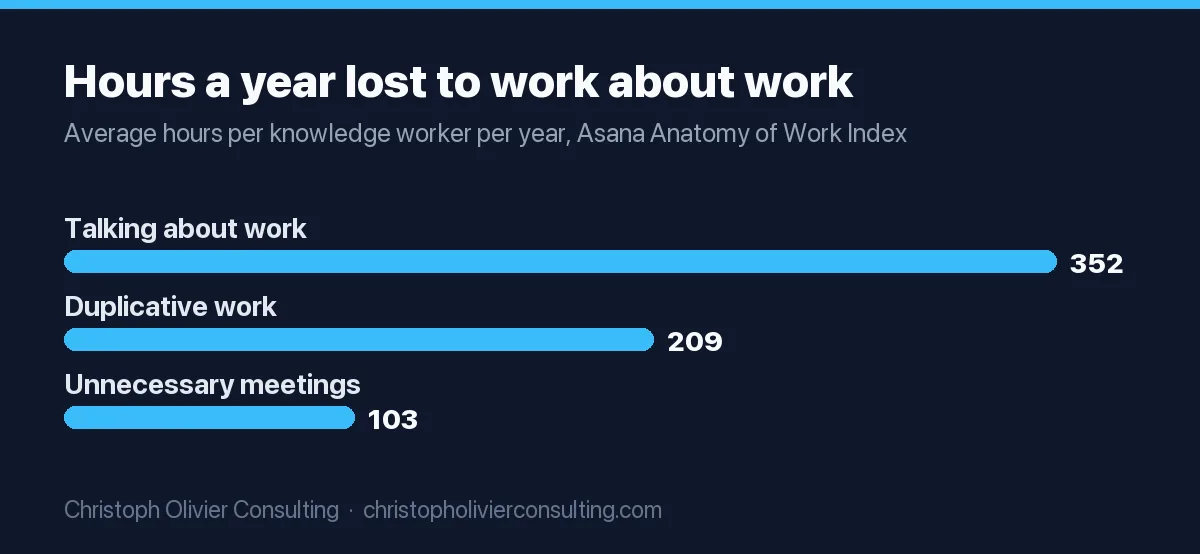
The same Asana research puts numbers on the waste: per worker, per year, 352 hours spent talking about work, 209 hours on duplicative work and 103 hours in unnecessary meetings. It also reports that 88% of knowledge workers say time-sensitive projects have fallen behind because of task volume. Keep in mind that Asana sells project management software, so read these as directional.
Agency data points the same way. In Teamwork.com’s survey of more than 500 agency leaders, 52% of agencies struggle to hit billable utilization above 50%, only 18% always reach their billable vs non-billable time targets, and agency leaders spend 69% of their time in meetings. Again, a vendor survey, but the pattern matches what most agency owners describe: the problem is rarely effort, it is lost visibility on where time goes.
The 10 best marketing project management software tools compared
The ten tools most worth shortlisting in 2026 are Asana, monday.com, ClickUp, Wrike, Teamwork.com, Productive.io, Notion, Trello, Basecamp and Airtable. All but Productive offer a free plan. Paid entry prices run from $5 per user per month (Trello) to $25 per month flat (Basecamp), with agency features usually one tier higher.
| Tool | Best for | Free plan | Entry paid price (billed annually) | Marketing-relevant strengths |
|---|---|---|---|---|
| Asana | In-house campaign planning | Yes, up to 2 users | $10.99/user/mo (Starter) | Proofing and approvals, time tracking and portfolios on Advanced ($24.99); unlimited free guests from Starter |
| monday.com | Visual boards across teams | Yes, up to 2 seats, 3 boards | €9/seat/mo (Basic, shown in EUR) | Gantt and guest access from Standard (€12); time tracking on Pro (€19) |
| ClickUp | All-in-one on a budget | Yes, with tight limits | $9/user/mo (Core) | Time tracking and Gantt on Core; proofing (annotation) from Business ($17) |
| Wrike | Larger teams with heavy approvals | Yes | $10/user/mo (Team, 2 to 15 seats) | Visual proofing for 30+ file types; Business $25 for 5 to 200 seats |
| Teamwork.com | Client-service agencies billing time | Yes, up to 5 users, 5 projects | $9.99/user/mo (Basics, 3-user minimum) | Billable time; invoices from logged time, time budgets and retainers on Accelerate ($24.99); free client users |
| Productive.io | Agency operations and profitability | No (14-day trial) | $10/user/mo (Essential) | Budgeting, time tracking and resource planning from Essential; advanced reports on Professional ($25) |
| Notion | Docs, wikis and light PM | Yes, 10 guests | €9.50/member/mo (Plus, shown in EUR) | Flexible databases; unlimited guests on paid plans; full AI on Business (€19.50) |
| Trello | Simple kanban for small teams | Yes, up to 10 collaborators | $5/user/mo (Standard) | Calendar, Timeline and Table views on Premium ($10) |
| Basecamp | Small agencies wanting flat pricing | Yes, 1 project, 5 users | $25/mo flat (Freelancer, 3 projects) | No per-user fees; time tracking on every plan |
| Airtable | Data-heavy content operations | Yes | $20/seat/mo (Team) | Custom interfaces on top of a content database |
Prices are list prices from each vendor’s pricing page on 18 October 2026, excluding tax. monday.com and Notion displayed euros to our fetch; US visitors may see dollar pricing. Always confirm on the vendor page before you buy, because packaging changes often.
Asana
Asana is the safest default for in-house marketing teams. Starter costs $10.99 per user per month billed annually ($13.49 monthly) and includes timeline views and unlimited free guests. Proofing, approvals, time tracking and portfolios sit on Advanced at $24.99, so most marketing teams end up there.
monday.com
monday.com is the most visual option and easy for non-technical teams to adopt. Work management plans start at €9 per seat per month, with Gantt, guests and 250 automations a month on Standard (€12) and time tracking only on Pro (€19). Its FAQ says plans start from 3 users.
ClickUp
ClickUp packs the most features per dollar. Its Core plan is $9 per user per month billed yearly and includes time tracking and Gantt charts; Business at $17 adds proofing, resource management and 10,000 automations a month. The tradeoff is setup effort: flexible tools need someone to own the structure.
Wrike
Wrike suits larger marketing departments with formal review cycles. Team is $10 per user per month for 2 to 15 seats; Business is $25 for 5 to 200 seats, annual only. Wrike’s approvals feature offers visual proofing for 30+ file types; confirm which plan includes it with sales.
Teamwork.com
Teamwork.com is built for client work. Basics is $9.99 per user per month (3-user minimum) with billable time; Accelerate at $24.99 (5-user minimum) adds invoices from logged time, time budgets and retainers. Teamwork also lets you bring clients into projects at no extra cost.
Productive.io
Productive is closer to agency operations software than a task board. Essential lists at $10 per user per month billed yearly and Professional at $25, with budgeting, time tracking and resource planning from the first tier. Choose it when margin reporting matters more than creative workflow.
Notion
Notion works when your team lives in documents: briefs, wikis and a content database in one place. Plus is €9.50 per member per month and Business €19.50, with unlimited guests on paid plans. It lacks native time tracking and proofing, so agencies usually pair it with other tools.
Trello
Trello is the simplest way to run a kanban content board. Standard is $5 per user per month annually ($6 monthly); Premium is $10 and adds Calendar, Timeline and Table views. It fits small teams with simple workflows and gets thin once you need budgets or capacity.
Basecamp
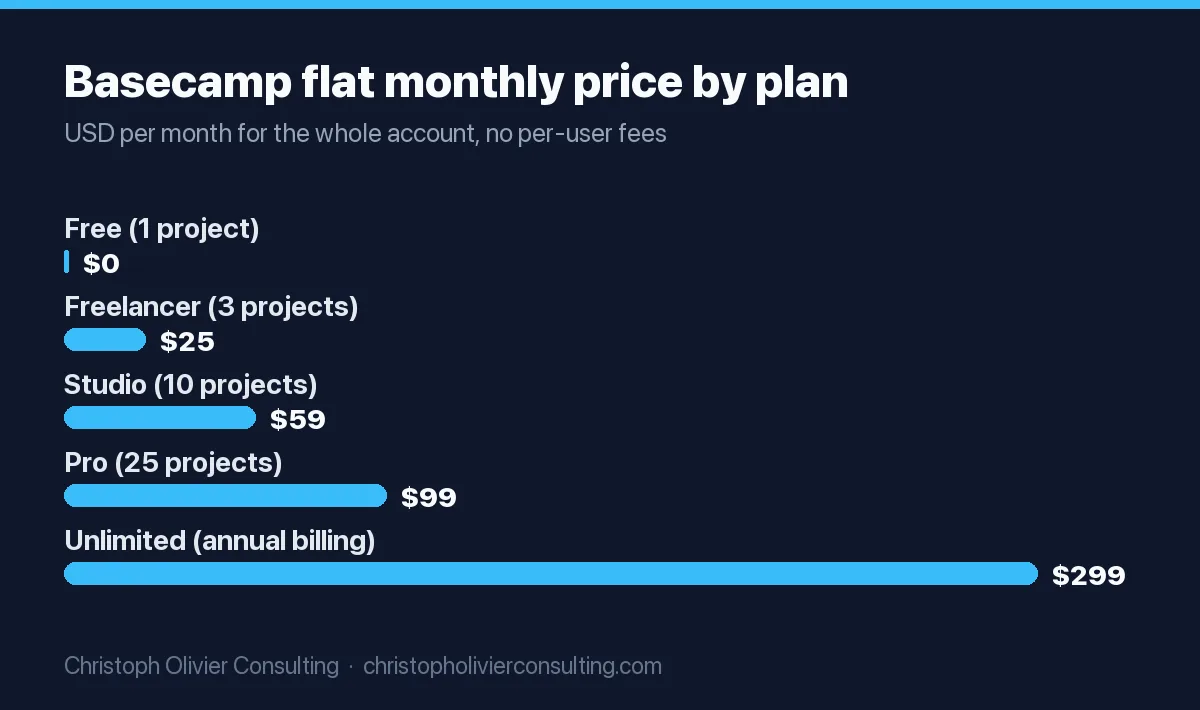
Basecamp charges flat rates instead of per user. Plans run from free (1 project) to $299 per month billed annually for unlimited projects, and every person you add, including clients, counts toward your user total, with no per-user fees (Freelancer caps at 20 people). Time tracking is included on every plan.
Airtable
Airtable is a database first. Team is $20 per seat per month and Business $45, billed annually. It shines for content operations with many fields (persona, funnel stage, channel, status, owner) and custom interfaces, but you build the workflow yourself.
Marketing project management tool pricing: per seat vs flat rate
Most marketing project management tools charge per user per month, so cost scales with headcount. Basecamp charges a flat monthly fee by number of active projects. Per-seat pricing is cheaper for small teams; flat pricing wins once you add many contractors or client users. Seat minimums and seat bundles often change the real bill.
Three pricing details catch most buyers out:
- Seat bundles. Asana sells seats one at a time up to 5 users, then in groups of 5 up to 30. Wrike sells seats in groups of 5 up to 30. An 8-person team pays for 10 seats on both.
- Minimums. Teamwork.com Basics requires 3 users and Accelerate requires 5. monday.com’s FAQ says plans start from 3 users.
- Monthly billing premium. Asana Starter is $10.99 annually but $13.49 monthly, about 23% more. Trello Standard is $5 vs $6. Teamwork.com says annual billing saves about 29%.
Flat pricing is worth a look if your agency uses many freelancers or wants clients inside projects. Basecamp’s tiers, for example, scale by active projects rather than people. Agencies whose main need is tracking clients rather than tasks may prefer a dedicated client management app over a project tool.
Features marketing teams need (and what agencies need on top)
Marketing teams need five things from a project management tool: a campaign or content calendar, request intake, creative proofing and approvals, guest or client access, and automations for handoffs. Agencies need three more: time tracking against budgets, capacity planning by person or role, and profitability reporting by client or project.
| Feature | Why it matters for marketing | Where it is included (verified Oct 2026) |
|---|---|---|
| Proofing and approvals | Moves feedback on creative out of email threads and into the asset | Asana Advanced; ClickUp Business; Wrike (plan by quote) |
| Timeline / Gantt | Shows campaign dependencies and launch dates | Asana Starter; monday.com Standard; ClickUp Core; Wrike Team; Trello Premium |
| Time tracking | Needed for retainers, utilization and pricing future work | Asana Advanced; monday.com Pro; ClickUp Core; Teamwork.com all plans; Productive all plans; Basecamp all plans |
| Client or guest access | Clients see status and approve without extra licenses | Asana free guests from Starter; Teamwork.com free client users; Notion unlimited guests on paid plans |
| Budgets, retainers, invoicing | Connects work to revenue and margin | Teamwork.com Accelerate; Productive Essential and up |
| Automations | Auto-assigns reviews and status changes | monday.com Standard (250/mo); ClickUp Core (1,000/mo) |
Two things project management tools generally do not replace: a social scheduling tool and a marketing automation platform. If social publishing is a big part of the work, plan for a separate scheduler from our list of social media marketing tools and let the project tool track the work around it.
Which marketing project management tool fits your team?
Match the tool to your operating model, not to a feature checklist. Agencies billing time should start with Teamwork.com or Productive. Small agencies wanting predictable cost should look at Basecamp. In-house teams should start with Asana, monday.com or ClickUp, and teams with heavy creative review should test Wrike.
| Your situation | Start your shortlist with | Why |
|---|---|---|
| Agency, 5 to 30 people, hourly or retainer billing | Teamwork.com, Productive.io | Time, budgets and client users in one system |
| Small agency or studio, many freelancers or clients in projects | Basecamp | Flat price, no per-user fees |
| In-house team, content plus campaigns, under 20 people | Asana, monday.com, Trello | Fast adoption, calendars and approvals |
| Budget-conscious team that wants everything in one app | ClickUp | Time tracking and Gantt on the $9 Core plan |
| Larger department with formal review cycles | Wrike, Asana Advanced | Proofing, approvals and portfolio views |
| Content-ops team managing hundreds of assets | Airtable, Notion | Database structure for metadata and reporting |
In my experience, the tool matters less than whether one person owns the structure. A well-run $5 Trello board beats an abandoned enterprise workspace.
How to choose marketing project management software in 6 steps
Choose by running a short, structured trial with real work. List your three biggest workflow failures, shortlist two or three tools that fix them, rebuild one live campaign in each during the free trial, then price the plan you would actually need for a year, including seat minimums and add-ons.
- Write down the failures. Missed deadlines, approvals stuck in email, unbilled hours, nobody knowing capacity. Rank them.
- Decide your system of record. If time and invoices matter most, the project tool must handle them or integrate cleanly with your accounting software.
- Shortlist two or three tools from the decision table above. More than three turns into a feature beauty contest.
- Rebuild one real campaign in each trial: brief, tasks, a review round, a client approval and a launch. Use real people, not a demo project.
- Price the plan you will actually need. Most marketing teams need the second tier for proofing, time tracking or guests. Apply seat bundles and minimums.
- Set adoption rules before rollout. One owner, one intake route, statuses everyone uses, and a date when email requests stop being accepted.
How to set up a content calendar and campaign workflow
Set up one board or project for the content calendar and one template for campaigns. The calendar holds every asset with an owner, channel, status and publish date. The campaign template holds the repeatable steps from brief to report, with review and approval tasks assigned automatically so nothing waits on someone remembering to ask.
If you have not planned the calendar itself yet, start with our content calendar guide and a quarterly content roadmap, then load them into the tool. The tool should hold the plan, not create it.
Copy-ready template: content calendar fields
- Title (working headline)
- Channel (blog, email, LinkedIn, paid, video)
- Campaign (link to the parent campaign)
- Funnel stage (awareness, consideration, decision)
- Owner and reviewer (one name each)
- Status: Idea, Briefed, In progress, In review, Client approval, Scheduled, Published
- Due date (draft) and publish date
- Estimated hours (agencies: for retainer tracking)
- Link to final asset and result (filled in 30 days after publishing)
Campaign template: the repeatable steps
- Brief approved (goal, audience, offer, budget, KPI)
- Assets planned and added to the content calendar
- Copy drafted, then internal review
- Design drafted, then proofing round
- Client or stakeholder approval
- Build and QA (tracking links, forms, audiences)
- Launch
- Report at 14 and 30 days
Then automate the handoffs: when a task moves to “In review”, assign the reviewer; when it is approved, notify the builder. Our guide to which marketing automation workflows to build first uses the same start-small logic. monday.com’s own tutorial below shows a two-board version of this setup, with a high-level plan board linked to a day-to-day task board.
Worked example: what an 8-person agency would pay
For an 8-person agency that needs time tracking and client collaboration, annual list prices on the plan that fits range from about $864 a year (ClickUp Core) to about $3,000 (Asana Advanced or Wrike Business). Seat bundles push Asana and Wrike to 10 billed seats. Basecamp Pro costs $1,188 a year regardless of headcount.
| Tool and plan | Billed seats | Monthly cost | Annual cost | What you get for agency work |
|---|---|---|---|---|
| ClickUp Core ($9) | 8 | $72 | $864 | Time tracking, Gantt; no proofing |
| ClickUp Business ($17) | 8 | $136 | $1,632 | Adds proofing and resource management |
| Basecamp Pro ($99 flat) | Unlimited | $99 | $1,188 | 25 active projects, time tracking, clients inside |
| Teamwork.com Accelerate ($24.99) | 8 | $199.92 | $2,399.04 | Invoicing, retainers, free client users |
| Productive Professional ($25) | 8 | $200 | $2,400 | Budgets, resource planning, advanced reports |
| Asana Advanced ($24.99) | 10 | $249.90 | $2,998.80 | Proofing, approvals, time tracking, portfolios |
| Wrike Business ($25) | 10 | $250 | $3,000 | Proofing, larger-team controls |
Assumptions: 8 internal users, annual billing, list prices from vendor pages on 18 October 2026, before tax, AI add-ons and storage upgrades. This is an illustration, not a quote. The more useful math is the other side: if better time capture recovers even a few billable hours a month per person, the subscription is usually a small line in comparison. Measure that during your trial rather than assuming it.
When project management software is overkill
Project management software is overkill when one or two people do all the marketing, when work is mostly recurring with no client approvals, or when nobody will own the system. In those cases a shared calendar, a simple kanban board or a spreadsheet often works better and costs nothing.
- Solo marketer or a two-person team. Asana’s free plan covers 2 users and Trello’s covers up to 10 collaborators. Start there.
- No billing or approvals. If you are not tracking hours for clients or routing creative for sign-off, the second-tier features you would pay for go unused.
- No owner. A tool without a maintainer decays within weeks. If nobody has an hour a week to keep it tidy, do not buy it yet.
- The real problem is strategy. If you are busy but cannot say which work drives pipeline, software will organize the wrong work more efficiently.
I would rather see a small firm run one disciplined board than three half-configured apps. If you are weighing project tools as part of a wider systems clean-up, our overview of business automation covers where the project tool fits next to your CRM and email platform. And if you want a second opinion on the marketing operation behind the tool, you can book a consultation and we can talk it through.
Frequently asked questions
What is the best project management tool for a marketing agency?
For agencies that bill time or retainers, Teamwork.com and Productive.io are strong starting points because they connect tasks to time tracking, budgets and client access. Small agencies wanting predictable cost often prefer Basecamp's flat pricing. If billing lives elsewhere, Asana, monday.com and ClickUp handle campaign work well. Test two tools on one real campaign before committing.
Is there free marketing project management software?
Yes. Asana is free for up to 2 users, monday.com for up to 2 seats, Trello for up to 10 collaborators, Teamwork.com for up to 5 users and 5 projects, and Basecamp for 1 project and 5 users. ClickUp and Notion also have free plans. Free tiers usually lack proofing, time tracking or timeline views, which most growing teams eventually need.
How much does marketing project management software cost?
As of October 2026, entry paid plans run from $5 per user per month (Trello Standard) to about $25 per user for agency-focused tiers such as Teamwork.com Accelerate or Asana Advanced, billed annually. Basecamp charges a flat $25 to $299 per month. Seat minimums and bundles can raise the real cost, so price the plan you will actually use.
What features should marketing project management software have?
Look for a campaign or content calendar, request intake, creative proofing and approvals, guest or client access, and automations for handoffs. Agencies should add time tracking against budgets, capacity planning and profitability reporting by client. Prioritize the features that fix your biggest workflow failure rather than the longest feature list.
What is the difference between project management for marketing teams and for agencies?
In-house marketing teams mainly need visibility, priorities and approvals across one company's campaigns. Agencies also need to protect margin, so they need time tracking, retainer and budget tracking, client users and often invoicing. That is why agency-built tools like Teamwork.com and Productive emphasize billing, while general tools emphasize calendars and collaboration.
Can I use Trello or Notion as a marketing project management tool?
Yes, for small teams with simple workflows. Trello works well as a kanban content board, and its Premium plan adds Calendar and Timeline views. Notion suits teams that live in briefs and documents. Both lack native time tracking and proofing, so agencies that bill hours usually outgrow them or pair them with other tools.
More Business Automation guides
- 10 Marketing Automation Workflows to Build First
- The SEO Process: A Repeatable Monthly Workflow That Compounds Rankings
- Marketing Automation: When You Need It
- Marketing Automation Strategy: Tools to Workflows
- Marketing Automation for Exit Planning Advisors Without Losing the Personal Touch
- AI Content Writing Workflows That Work
- All Business Automation guides →