
Last reviewed: October 2026

The best digital marketing reporting tools in 2026 fall into five groups: free visualization (Data Studio, formerly Looker Studio), agency client reporting (AgencyAnalytics, DashThis, Swydo, Whatagraph, TapClicks), live dashboards (Databox), data connectors (Supermetrics) and BI or CRM reporting (Power BI, HubSpot). Most firms should pick by pricing model and white-label needs, not by feature count. Verified entry prices run from free to about $20 per client or $44 per month for paid agency tools.
This guide compares ten tools using prices checked on each vendor’s own pricing page on 18 October 2026, then gives you what the comparison posts usually skip: what a useful dashboard actually shows at each funnel stage, a one-page template you can copy, a worked cost example for a 10-client agency, and an honest build vs buy answer.
What are digital marketing reporting tools?
Digital marketing reporting tools pull data from ad platforms, analytics, SEO tools and your CRM into one place, then turn it into scheduled reports or live dashboards. They save the copy-paste work of monthly reporting and give owners and clients one consistent view of spend, leads and revenue instead of six platform screenshots.
They are not the same as analytics platforms. GA4, Google Ads and LinkedIn Campaign Manager collect and measure data. A reporting tool sits on top of them and presents it. If the underlying tracking is wrong, a prettier report only spreads the error faster, which is why a clean GA4 setup comes before any reporting purchase.
The market splits into five practical types:
- Free visualization: Data Studio (Google renamed Looker Studio back to Data Studio in April 2026, per the Google Cloud release notes).
- Agency client reporting: AgencyAnalytics, DashThis, Swydo, Whatagraph, TapClicks. Built around many clients, templates and white-label portals.
- Live KPI dashboards: Databox. Built for in-house teams watching numbers daily.
- Data connectors: Supermetrics. Moves platform data into Sheets, Excel, Data Studio or Power BI so you report in a tool you already use.
- BI and CRM reporting: Power BI for multi-department analysis, HubSpot reports when the CRM already holds your leads and deals.
Digital marketing reporting tools compared: 2026 prices
Entry prices for the ten tools range from free (Data Studio, Databox Free, Power BI Free) to sales-quoted (TapClicks, Whatagraph Prime). Agency-focused tools start around $20 per client or $44 per month on annual billing. Prices below are the lowest paid tier on each vendor’s pricing page, checked 18 October 2026.
Three vendors (Supermetrics, Whatagraph, Swydo) displayed euro prices to our fetch. Swydo’s own FAQ says it bills EUR in EU countries and USD elsewhere, so US buyers may see a dollar figure. Treat every number here as a starting point and confirm on the vendor page before you budget.
| Tool | Lowest paid price (verified Oct 2026) | Pricing unit | White label | Best for |
|---|---|---|---|---|
| Data Studio (ex Looker Studio) | Free; Pro $9 per user per project per month | Free / per user | No true white label | Teams on Google data who can build their own reports |
| AgencyAnalytics | $20 per client per month, billed annually | Per client | Yes: logo, colors, custom domain, custom email | Agencies running branded client portals |
| DashThis | $44/mo billed yearly ($54 monthly), 3 dashboards | Per dashboard tier | Included on every plan | Small agencies and consultants wanting fast setup |
| Swydo | €62/mo billed annually (€69 monthly), 10 data sources included | Base fee plus per data source | Included | Budget-conscious PPC and paid social agencies |
| Whatagraph | Max plan from €999/mo billed annually, 50 credits | Per connected account (credit) | Included; custom domain is a Prime add-on | Larger agencies wanting finished, polished reports |
| TapClicks | Not published; demo required | Quoted | Basic branding on all plans | Agencies and media sellers with many clients and order workflows |
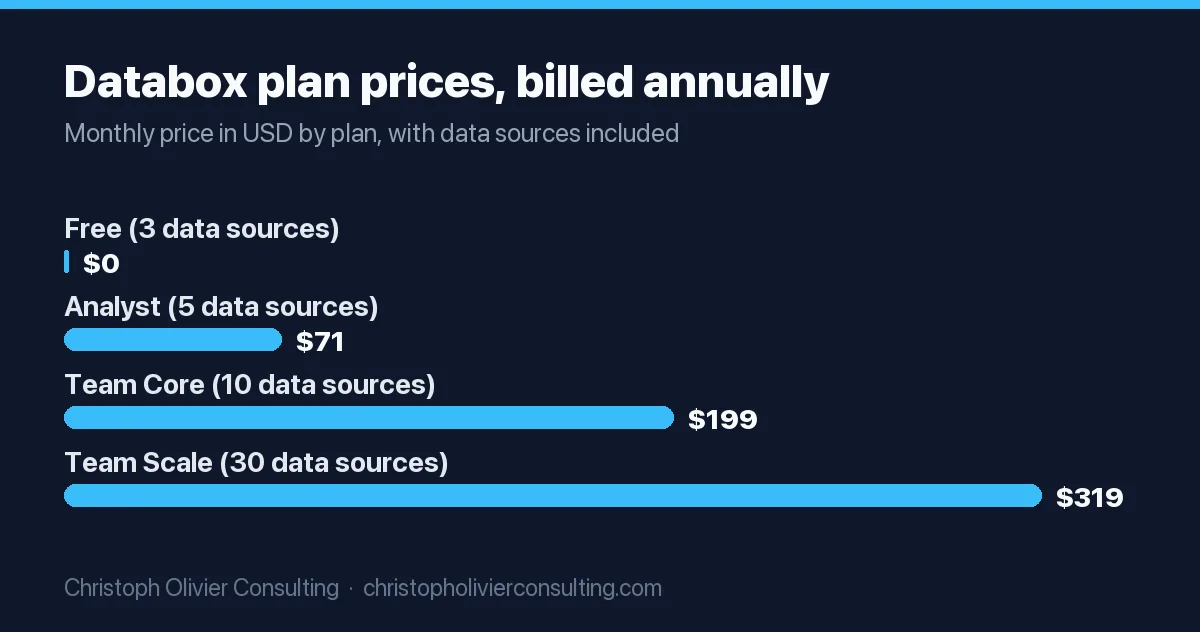
| Databox | Free plan; Analyst $71/mo billed annually | Per plan, by data sources and users | $80/mo add-on | In-house teams wanting live KPI dashboards |
| Supermetrics | Starter €39/mo billed yearly (€49 monthly) | Per plan, by sources, destinations and accounts | Depends on the destination tool | Teams reporting in Sheets, Excel, Data Studio or Power BI |
| Power BI | Free (no sharing); Pro $14 per user per month billed yearly | Per user | Not a client-portal tool | Firms already on Microsoft 365 blending marketing with finance |
| HubSpot Marketing Hub | Free tier with 10 dashboards; custom report builder on Professional (about $800 to $890/mo for 3 seats, plus $3,000 onboarding) | Per seat / per plan | No | Firms whose leads and deals already live in HubSpot |
Tool by tool: what each marketing reporting tool does well
Each marketing reporting tool solves a different problem. Data Studio and Power BI are flexible but you build everything. AgencyAnalytics, DashThis, Swydo and Whatagraph trade flexibility for client-ready templates. Databox focuses on live KPIs, Supermetrics on moving data, HubSpot on tying marketing to CRM revenue.
Data Studio (formerly Looker Studio)
Google’s report builder is available at no charge for creators and report viewers, and Data Studio Pro costs $9 per user per project per month. Pro adds organization-owned content, team workspaces, scheduled delivery and Google Cloud support, per Google’s Pro documentation. Native Google connectors (GA4, Ads, Search Console, Sheets, BigQuery) are free. Non-Google sources such as Meta or LinkedIn usually need a paid partner connector, which is the cost people forget.
AgencyAnalytics
One Core plan at $20 per client per month on annual billing, with 85+ integrations, a white-labeled client portal, custom domain and custom email, plus a 14-day trial with no card. Volume pricing starts at 25+ clients. Rank tracking and AI tracking are paid add-ons, so SEO-heavy agencies should price those in.
DashThis
Priced by number of dashboards: Individual (3), Professional (10), Business (25) and Standard (50+). White label and unlimited integrations are included on every plan, and the trial gives 10 dashboards for 14 days. Simple to set up, though you have less design freedom than in Data Studio.
Swydo
A single plan with all features, including full white-labeling. The first 10 data sources are included, then each extra source costs €4.50 (sources 11 to 100), €3.00 (101 to 500) or €2.00 (501+). It lists 38+ integrations, fewer than the larger tools, so check that your channels are covered.
Whatagraph
Whatagraph’s Max plan starts from €999 per month billed annually with 50 credits, where one credit equals one connected account. Prime is custom-priced and adds a custom report domain as an add-on. The pricing page routes buyers to a demo and does not mention a free trial. This is a premium option, priced for agencies with real volume.
TapClicks
Four tiers (SmartStory, SmartReports, SmartAnalytics, SmartSuite) with no public prices. Higher tiers include a 250+ connector package, report automation, a client portal and campaign order management. Worth a demo only if you run many clients and want reporting tied to workflow and media orders.
Databox
The free plan gives 1 user, 3 data sources and 1 dashboard. Paid plans run from Analyst ($71/month billed annually) through Team Core and Team Scale, with an Agency plan from $79/month plus account packs. White-labeling is an $80/month add-on rather than a plan feature, which matters if you report to clients.
Supermetrics
Supermetrics is a connector, not a dashboard. Starter (€39/month yearly) moves data from 2 sources into one destination such as Data Studio, Google Sheets, Excel, Power BI or an AI assistant. Growth (€159/month yearly) raises that to 7 sources. Any connector can be trialed free for 14 days without payment details.
Power BI
Power BI Desktop and the Free license cost nothing, but Free users cannot share reports. Pro is $14 per user per month billed yearly and Premium Per User is $24, per Microsoft’s pricing page. Strong for blending marketing with finance and sales data. Weak as a client-facing report tool.
HubSpot reports
If your leads, deals and revenue already sit in HubSpot, its built-in dashboards are often the shortest path to pipeline reporting. Free includes 10 dashboards, Starter 30, Professional 75 and Enterprise 100, per HubSpot’s pricing page. Custom reports and attribution sit on the higher tiers, which is a large jump in cost.
How the pricing models actually work
Marketing reporting tools charge in five ways: per client, per dashboard, per data source or connected account, per user, or by custom quote. The cheapest tool depends on your shape. A firm with many small clients pays least on per-dashboard pricing. A firm with few clients but many ad accounts often pays least per client.
| Pricing model | Example tools | What makes the bill grow | Works best when |
|---|---|---|---|
| Per client | AgencyAnalytics | Adding clients | Clients have many channels each |
| Per dashboard tier | DashThis | Crossing a dashboard threshold (3, 10, 25, 50) | You need one dashboard per client and few extras |
| Per data source or account | Swydo, Whatagraph, Databox | Each new ad account, property or page connected | Clients use 2 to 3 channels |
| Per user | Power BI, Data Studio Pro, HubSpot | Adding editors and viewers | A small internal team builds and reads reports |
| Quote only | TapClicks, Whatagraph Prime | Negotiated volume | You have scale and can negotiate volume |
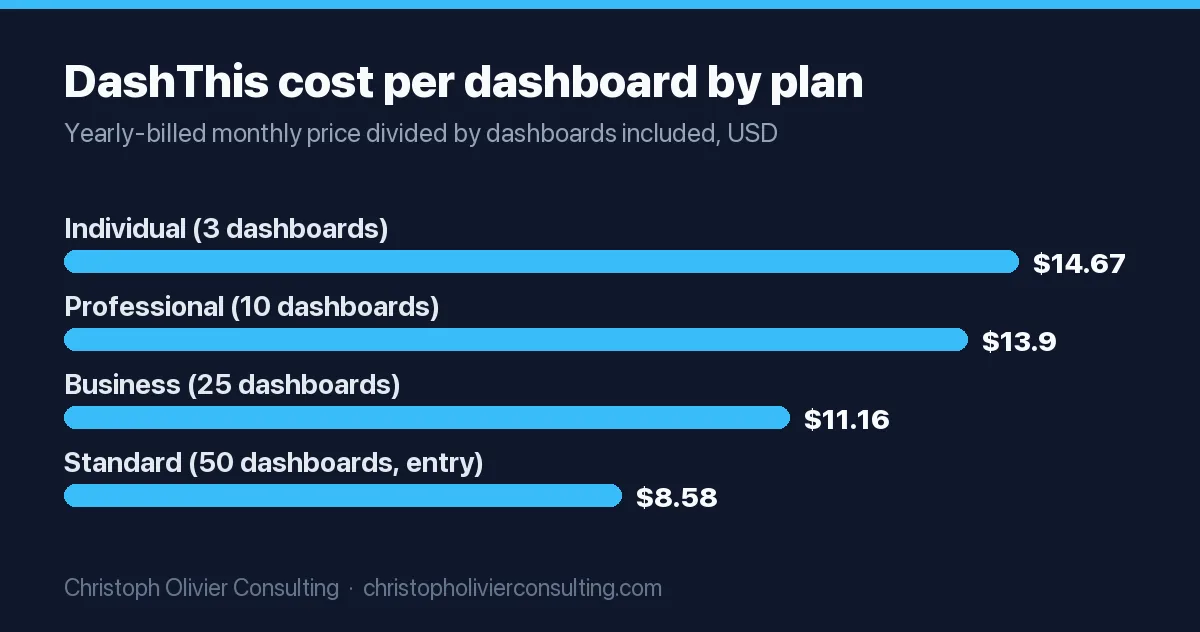
Per-dashboard pricing gets cheaper per unit as you grow. On DashThis’s yearly-billed plans, each dashboard costs about $14.67 on Individual, $13.90 on Professional, $11.16 on Business and $8.58 at the 50-dashboard entry point of Standard, calculated from the DashThis pricing page. The chart shows that drop.
Worked example: what a 10-client agency would pay
For a 10-client agency on annual billing, list prices put AgencyAnalytics at $200 per month, DashThis Professional at $139 per month, and Swydo at roughly €197 per month if each client connects 4 data sources. Real quotes vary, but this shows how the pricing model, not the headline price, sets your bill.
Assumptions: 10 clients, one dashboard or report per client, 4 connected platforms per client (40 sources in total), annual billing, no add-ons. Monthly billing costs more on every tool.
| Tool | Calculation | Approx. monthly cost | What could push it up |
|---|---|---|---|
| AgencyAnalytics | 10 clients x $20 | $200 | Rank tracker or AI tracker add-ons |
| DashThis Professional | 10 dashboards included, 40 sources allowed | $139 | An 11th client forces the Business plan ($279) |
| Swydo | €62 base + 30 extra sources x €4.50 | about €197 | More ad accounts per client |
| Data Studio + Supermetrics Growth | Free + €159 | €159 plus build time | Growth covers 7 sources and 7 accounts per source, so 10 clients may need add-ons |
Note the DashThis cliff: client number 11 roughly doubles the bill. Per-client pricing grows more smoothly. Neither is better in general, it depends on how fast you add clients.
Agency reporting tools vs in-house marketing dashboard tools
Agency reporting tools are built to serve many clients: templates you copy across accounts, white-label portals, scheduled PDF or email reports. In-house marketing dashboard tools are built for one business watching its own numbers live. If you report to clients, buy for white label. If you report to your partners, buy for live KPIs and CRM data.
For a professional-service firm (law, accounting, wealth, consulting), the in-house view matters more. Partners rarely need 40 charts. They need leads, cost per lead, consults booked and fee revenue by source. That usually points to Databox, HubSpot reports or Data Studio fed by your CRM, not a client-portal tool. For a broader look at the stack behind those numbers, see this guide to marketing analytics tools.
- Choose an agency tool if you report to 5+ external clients, need branded logins, or bill reporting as a deliverable.
- Choose an in-house dashboard if one leadership team reads it, CRM revenue matters more than platform clicks, and nobody needs a branded portal.
- Choose a connector plus BI if you already have someone comfortable in Data Studio, Excel or Power BI and want control over every calculation.
What a good digital marketing performance dashboard shows
A good digital marketing performance dashboard answers four questions in order: are we reaching the right people, are they engaging, are they converting into leads, and are those leads turning into revenue. Each funnel stage gets two or three KPIs, a target and a trend line. Anything that does not change a decision belongs in an appendix.
| Funnel stage | Question it answers | Core KPIs | Typical data source |
|---|---|---|---|
| Awareness | Are the right people finding us? | Impressions, reach, organic search clicks, branded search volume | Ad platforms, Search Console |
| Engagement | Do visitors care about what they see? | Engaged sessions, engagement rate, key page views, email click rate | GA4, email platform |
| Conversion | Are visitors becoming leads? | Leads (form, call, chat), conversion rate, cost per lead | GA4 key events, call tracking, ad platforms |
| Pipeline | Are leads qualified? | Qualified leads, consults booked, lead-to-consult rate | CRM |
| Revenue | Is marketing paying for itself? | Won deals or matters, revenue by source, customer acquisition cost, ROAS | CRM, billing system |
Most tools stop at the conversion row because that is where platform data ends. The pipeline and revenue rows require your CRM, which is why I push clients to connect the CRM first and the ad platforms second. If you want chart-level guidance, these are the eight charts a marketing dashboard needs, and SEO-specific reporting is covered in this SEO dashboard guide.
A marketing dashboard template you can copy
The simplest useful marketing dashboard is one page with five blocks: a headline scorecard, a channel table, a lead trend, a pipeline view and a short written commentary. You can build it in any tool on this list. Keep it to one screen so a partner can read it in two minutes.
One-page monthly marketing dashboard template
- Scorecard row (top): total leads, cost per lead, qualified leads, revenue influenced. Each with this month, last month, and target.
- Channel table: one row per channel (paid search, paid social, organic, referral, email) with spend, leads, cost per lead and qualified leads.
- Lead trend: 13-month line chart of leads and qualified leads so seasonality is visible.
- Pipeline view: leads to consults to won deals, by source, from the CRM.
- Commentary box: three bullets: what changed, why we think it changed, what we will do next month.
Pre-send checklist
- Date range matches the billing or reporting month.
- GA4 key events and CRM lead counts are within an agreed tolerance of each other.
- Every KPI has a target or benchmark next to it.
- Spend figures reconcile with the platform invoices.
- Commentary names one decision or action, not just numbers.
Build vs buy: when free Data Studio is enough
Free Data Studio is enough when most of your data is Google (GA4, Ads, Search Console, Sheets), one person can maintain the reports, and nobody needs a branded client portal. Buy a paid tool when you add non-Google sources at scale, report to many clients, or the hours spent fixing broken reports cost more than the subscription.
The hidden cost of building is maintenance. Connectors break when platforms change their APIs, calculated fields drift, and the one person who understands the report leaves. The hidden cost of buying is lock-in: templates and historical settings rarely move cleanly between vendors. Neither cost shows up on a pricing page.
- Build (Data Studio, Power BI, plus a connector) when you want full control of formulas and you have in-house skills.
- Buy (AgencyAnalytics, DashThis, Swydo, Databox) when speed, templates and client logins matter more than custom logic.
- Hybrid when a connector like Supermetrics feeds the tool your team already knows. This is often the cheapest serious setup.
How to choose marketing reporting tools in 6 steps
Choose by listing your data sources and audience first, then shortlisting by pricing model, then testing with real data during a free trial. Most tools on this list offer a 14-day trial, which is enough to rebuild one real monthly report and see where the gaps are.
- List every data source you report on today, including the CRM, call tracking and any spreadsheets.
- Name the audience: clients, partners, or the marketing team. This decides whether white label or live KPIs matter.
- Count your units: clients, dashboards, connected accounts and users, then price each tool against those counts, not the headline price.
- Check connector coverage for your exact platforms. A missing connector means CSV uploads every month.
- Run a trial with one real report. Rebuild last month’s report and check that totals match the source platforms.
- Confirm the exit path: can you export data and templates if you leave?
Common mistakes with marketing reporting tools
The most common mistakes are buying a tool before fixing tracking, reporting platform metrics nobody acts on, and ignoring the CRM. A reporting tool can only show the data it receives. If GA4 key events or lead sources are wrong, the dashboard is confidently wrong, which is worse than no dashboard.
- Reporting vanity metrics. Impressions and clicks without leads and revenue invite the wrong decisions.
- Too many charts. If a chart has not changed a decision in three months, move it to an appendix.
- Ignoring currency and billing terms. Several vendors quote in EUR or show annual prices as monthly figures.
- No owner. Every dashboard needs one named person who checks it before it goes out.
- Skipping the CRM. Without it, you report cost per lead but never cost per client.
Reporting is only as useful as the measurement under it, and this digital marketing analytics guide covers that foundation. If you want a second opinion on which reporting setup fits your firm, you can book a consultation and we can look at your current reports together.
Frequently asked questions
What are the best digital marketing reporting tools in 2026?
It depends on who reads the report. Agencies reporting to clients usually shortlist AgencyAnalytics, DashThis, Swydo or Whatagraph for white-label portals. In-house teams often choose Databox or HubSpot reports for live KPIs and CRM revenue. Teams with spreadsheet or BI skills can use free Data Studio or Power BI, fed by a connector such as Supermetrics.
Is there a free marketing reporting tool?
Yes. Data Studio, formerly Looker Studio, is free for creators and report viewers, with a paid Pro tier at $9 per user per project per month. Databox has a free plan with 3 data sources and 1 dashboard, and Power BI has a free license that cannot share reports. Free tools work best when most of your data comes from Google products.
How much do agency reporting tools cost?
Verified October 2026 list prices start at $20 per client per month for AgencyAnalytics and $44 per month for DashThis on annual billing. Swydo starts at 62 euros per month with 10 data sources included. Whatagraph starts from 999 euros per month and TapClicks quotes on request. Your real cost depends on clients, dashboards and connected accounts.
What is the difference between a marketing reporting tool and an analytics tool?
Analytics tools such as GA4 or ad platforms collect and measure data. Reporting tools pull that data from several sources into one report or dashboard and present it for clients or leadership. A reporting tool cannot fix bad tracking, so the analytics setup should be correct before you pay for reporting software.
What should a digital marketing performance dashboard include?
Two or three KPIs per funnel stage: reach and organic clicks for awareness, engaged sessions for engagement, leads and cost per lead for conversion, qualified leads and consults for pipeline, and revenue by source for revenue. Add targets, a 13-month trend and a short written commentary so readers know what action to take.
Do I need a paid tool if I already use Data Studio?
Often not. If your data is mostly Google, one person maintains the reports and nobody needs a branded client portal, Data Studio is usually enough. Paid tools start to pay off when you add many non-Google sources, report to many clients, or spend more hours fixing broken connectors than a subscription would cost.
More Analytics & Attribution guides
- Marketing Dashboards: 8 Essential Charts
- SEO Dashboard: How to Build and Read One in Looker Studio
- Marketing Analytics Tools: A Practical Guide to Attribution and ROI
- GA4 Setup in 2026: What Most Get Wrong
- Email Marketing Statistics and Benchmarks for 2026: 40+ Verified Data Points
- Attribution Models: First, Last & Multi-Touch
- All Analytics & Attribution guides →