
Last reviewed: October 2026
Paid social media advertising is buying ad placements on social platforms such as Facebook, Instagram, LinkedIn, TikTok and YouTube so your message reaches people chosen by targeting, not just your followers. You pay per impression, click or result, and in the US it is now the largest digital ad format: IAB and PwC put 2025 social media ad revenue at $117.7 billion, up 32.6% year over year.
This guide is for owners, partners and marketing leads at professional-service firms and 7-figure service businesses. It compares the major platforms, then walks through strategy, campaign structure, audiences, creative testing, budgets, tracking and the compliance rules that catch regulated firms, with a worked budget example and a launch checklist you can reuse.
If you would rather have an expert run your ads, see how CO Consulting manages paid advertising for service businesses.
What is paid social media advertising?
Paid social media advertising is any placement you pay a social network to show: sponsored feed posts, stories, short videos, lead forms, message ads and in-stream video. Unlike organic posting, you control who sees it, how often and at what budget, and the platform’s auction and delivery system decides which of your ads each person sees.
Paid social advertising sits inside your wider paid advertising mix alongside search, display and video. The difference is intent: search ads answer a question someone already typed, while social ads interrupt a feed and must earn attention before they sell.
Every platform uses the same basic mechanics:
- Objective: what the platform optimizes for (reach, traffic, leads, sales).
- Audience: who is eligible to see the ad.
- Budget and bid strategy: how much you spend and how hard you compete in the auction.
- Creative: the ad itself, from image or video to copy and call to action.
- Tracking: pixels and server-side events that show the platform which impressions produced results.
Benefits of paid social media advertising, and the honest limits
The main benefits of paid social media advertising are reach beyond your followers, precise audience selection, fast feedback on messaging, and measurable cost per result. The limits are just as real: low purchase intent, creative fatigue, tracking gaps after privacy changes, and platform rules that restrict targeting for housing, employment and financial ads.
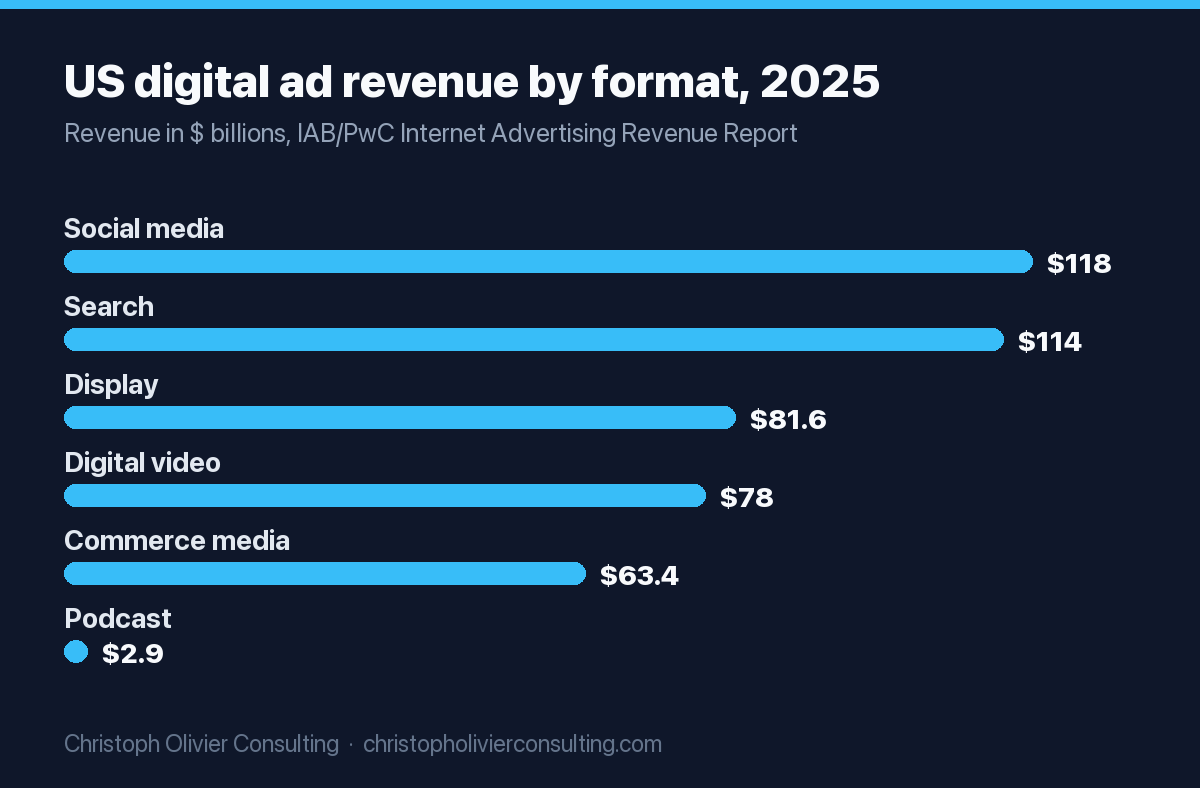
Money follows results, and the spend data shows advertisers are moving budget toward social. In the IAB/PwC Internet Advertising Revenue Report for full year 2025, released April 16, 2026, social media revenue grew 32.6% to $117.7 billion, passing search ($114.2 billion, up 11.0%). Total US digital ad revenue reached $294.6 billion. IAB also sized creator advertising at $37 billion in 2025, with $44 billion projected for 2026.
Benefits worth paying for
- Demand creation. Social reaches future buyers before they start searching or shortlisting.
- Audience control. You can reach a job title on LinkedIn, past site visitors on Meta, or a lookalike of your best clients.
- Fast message testing. A week of spend can show which headline or offer resonates.
- Retargeting. Stay visible to people who visited your pricing or contact page and left.
Limits to plan around
- Interruptive context. People are scrolling, not shopping.
- Creative decay. The same ad shown to the same audience loses effect, so you need a steady supply of new concepts.
- Signal loss. Browser restrictions and Apple’s App Tracking Transparency weaken pixel-only tracking (more below).
Paid social platform comparison: where each one fits
Choose platforms by where your buyer spends attention and what the platform lets you target. For most US service firms, Meta (Facebook and Instagram) is the default for local and consumer reach, LinkedIn for B2B job-title targeting, YouTube for video reach, and TikTok for under-35 audiences with short-form video.
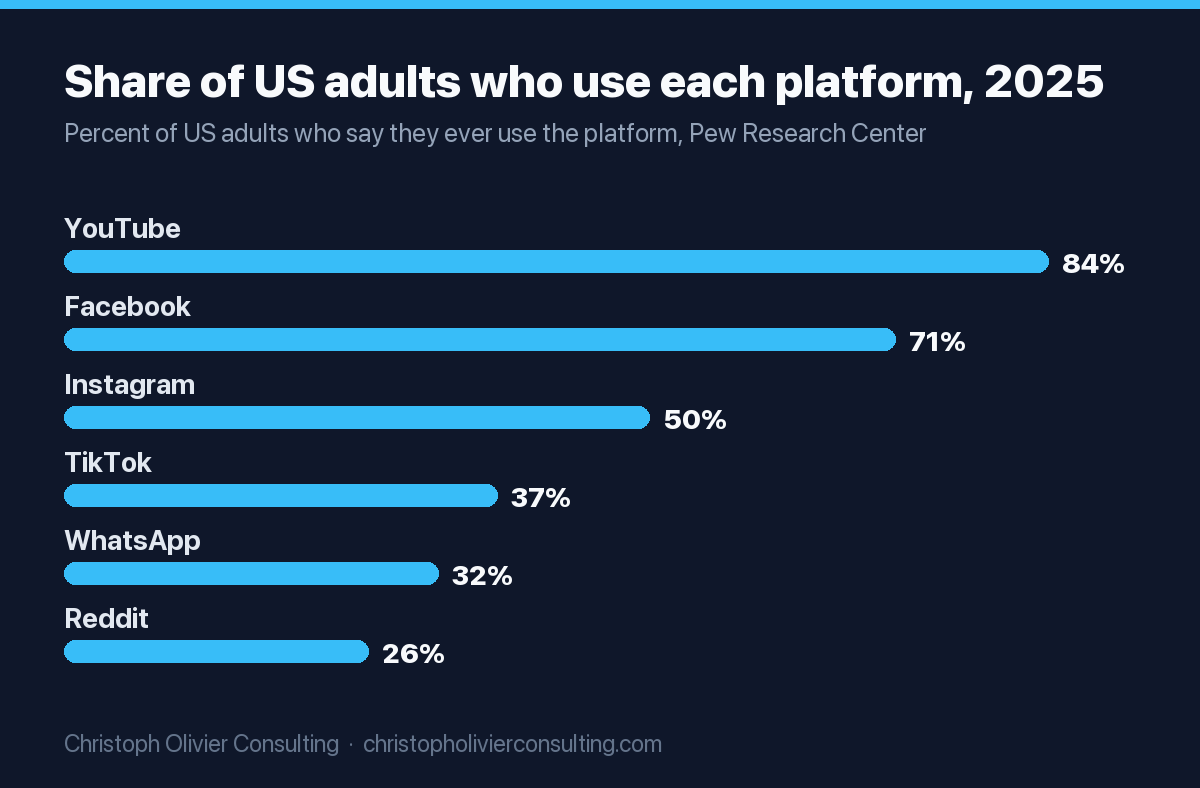
Reach data from the Pew Research Center’s 2025 survey of 5,022 US adults shows YouTube (84%) and Facebook (71%) far ahead, with Instagram at 50% and TikTok at 37%, up from 21% in 2021. Pew notes adults under 30 stand out in their use of Instagram, Snapchat, TikTok and Reddit.
| Platform | US adult reach (Pew 2025) | Core targeting strength | Main ad formats | Typical best use | Published minimum budget |
|---|---|---|---|---|---|
| Meta (Facebook, Instagram) | Facebook 71%, Instagram 50% | Pixel and customer-list data, lookalikes, broad AI delivery | Image, video, carousel, Reels, Stories, instant lead forms | Local and consumer services, retargeting, lead generation | No fixed floor; Meta advises budgeting for about 50 results per ad set per week |
| Not measured in Pew’s 2025 report; LinkedIn reports over 1 billion members globally | Job title, company, industry, seniority; contact and account lists | Single image, video, document, message and lead gen forms | B2B, professional services, recruiting, account-based marketing | $10 per day; $100 lifetime for new campaigns | |
| YouTube | 84% | Google intent and interest signals, customer lists | In-stream, in-feed and Shorts video | Explainer video, brand reach, retargeting viewers | Set in Google Ads; no floor published in this guide’s sources |
| TikTok | 37% | Interest and behavior signals, broad delivery | Short vertical video, Spark Ads, lead forms | Under-35 consumer offers, creator-led content | Over $50/day per campaign, over $20/day per ad group |
| 26% | Communities (subreddits) and interests | Promoted posts, conversation ads | Niche technical or hobby audiences | Not verified for this guide | |
| Snapchat, X | Each under a third (Pew gives no single figure in its summary) | Age and interest signals | Vertical video, promoted posts | Youth consumer brands (Snapchat), news and tech audiences (X) | Not verified for this guide |
| Not measured in Pew’s 2025 report | Search-like keyword and interest intent | Static and video pins, shopping ads | Home, design, wedding, food and retail planning | Not verified for this guide |
Start with one platform and earn the right to add a second, and match it to the decision maker, not to where your team likes to post.
Paid social strategy: how to build one in 7 steps
A paid social strategy is a written plan that links one business goal to one platform, audience, offer and measurement method, with a budget sized to produce enough conversions to learn. Build it in seven steps, in order, and resist launching ads before tracking and the landing page are ready.
- Pick one business outcome. Booked consultations, qualified leads or purchases. Write the number you need per month and what each is worth to you.
- Set your target cost per result. Work backward from client value and close rate. If a client is worth $6,000 in first-year margin and you close 1 in 5 consultations, a consultation is worth up to $1,200 before you lose money.
- Choose the platform and audience. Use the comparison table above. Start with the one where your buyer is most identifiable.
- Build the offer and landing page. A specific, low-friction next step (assessment, checklist, short call) converts colder social traffic better than “contact us.”
- Install tracking. Pixel plus server-side events, a conversion event for the exact outcome you want, and CRM fields to record lead source.
- Launch a simple structure. One campaign, one or two ad sets, three to five distinct creative concepts.
- Review weekly, decide monthly. Watch spend, cost per result and lead quality weekly. Make structural changes on a monthly cadence so the algorithm has time to learn.
Campaign structure: objectives, ad sets and the learning phase
Most paid social platforms use three levels: the campaign sets the objective, the ad set (LinkedIn calls it a campaign, TikTok an ad group) sets audience, budget and placements, and the ad holds the creative. Keep the structure lean so each ad set collects enough conversions to exit the learning phase.
Meta is explicit about volume. In its campaign launch guidance, Meta tells advertisers to “structure your ad sets to achieve a minimum of 50 events over a 7-day period,” and warns that missing the threshold can raise cost per result. Its worked example: at an average $10 cost per install, set at least an $80 daily budget.
| Funnel stage | Objective to choose | Primary KPI | What to watch for |
|---|---|---|---|
| Awareness | Reach or video views | Cost per 1,000 people reached, video completion rate | Frequency creeping too high on a small audience |
| Consideration | Traffic or engagement | Cost per landing page view, time on page | Cheap clicks from placements that never convert |
| Lead generation | Leads (on-platform form or website) | Cost per qualified lead, not cost per lead | Instant forms producing volume with low answer rates |
| Sales | Sales or conversions | Cost per acquisition, return on ad spend | Optimizing for an event that fires too rarely to learn |
| Retargeting | Sales or leads, narrowed to past visitors | Cost per result vs cold audiences | Audience too small to spend the budget |
If your true goal (a signed client) happens a few times a month, optimize for an earlier, more frequent event such as a completed booking form, then pass closed-deal data back through offline conversions so the platform learns which leads turn into revenue.
Audiences: first-party data, lookalikes and broad targeting
Paid social audiences come in three types: first-party audiences built from your own data, lookalike or similar audiences modeled on that data, and broad audiences where the platform’s algorithm finds buyers from creative and conversion signals. In 2026 most accounts blend all three, with first-party data doing the heavy lifting.
First-party audiences
These are your website visitors, video viewers, lead-form openers and uploaded customer or prospect lists. They are your highest-intent audiences and the seed for everything else. On LinkedIn, Matched Audiences cover retargeting, contact targeting and account-based targeting. Upload lists only where your privacy notice and consent records allow it.
Lookalikes and similar audiences
A lookalike tells the platform “find more people like my best clients.” The quality of the seed matters more than its size. A list of 300 signed clients usually beats a list of 5,000 newsletter subscribers who never bought. Note that lookalikes are unavailable for some regulated categories on Meta (see the compliance section).
Broad targeting
Broad means few or no interest filters, letting the algorithm use conversion data to find buyers. It tends to work when your tracking is solid and your creative clearly signals who the ad is for. It tends to fail on new accounts with no conversion history. Meta’s own Advantage+ sales campaign video below shows how its automated delivery is meant to work.
A creative testing framework for paid social
Creative is the biggest lever you control in paid social advertising because the algorithm now handles much of the targeting. Test distinct concepts, not small tweaks: different angles, hooks and formats. Give each test enough spend to reach a decision, change one variable at a time, and retire ads when results fade.
Meta’s guidance for Advantage+ campaigns is to “test as many creative concepts as you can,” and it lets advertisers upload up to 50 assets with up to 5 primary texts and headlines for automatic combination, per its launch guidance. For real ads to model, the social media ads examples roundup breaks down what strong hooks look like in practice.
The concept, hook, format matrix
| Layer | What changes | Example for a CPA or law firm | Test order |
|---|---|---|---|
| Concept (angle) | The core reason to care | Cost of a missed deduction vs. time saved vs. peace of mind | Test first: biggest swings |
| Hook | First line or first 3 seconds | A question, a number from your own pricing, a common mistake | Second, inside the winning concept |
| Format | Static, video, carousel, document | Partner talking to camera vs. a checklist carousel | Third |
| Offer | The next step requested | Free 15-minute review vs. downloadable checklist | Alongside concepts when lead quality is the issue |
| Copy and CTA | Wording and button | “Book a call” vs. “Get the checklist” | Last: smallest effect |
Rules that keep tests honest
- Launch three to five genuinely different concepts.
- Judge on your real KPI (qualified leads, booked calls), not click-through rate alone.
- Set a kill threshold before launch, for example: pause any ad that spends twice your target cost per result without a conversion.
- Refresh creative when frequency climbs and cost per result rises together.
How much to spend on paid social advertising
Budget paid social from the conversion volume you need, not a round number. Multiply your target cost per result by the results each ad set needs to learn, check it against platform minimums, then add a testing reserve. If that number is unaffordable, optimize for an earlier event or run fewer ad sets.
Platform floors are low. LinkedIn sets a $10 minimum daily budget and $100 minimum lifetime budget for new campaigns and suggests $25 a day for new advertisers. TikTok requires a daily budget above $50 at campaign level and above $20 at ad group level. Those floors let you spend, but rarely let you learn. For Meta specifically, the Facebook ads cost guide for 2026 covers CPM, CPC and lead cost ranges in detail.
Worked example: a lead-generation budget
Assume an accounting firm wants booked tax-planning consultations through Meta, and its target cost per booked consultation is $60. This is an illustration of the math, not a benchmark.
- Learning target: about 50 conversions per ad set per week, per Meta’s guidance.
- Weekly spend needed for one ad set: 50 x $60 = $3,000, or roughly $430 a day.
- If $3,000 a week is out of reach, optimize for a cheaper upstream event (for example, a lead-form submit at an assumed $20) where 50 x $20 = $1,000 a week, and import booked-call data as an offline conversion.
- Run one ad set, not three. Three ad sets at the same total budget would each get a third of the conversions and none may exit learning.
- Hold 10 to 20% of budget as a creative testing reserve.
Firms in this category have extra wrinkles, which the guide to Meta ads for accounting firms covers, including when a service may fall under Meta’s financial category.
Tracking and measurement: pixels, Meta CAPI and consent
Reliable paid social tracking in 2026 means a browser pixel plus server-side events, deduplicated, with conversions tied back to your CRM. Pixel-only setups miss conversions because of browser restrictions and app privacy prompts, which weakens optimization and makes reported cost per result look worse or better than reality.
Meta’s Conversions API (CAPI) sends events from your server, website platform, app or CRM directly to Meta, where they are processed like pixel events. Meta’s documentation states: “For optimal ad performance, we recommend that advertisers implement the Conversions API alongside their Meta Pixel,” a so-called redundant setup. To avoid double counting, the pixel’s event ID and name must match the server event’s event_id and event_name, and events are only deduplicated within 48 hours of the first one received.
On mobile, Apple requires apps on iOS 14.5 and later to get the user’s permission through App Tracking Transparency before tracking them across other companies’ apps and websites. That is a major reason server-side and CRM-based measurement matter more than they did five years ago.
Measurement stack checklist
- Pixel or Insight Tag installed on every page, firing a standard event for your key conversion.
- Server-side events (Meta CAPI or the equivalent for other platforms) with matching event IDs for deduplication.
- Consent banner that records choices and passes them to your tags where state or international privacy laws apply.
- UTM parameters on every ad URL, captured into hidden form fields and your CRM.
- Offline conversion uploads for qualified leads and closed deals.
- A monthly CRM view of cost per qualified lead by platform.
Special ad categories: housing, employment, credit and financial ads
If you advertise housing, employment or financial products and services on Meta, you must declare a special ad category, and your targeting options shrink. Age is fixed to 18 through 65+, gender cannot be narrowed, ZIP code targeting is off, location needs at least a 15-mile radius, and lookalike audiences are unavailable.
Meta’s Marketing API documentation lists the categories as housing, financial products and services, employment, and issues, elections or politics. Since January 14, 2025, the financial products and services category is required for US-based advertisers or ads shown to US audiences, with the same restrictions as housing and employment. Detailed targeting is limited to approved options, and neighborhood targeting and location exclusions are not supported.
What this means for professional-service firms:
- Mortgage brokers, lenders, insurers, financial advisers and recruiters should assume the rules apply and build creative that self-selects the right buyer.
- Accounting, tax and legal firms should check whether a specific offer (for example, a loan, credit or investment product) triggers the financial category before launching.
- Because lookalikes are off, first-party retargeting and strong qualifying copy carry more of the load.
- Declare the category before launch and document why, rather than fixing it after a rejection.
Paid social launch checklist (template)
Use this checklist before any paid social campaign goes live. It covers the failure points that waste the most budget: missing tracking, unclear offers, structures too fragmented to learn, and compliance categories declared too late. Copy it into your project tool and assign an owner to each line.
Paid social launch checklist
Strategy
- [ ] One business outcome and monthly target written down
- [ ] Target cost per result calculated from client value and close rate
- [ ] One primary platform chosen, with the reason recorded
Tracking
- [ ] Pixel firing on the conversion event, verified in the platform’s event tool
- [ ] Server-side events live and deduplicated (matching event IDs)
- [ ] UTMs on all ad URLs and captured in the CRM
- [ ] Consent banner and privacy notice cover ad tracking and list uploads
Campaign
- [ ] Objective matches the funnel stage
- [ ] Budget supports about 50 optimization events per ad set per week (or a cheaper upstream event is chosen)
- [ ] Special ad category declared if housing, employment, credit or financial
- [ ] Audience: first-party seed lists uploaded, retargeting audience built
Creative
- [ ] Three to five distinct concepts, each with a clear hook in the first line or 3 seconds
- [ ] Landing page matches the ad’s promise and loads fast on mobile
- [ ] Kill threshold and review dates set before launch
After launch, hold structure steady for at least a week and make bigger budget or targeting changes monthly. In my experience the accounts that struggle most are the ones edited every day.
If you want a second set of eyes on your paid social strategy or measurement setup, you can book a consultation and we will look at it together.
Work with CO Consulting
Want ads that book qualified calls?
- Google, Meta, LinkedIn and YouTube campaigns built around qualified pipeline, not clicks
- Run by Christoph Olivier, who has managed millions of dollars in ad spend
- Tracking and follow-up fixed before budget is scaled
- No guaranteed leads, costs or revenue; we report what the auctions actually deliver
Frequently asked questions
What is paid social media advertising?
Paid social media advertising is paying platforms such as Facebook, Instagram, LinkedIn, TikTok and YouTube to show your ads to audiences you choose, rather than relying on organic reach. You set an objective, audience, budget and creative, and pay per impression, click or result. In the US it is the largest digital ad format by revenue, at $117.7 billion in 2025 according to IAB and PwC.
What are the benefits of paid social media advertising?
The main benefits are reach beyond your followers, precise targeting by audience, job title or past behavior, fast feedback on which messages work, low-cost retargeting of site visitors, and measurable cost per result. The trade-offs are lower purchase intent than search, creative that wears out, tracking gaps from privacy changes, and targeting limits for regulated categories.
How much should a small business spend on paid social ads?
Size the budget from conversions, not a round number. Multiply your target cost per result by the volume an ad set needs to learn, which Meta puts at about 50 events per week. Platform minimums are low, such as $10 a day on LinkedIn and over $20 a day per ad group on TikTok, but those floors rarely produce enough data to optimize.
Which social media platform is best for paid advertising?
It depends on who buys from you. Meta suits most local and consumer services and retargeting. LinkedIn is usually the best fit for B2B and professional services because you can target by job title, company and seniority. YouTube offers the widest US reach for video, and TikTok suits younger consumer audiences. Start with one platform before adding a second.
Do I need the Meta Conversions API if I already have the pixel?
Meta recommends running the Conversions API alongside the pixel for optimal ad performance. Server-side events recover conversions the browser pixel misses because of privacy restrictions. Send the same event ID and event name from both sources so Meta can deduplicate them, which it does for events received within 48 hours of the first.
What are Meta's special ad categories?
Meta's special ad categories are housing, employment, financial products and services, and issues, elections or politics. For housing, employment and financial ads, age is fixed to 18 through 65+, gender cannot be narrowed, ZIP code targeting is unavailable, locations need at least a 15-mile radius, and lookalike audiences are off. The financial category became required for US campaigns on January 14, 2025.