

A welcome series email flow is an automated set of emails that starts the moment someone joins your list and stops when they buy, book or stop engaging. The two flows below are ready to copy: a 5-email ecommerce welcome flow and a 5-email B2B or service-business welcome sequence, each sent on day 0, 1, 3, 5 and 7, with subject lines, full body copy and the branch rules that decide who gets what. It is worth the setup time: in Klaviyo’s 2026 benchmark report (110,000+ customers, published October 2, 2026), the welcome series averages $5.75 revenue per recipient and a 6.5% click rate, and the top 10% reach $13.27 and 13.3%.
Both flows at a glance. Day 0 is the moment the person joins the list (after they confirm, if you use double opt-in).
| Day | Ecommerce welcome flow | B2B / service-business welcome sequence |
|---|---|---|
| 0, immediately | Deliver the code, show 3 starter products, set frequency | Deliver the guide, say which page to read first, ask why they downloaded it |
| 1 | Why the product is different: 3 concrete facts | One quick win from the guide, in 3 steps |
| 3 | Real customer reviews for the bestseller | How you would handle their problem in the first 30 days |
| 5 | Shipping, returns and sizing in one email | What it costs and who it is not for |
| 7 | Code expiry reminder (never-purchased path only) | Plain-text ask for a 20-minute call |
| Exit | Placed Order since starting the flow | Meeting booked, replied, or became a client |
The 5-email ecommerce welcome flow (day 0 to day 7)
Trigger: added to your main newsletter list (popup or footer form). Goal: first order. Top-of-flow split: “Has Placed Order at least once over all time.” People on the NO path have never bought and get the discount; people on the YES path are existing customers who just subscribed and get the same emails without a code. This is the split Klaviyo’s own welcome series guide (updated October 7, 2026) uses for first-purchase discounts. Replace every bracketed field.
| # | Send | Subject line | Preview text | Goal | Skip or exit if |
|---|---|---|---|---|---|
| 1 | Day 0, no delay | Your [10]% code is inside: [CODE] | Plus the 3 things new customers start with | Deliver the promise, first click | Nothing; everyone gets it |
| 2 | Day 1 | Why we make [product] the slow way | [Material], [where it is made], [how it is tested] | Belief in the difference | Placed Order since starting this flow |
| 3 | Day 3 | What [customer type] say after 30 days with [product] | 3 real reviews, including the 4-star one | Proof | Placed Order since starting this flow |
| 4 | Day 5 | Shipping, returns, sizing: the short answers | Free returns for [X] days, delivery in [X] days | Remove objections | Placed Order since starting this flow |
| 5 | Day 7 | Your [10]% code expires tonight | [CODE] works until midnight [time zone] | First order | Placed Order since starting this flow; YES-path customers skip it |
Email 1 (day 0): deliver the code
Hi [First name | there], welcome to [Brand]. Here is your code: [CODE]. It takes [10]% off your first order and works until [date, 7 days from today]. Not sure where to start? These are the three products new customers buy first: [Product 1, one-line reason], [Product 2, one-line reason], [Product 3, one-line reason]. [Button: Shop the starter picks]. What to expect from us: about [2] emails a week, mostly [new releases, how-to guides, restocks]. Reply to this email if you have a question; a person on our team reads every reply. [Brand], [postal address]. [Unsubscribe]
YES-path version: same email, but the first line becomes “Thanks for subscribing, and thanks for being a customer” and the code block is replaced by a link to what is new since their last order.
Email 2 (day 1): why it is different
Hi [First name | there], quick story. We started [Brand] in [year] because [the specific problem with existing products, in one sentence]. Three things we do differently: 1. [Material or ingredient fact with a number]. 2. [Where and how it is made]. 3. [How it is tested, or the guarantee]. That is why [hero product] costs [price] and lasts [specific claim you can back up]. [Button: See how [hero product] is made]. Your code [CODE] still works until [date]. [Brand], [postal address]. [Unsubscribe]
Email 3 (day 3): proof
Hi [First name | there], we asked customers what changed after a month with [product]. Three answers, unedited: “[Review 1]” ([Name, city, verified buyer]). “[Review 2]” ([Name]). “[A 4-star review that names a small drawback]” ([Name]). The third one matters: [one sentence on how you fixed or explain the drawback]. [Button: Read all [number] reviews]. [Brand], [postal address]. [Unsubscribe]
Use only real reviews you have permission to publish. Including one honest 4-star review makes the other two more believable.
Email 4 (day 5): objections
Hi [First name | there], the questions we get most before a first order, answered in one line each. Shipping: [free over $X / $X flat], arrives in [X to X] business days. Returns: [X] days, [free / prepaid label], no questions. Sizing: [one rule, e.g. “between sizes, size up”], full guide here: [link]. Still unsure? Reply with your question and [Name] will answer today. [Button: Shop with [CODE]]. [Brand], [postal address]. [Unsubscribe]
Email 5 (day 7): last call
Hi [First name | there], a short reminder: [CODE] for [10]% off your first order expires tonight at midnight [time zone]. After that it is gone, and we do not resend it. [Button: Use my code]. If now is not the right time, no problem. You will keep getting our [weekly] emails, and you can unsubscribe below whenever you like. [Brand], [postal address]. [Unsubscribe]
Ecommerce branch rules: purchased, clicked, suppress
| Condition | Where to check it | What happens |
|---|---|---|
| Has placed an order before (over all time) | Split directly under the trigger | YES path: no code, no email 5. NO path: code version |
| Places an order during the flow | Before every email from email 2 on (“Has Placed Order at least once since starting this flow”) | Exit the welcome flow; the post-purchase flow takes over |
| Starts checkout but does not buy | Your abandoned cart flow, not the welcome flow | The cart flow sends its own message; keep Smart Sending on for emails 2 to 5 so the two flows do not stack |
| Clicked nothing in emails 1 to 3 | Split after the day 3 email: “Clicked Email at least once since starting this flow” | NO path: email 4 goes out as plain text from a named person with the subject “Can I help you pick?” |
| Clicked nothing in all 5 emails | Segment at day 8 | My rule: tag welcome_unengaged, send campaigns at half frequency, and move to a re-engagement and sunset drip at day 90 if there is still no click |
| Unsubscribes, bounces or marks as spam | Platform level | Stops automatically; no rule needed |
One setting to change: Klaviyo’s Smart Sending skips anyone emailed in the last 16 hours by default, and Klaviyo’s Smart Sending guide (updated October 22, 2026) says skipped messages are not sent later. Someone who gets a campaign and then signs up an hour later would never see their code. Turn off “Skip recently emailed profiles” on email 1 only. The cart flow itself, with timing and discount math, is in the abandoned cart email guide.
The 5-email B2B and service-business welcome sequence
Trigger: a guide, checklist or newsletter signup form. Goal: a booked 20-minute call or a reply. Entry filter: exclude anyone whose lifecycle stage is already customer; existing clients get a client update, not a sales sequence. If you still need the thing they sign up for, the lead magnet ideas for coaches include a scorecard with scoring bands that drops straight into email 1.
| # | Send | Subject line | Preview text | Goal | Exit if |
|---|---|---|---|---|---|
| 1 | Day 0, no delay | Here is the [guide name] (read page [4] first) | And what you’ll get from me, and how often | Deliver, get a reply | Nothing; everyone gets it |
| 2 | Day 1 | The [number] most [audience] get wrong in [area] | A 10-minute fix, in 3 steps | Quick win | Meeting booked, replied |
| 3 | Day 3 | How we’d handle [problem] in your first 30 days | Week 1, weeks 2 to 3, week 4 | Show the method | Meeting booked, replied |
| 4 | Day 5 | What it costs, and who it isn’t for | Fee range, timeline, 3 bad-fit signs | Pre-qualify | Meeting booked, replied |
| 5 | Day 7 | 20 minutes on [problem]? | No slides, no pitch deck | Book the call | Meeting booked, replied |
Email 1 (day 0): deliver the asset
Hi [First name | there], here is the [guide name] you asked for: [link]. If you only have five minutes, read page [4]: it covers [the single most useful section]. From here on you’ll get one email every [Tuesday] about [topic], each under a 3-minute read. One question: what made you download this today? Reply with one line; I read every answer and it shapes what I write next. [Name], [Title], [Firm], [postal address]. [Unsubscribe]
Email 2 (day 1): one quick win
Hi [First name | there], the mistake I see most in [area] is [specific mistake, with the number attached, e.g. “pricing on hours instead of outcomes”]. The fix takes about 10 minutes: 1. [Step with an exact action]. 2. [Step]. 3. [Step, with what “done” looks like]. Page [X] of the guide has the worksheet. [Link: The full walkthrough]. [Name], [Firm], [postal address]. [Unsubscribe]
Email 3 (day 3): the method
Hi [First name | there], if you hired us to fix [problem], this is what the first 30 days look like. Week 1: [diagnostic, with the deliverable named]. Weeks 2 to 3: [the build or change]. Week 4: [the review, and the number we report]. [If you have a real, permissioned client result: “For [client type], that meant [specific result] by [month].”] [Link: See how we work]. [Name], [Firm], [postal address]. [Unsubscribe]
Leave the result line out if you do not have a real one you are allowed to share. An invented case study is worse than none.
Email 4 (day 5): price and fit
Hi [First name | there], most firms hide this until the third call, so here it is. Engagements usually run [$X to $Y] over [X months]. We are a bad fit if: 1. [revenue or size floor], 2. [you need it done in under X weeks], 3. [you want someone to execute without a strategy]. If none of those apply, the next step is a 20-minute call. [Link: Pricing and scope]. [Name], [Firm], [postal address]. [Unsubscribe]
Email 5 (day 7): the ask, in plain text
Hi [First name], a direct question: would 20 minutes on [problem] be useful? On the call we’ll look at [your numbers / your current setup], and you’ll leave with [a fee range / the first three fixes], whether or not we work together. Pick a time here: [booking link]. If a call is not convenient, reply with your question and I’ll answer by email within one business day. [Name], [Title], [Firm], [postal address]. [Unsubscribe]
Send email 5 with no images, no header and no button. It should look like the email a partner would type themselves.
B2B branch rules: booked, replied, clicked, suppress
| Condition | Where to check it | What happens |
|---|---|---|
| Already a client | Entry filter (lifecycle stage is customer) | Never enrolled |
| Books a meeting | Unenrollment criteria; needs your booking tool to sync to the CRM | Exit; the confirmation and reminder emails take over |
| Replies to any email | Tag on reply, or a manual list your inbox owner updates daily | Exit; a person answers within one business day |
| Clicked the pricing link in email 4, no booking 2 days later | Branch after a 2-day delay | Create a task for the owner: a personal one-line email, not another automated one |
| No click in all 5 emails | Branch at day 8 | Newsletter only; after 120 days with no opens, clicks or meetings, move to re-engagement |
| Unsubscribes | Platform level | Stops automatically, including the task step |
The 120-day lapse rule matches the B2B lapse row in the triggered emails guide, so the two systems hand off cleanly. The re-engagement sequence itself, with a 3-email sunset, is in the email drip campaign examples.
How to set up a welcome series flow in Klaviyo, Mailchimp and HubSpot
The steps use the labels in each vendor’s help center on the dates shown. Prices are USD list prices from each vendor’s pricing page on November 1, 2026.
| Platform | Cheapest plan that runs this welcome flow | What to know for a welcome series |
|---|---|---|
| Klaviyo Flows | Free plan: up to 250 active profiles and 500 email sends a month, and its FAQ says it lets you run automations (Klaviyo pricing); paid plans scale with active profiles | 500 sends is 100 new subscribers through a 5-email flow, before any campaign |
| Mailchimp automation flows (Customer Journeys in older docs) | Standard from $20/mo for 12 months at 500 contacts, for up to 200 flows and 3 triggers per flow (Mailchimp pricing). Essentials, from $13/mo for 12 months, caps flows at 4 steps. The Free plan has no flows. | 5 emails plus 4 delays is 9 steps, so Essentials cannot hold this flow; Conditional split is Standard or higher |
| HubSpot Workflows | Marketing Hub Professional, $800/mo billed annually ($890 monthly) with 3 core seats and 2,000 marketing contacts, plus a required $3,000 onboarding fee (HubSpot pricing) | The Send email action is Marketing Hub or Service Hub Professional and Enterprise only, per HubSpot’s actions reference |
Klaviyo: list-triggered welcome series
- Go to Flows, click Create Flow, then Build your own. Name it and click Create Flow. (New accounts can instead click Create welcome series, pick the trigger list and click Next, per the welcome series guide.)
- Select Added to list, choose your main subscriber list and click Done.
- Drag Split from the Logic section under the trigger and set the first path to “Has Placed Order at least once over all time.” Klaviyo’s multi-branch split guide (updated October 7, 2026) allows up to 20 paths, checked in order, with “Everyone else” last.
- Drag an email onto each path, click it, then Configure Content. Add time delays of 1, 2, 2 and 2 days between emails to land on days 0, 1, 3, 5 and 7.
- Add the profile filter “Placed Order zero times since starting this flow.” Klaviyo’s flow trigger documentation (updated October 7, 2026) says profile filters are checked at entry and again before each action, which is what makes the purchase exit work.
- Open email 1 and turn off Skip recently emailed profiles.
- Click Update status, select Live, then Save. A flow left in Draft does not send.
Three Klaviyo rules catch people out. A contact gets a list-triggered flow only once, so someone who unsubscribes and resubscribes will not get the series again. Before importing contacts, set the flow to Manual, or Klaviyo schedules the first email for every imported profile “even if they subscribed months ago,” then switch it back to Live. And keep the SMS welcome series separate from the email one.
Mailchimp: welcome automation flow
- Click Automations, then Flow templates. Search “welcome” or scroll to Find & welcome new contacts, click a template and Use this flow, choose the audience and click Continue. Or click Build from scratch, enter a Name, choose the Audience and click Choose a trigger (Mailchimp help).
- Choose Signs up for email. Decide whether to include newly added and imported contacts; for a welcome series, leave imports out.
- Click Filter who can enter this flow if you need to exclude existing customers, then Save Trigger.
- Use the plus icon to add Time delay and Send email steps, and a Conditional split (up to 5 conditions, Standard or higher) for the purchase and click branches, per Mailchimp’s flow overview.
- Click Continue, then Turn flow on.
With double opt-in on, a contact enters the flow only after clicking the confirmation link; people who never confirm never get email 1.
HubSpot: welcome workflow
- Go to Automation > Workflows, click Create workflow, then From scratch (HubSpot guide, updated October 16, 2026).
- Click Trigger enrollment for contacts and choose the Form submission event for your guide form, or Met filter criteria for list membership (enrollment trigger guide). Add a filter that excludes lifecycle stage customer.
- In the Settings tab, leave Re-enroll off so each contact gets the welcome once, and set unenrollment criteria for meeting booked or lifecycle stage changed.
- Click + and add Send email with an email saved for automation, then a Delay of a set amount of time (1 day, then 2, 2 and 2). HubSpot’s delay options include a business-days checkbox; leave it off for email 1.
- Add a Branch based on one property or action output after email 4 for the pricing-click rule, with a Create task action on the clicked path.
- Click Review and publish, choose to enroll only contacts who meet the trigger after you turn it on, then Turn on workflow.
HubSpot cannot trigger on something that did not happen: its guide states “it is not possible to determine if an event did not occur.” “Clicked pricing but did not book” is therefore a delay plus a branch, not a trigger.
Deliverability rules for new subscribers
A welcome flow is the first mail a new address gets from you, so it sets your complaint rate and your engagement history with the mailbox provider. Three decisions matter: how people opt in, whether you meet the Gmail and Yahoo sender rules, and whether the emails meet US law.
Double opt-in: pros and cons
| Double opt-in (confirm by email) | Single opt-in | |
|---|---|---|
| What the vendors say | Klaviyo says it minimizes abuse and prevents “invalid or mistyped emails” (Klaviyo double opt-in guide, updated March 30, 2026); Mailchimp says it “can help improve open rates” (Mailchimp help) | Klaviyo lists one typical use: a third-party form already runs double opt-in, so subscribers would otherwise get two confirmation requests |
| Mailbox providers | Yahoo recommends asking new subscribers “to click to confirm their opt-in”; Google says to verify each address before subscribing it | Allowed, but you carry the typo and bot risk |
| Effect on the flow | Contacts enter only after they confirm; the confirmation email is effectively email 0 | Email 1 fires on form submit |
| Cost | Some signups never confirm. Neither vendor publishes how many, so measure it: confirmed contacts divided by form submissions, weekly | More signups, more cleanup later |
| SMS | Klaviyo: some carriers require it, and abandoned cart texts in the US and Canada require it | “Not recommended for SMS” (Klaviyo) |
My view: use double opt-in for discount popups, where fake and mistyped addresses are common. A B2B guide form that delivers the guide only by email already proves the address works, so single opt-in is a reasonable choice there. In Klaviyo the switch is Audience > Lists & segments, open the list, Settings, Consent tab, Opt-in process.
Gmail and Yahoo bulk sender rules that apply to welcome flows
These are the same rules our win-back campaign guide applies to lapsed customers. For a welcome flow, the risk is a list import or a big giveaway that sends thousands of welcome emails in one day.
| Rule | Gmail | Yahoo | What it means for a welcome flow |
|---|---|---|---|
| Who it applies to | Requirements started February 1, 2024. A bulk sender is anyone sending close to 5,000 messages to personal Gmail accounts in 24 hours, and the status is permanent (Google sender FAQ) | Enforcement began February 2024 | One giveaway or import pushed through the welcome flow can make you a bulk sender for good |
| Spam rate | Below 0.3% in Postmaster Tools; Google’s target is below 0.10% | Below 0.3% | Complaints come from people who forgot they signed up, so email 1 must go out immediately and name the signup |
| Unsubscribe | One-click unsubscribe for marketing and subscribed messages; Google recommends honoring requests within 48 hours | One-click via the List-Unsubscribe header (RFC 8058 POST recommended); honor within 2 days | An unsubscribe after email 2 must stop emails 3 to 5 |
| Authentication | SPF, DKIM and DMARC, with the From domain aligned | DMARC at least p=none, and it must pass | Authenticate the domain in the welcome flow’s From line, which is sometimes a different address from your newsletter |
| Enforcement | Since November 2025, Gmail is ramping up enforcement, including temporary and permanent rejections | Rolled out through the first half of 2024 | A misconfigured welcome flow now bounces instead of landing in spam |
Both providers also say never to pre-check the opt-in box or buy lists. The DNS records themselves are covered step by step in the email deliverability guide.
CAN-SPAM basics for welcome emails
A welcome email that promotes a product or service is a commercial message under the FTC’s CAN-SPAM compliance guide, even though the subscriber asked for it. Every email in both flows needs:
- Honest From, Reply-To and routing information that identifies your business.
- A subject line that matches the body. “Your code expires tonight” must mean the code really expires.
- A valid physical postal address: a street address, a registered PO box or a registered private mailbox.
- A clear way to opt out, which you honor within 10 business days and which keeps working for at least 30 days after you send.
“The law makes no exception for business-to-business email,” and each violating email can cost up to $53,088. CAN-SPAM is an opt-out law, but the Gmail and Yahoo rules above still expect people to have opted in. Canada, the UK and the EU require consent before you send. This is not legal advice.
High-converting welcome sequences: 4 settings that matter more than copy
- No first delay. Klaviyo’s pre-built series sends email 1 with no delay after the trigger. Every hour you wait, more people forget they signed up.
- Smart Sending off on email 1. Skipped messages are never resent, so the code or guide would simply never arrive.
- One call to action per email. Each email in the tables above has one goal and one button or link; a second link competes with it.
- The goal exit is checked before every email. A buyer who still gets “your code expires tonight” learns your emails are not about them.
On length, Klaviyo’s guide recommends just 3 emails over about a week (day 0, day 3, day 7). The 5-email versions above add a proof email and an objection email in the same 7 days. Run both and keep whichever earns more revenue per recipient for you.
How to measure success of a welcome email sequence
Measure the flow on the action it exists to cause, per person who entered it, and compare with published data from a named source. Do not grade it on opens. Apple’s Mail Privacy Protection “prevents senders from seeing if you’ve opened” an email, but it “does not extend to links,” so clicks stay countable.
| Metric | Published benchmark | Source |
|---|---|---|
| Revenue per recipient, email welcome series | $5.75 average, $13.27 top 10% | Klaviyo, 110,000+ customers, Oct 2, 2026 |
| Click rate, email welcome series | 6.5% average, 13.3% top 10% | Klaviyo, Oct 2, 2026 |
| SMS welcome series | $3.33 RPR average ($7.07 top 10%); 10.0% click (18.3% top 10%) | Klaviyo, Oct 2, 2026 |
| All flows vs campaigns | Flows: nearly 41% of email revenue from 5.3% of sends; 5.58% click vs 1.69% | Klaviyo benchmarks, 183,000+ customers, 2026 |
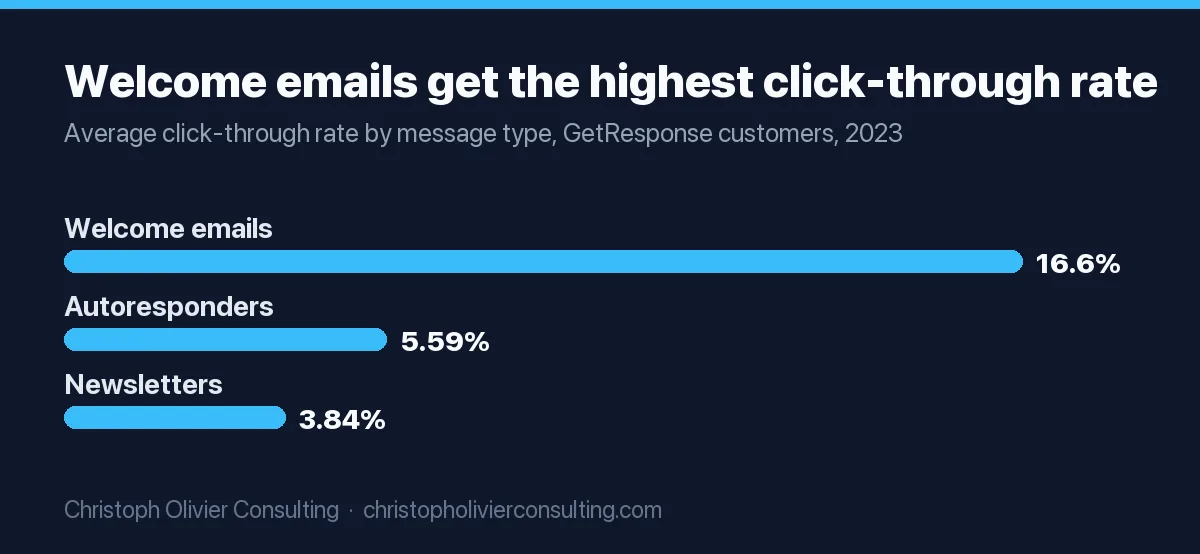
| Welcome email click-through | 16.6% (open rate 83.63%, click-to-open 19.85%) | GetResponse, 4.4 billion messages sent in 2023 |
| Share of automation orders | Welcome plus abandoned cart drove 76% of automation orders | Omnisend 2026 report, 150,000 brands, 2025 data |
| Spam complaint rate | Below 0.10% target, never 0.3% or higher | Google sender guidelines |
| B2B: booked calls per 100 people who entered | No vendor publishes one | Track your own, by signup source |
Klaviyo and GetResponse measure different datasets in different years, so compare within one source only, and treat the 83.63% open rate as directional for the Apple reason above. For how these sit against campaign averages by industry, see the email marketing benchmarks.
Worked example (ecommerce). A store adds 1,200 subscribers a month. At Klaviyo’s average welcome RPR, 1,200 x $5.75 = $6,900 a month from the flow. At the top-10% figure, 1,200 x $13.27 = $15,924. The $9,024 monthly gap is what better copy, offers and branch rules are competing for. Check your own RPR in the flow’s analytics after 30 days.
Worked example (B2B). A firm gets 80 guide downloads a month and 4 booked calls from the sequence: 5 calls per 100 entrants. That is your baseline, not a benchmark. Split it by signup source, because a pricing-page signup and a newsletter signup are different buyers. If the number is low and you want a second pair of eyes on the flow, you can book a consultation.
Test plan: 10 pass/fail checks before you turn the flow on
Use two test contacts: one who has bought before and one who has not. Any fail means the flow is not ready.
| # | Check | Pass if |
|---|---|---|
| 1 | Signup to inbox time | Email 1 arrives within 5 minutes of signup, or of confirmation with double opt-in |
| 2 | Confirmation path | A contact who never clicks the confirmation link never gets email 1 |
| 3 | Customer split | The past-buyer test contact gets no code and no email 5 |
| 4 | Purchase exit | Placing a test order after email 1 means email 2 never arrives |
| 5 | B2B booking exit | Booking a test meeting removes the contact before the next email |
| 6 | Unsubscribe | Unsubscribing after email 1 stops emails 2 to 5, and the List-Unsubscribe header is present |
| 7 | Code | The code applies at checkout, is single-use, and expires on the date email 5 states |
| 8 | Merge fallbacks | A contact with no first name sees “Hi there”, not “Hi ,” |
| 9 | Import safety | Importing a test list does not send email 1 (flow set to Manual, or imports excluded) |
| 10 | Replies | A reply to every email reaches a monitored inbox |
After launch, test one thing at a time, in this order: email 1 subject line, then discount versus no discount on the never-purchased path, then 3 emails versus 5. Klaviyo’s welcome guide suggests A/B testing flow branches for delays and messages. My rule of thumb: let each variant reach at least 1,000 recipients before you call a winner on clicks, and more before you call one on revenue.
Frequently asked questions
What is a welcome series email flow?
A welcome series email flow is an automated sequence that starts when someone joins your email list and ends when they buy, book a call or stop engaging. It usually runs 3 to 5 emails over about a week. Klaviyo's pre-built version sends 3 emails on day 0, day 3 and day 7; the flows on this page use 5 emails on days 0, 1, 3, 5 and 7.
How many emails should a welcome email sequence have?
Three to five. Klaviyo's help center recommends three emails over about a week, sent immediately, after 3 days and 4 days later. A 5-email version adds a proof email and an objection-handling email in the same 7 days. Test both on your own list and keep whichever produces more revenue per recipient or more booked calls per 100 subscribers.
How do you measure success of a welcome email sequence?
Measure revenue per recipient for ecommerce and booked calls or replies per 100 people who entered for B2B, plus click rate and spam complaints. Klaviyo's 2026 data puts the welcome series average at $5.75 revenue per recipient and a 6.5% click rate, with the top 10% at $13.27 and 13.3%. Do not grade on opens, because Apple Mail Privacy Protection hides real opens.
What is a good click rate for a welcome email flow?
In Klaviyo's 2026 benchmark report of 110,000+ customers, email welcome series average a 6.5% click rate and the top 10% reach 13.3%. GetResponse's 2023 data, from 4.4 billion messages, shows welcome emails at a 16.6% click-through rate. The two datasets define and sample differently, so compare your flow with one source at a time.
Should a welcome series include a discount?
For ecommerce, often yes, but only for people who have never ordered. Klaviyo's welcome guide splits the flow on whether the contact has placed an order before and shows the coupon only on the never-purchased path. B2B and service firms rarely need a discount; a clear fee range and a short call offer usually do the job better.
Should I use single or double opt-in for my welcome flow?
Klaviyo makes lists double opt-in by default because it prevents fake and mistyped addresses, and Yahoo recommends confirmed opt-in. The cost is that people who never click the confirmation link never get your welcome email. Double opt-in suits discount popups; a B2B guide delivered only by email already proves the address works, so single opt-in is reasonable there.
When should the first welcome email be sent?
Immediately. Klaviyo's pre-built welcome series has no delay before email 1, and with double opt-in the clock starts when the subscriber confirms. In Klaviyo, also turn off Smart Sending on that first email, because a message it skips is never resent, so a new subscriber who just got a campaign would never receive their code or guide.
More Funnels, Conversion & Email guides
- Auto Repair Shop Marketing: The Cost-Per-Customer and LTV Math That Sets Your Priorities
- Coffee Shop Marketing: The Frequency Economics That Beat One-Time Discounts
- Daycare Marketing: A Funnel That Fills Your Enrollment
- Email List Building: A Practical Guide With Real Benchmarks
- How to Improve Free Trial Conversion: A Metrics-Backed Framework
- Guest Posting: How to Earn Links and Authority Without Breaking Google's Rules
- Email Drip Campaign Examples: 12 Sequences You Can Copy (2026)
- Triggered Emails: 15 Trigger Types, Timing and Setup (2026)
- Email Marketing Agency: Costs, Options and How to Hire (2026)
- Email Marketing Ideas: 46 Campaigns by Goal (2026)
- All Funnels, Conversion & Email guides →