

A marketing automation consultant designs, builds and documents the rules inside your marketing and CRM software: the workflows that fire when a lead fills in a form, the lead scoring that decides who sales calls, the CRM sync that keeps both systems agreeing, and the attribution that tells you which channel produced the client. On Upwork the median hourly rate for marketing automation consultants is $40 to $90, vetted networks like MarketerHire publish $100 to $300 an hour for marketing consultants, and platform-specific projects on Upwork are priced from $500 to $7,500 each. Below: verified rates, what a consultant builds on each of six platforms, a copy-ready workflow spec with a filled example, a pass/fail audit, a 90-day scope you can paste into an SOW, and interview questions with the answers you want to hear.
Looking to hire rather than DIY? CO Consulting’s business automation service audits your workflows, builds the systems, documents them and trains your team.
Marketing automation consultant rates in 2026, by source
Prices differ mostly by where you look and whether you buy hours or a defined build. These are the figures each source publishes today.
| Source | Who is being priced | Published rate |
|---|---|---|
| Upwork cost guide | Marketing automation consultants | $40 to $90 per hour median. Upwork’s tiers: entry $30 to $50, intermediate $50 to $75, expert $75 to $150 |
| Upwork cost guide | HubSpot experts | $15 to $40 per hour median. Typical: beginner $25, intermediate $55, advanced $150 |
| Upwork hire page | Marketo Engage developers | $500 to $2,500 per focused project; REST API automation $4,500 to $7,500 |
| Upwork hire page | Account Engagement (Pardot) specialists | Lead scoring configuration $1,200 to $2,500; Salesforce CRM integration $4,500 to $7,000 |
| MarketerHire | Vetted marketing consultants, all specialties | $100 to $300 per hour; retainers $3,000 to $15,000 a month for 10 to 40 hours; projects $5,000 to $50,000+ |
| HubSpot Solutions Directory | HubSpot partner agencies | 3,572 partner listings ranked by tier (Elite, Diamond, Platinum, Gold) and review count. Profiles show a “Budgets we work with” field; a few publish floors, such as RevPartners (implementations from $1,500) and INSIDEA (fixed fees from $2,000 per Hub) |
Two things explain most of the spread. First, a marketplace median mixes people who configure what you spec with people who design the lifecycle, data model and reporting; you want the second kind for an audit or rebuild, and the first kind for well-specified builds. Second, enterprise platforms cost more to work in. Upwork’s own Account Engagement price bands climb from $500 for email templates to $7,000 for a Salesforce integration, because sync errors and duplicate rules are where projects break.
MarketerHire also notes its two-week trials cost $3,000 to $8,000. That is a useful benchmark for a paid audit: if a consultant will not do a small, fixed-fee diagnostic before a long retainer, ask why.
What a marketing automation consultant builds on each platform
The work is the same four jobs everywhere: workflows, lead scoring, CRM sync and attribution. What changes is what your plan allows and the setting names a consultant must get right. The re-entry rule is the one that causes the most silent failures, so it is listed for every platform.
| Platform | Published price (2026) | What the consultant builds | Setting to check first |
|---|---|---|---|
| HubSpot Marketing Hub | Professional from $800/mo with 3 core seats, 2,000 marketing contacts, $3,000 one-time onboarding. Enterprise from $3,600/mo, $7,000 onboarding | Workflows (Professional is the first tier with them, up to 300), lead scores, lifecycle stages, Salesforce or native CRM sync, attribution reports | Re-enrollment is off by default: records enroll only the first time they meet the trigger until you toggle “Allow contacts to re-enroll after completing the workflow” |
| ActiveCampaign | Billed yearly for 1,000 contacts: Starter $15/mo, Plus $49/mo, Pro $79/mo, Enterprise $145/mo | Multi-step automations, If/Else splits, Jump To steps, CRM pipeline automation (Plus adds Enhanced CRM), attribution and conversion tracking (Pro) | A contact can hit a “Jump To” only once per entry, and “Below contact’s position” vs “Anywhere” decides whether contacts on another branch can reach it |
| Adobe Marketo Engage | No public price. Four packages (Growth, Select, Prime, Ultimate) are quote-only | Smart Campaign configuration, webhook integrations, custom objects and REST API automation (the four project types Upwork prices for Marketo work) | Qualification rules default to “only once”; the alternatives are “every time” or “once every # days/weeks/months”, set on the Schedule tab |
| Salesforce Marketing Cloud Account Engagement | Growth $1,250, Plus $2,750, Advanced $4,400, Premium $15,000 per org per month; 10,000 contacts on the first three | Automation rules (50 on Growth, 100 on Plus, 150 on Advanced), Engagement Studio programs, lead scoring, Salesforce CRM sync | Automation rule caps by edition: a consultant who designs 80 rules for a Growth org has designed something you cannot run |
| Klaviyo | Free up to 250 active profiles and 500 email sends a month; paid plans priced by active profiles on the vendor calculator | Flows (welcome, browse and cart abandonment, post-purchase, win-back), segments, Shopify and app data sync, revenue attribution | Smart Sending skips anyone emailed in the last 16 hours by default (SMS: 24 hours), and skipped messages are not rescheduled |
| HighLevel (GoHighLevel) | Starter $97/mo (3 sub-accounts), Unlimited $297/mo, Pro $497/mo; unlimited contacts and users | Workflows for forms, SMS, email, calendars and pipelines; snapshot templates reused across sub-accounts | Allow Re-entry, Stop on Response and Time Window live in the workflow Settings tab; appointment and invoice triggers always allow re-entry |
Use the table two ways. Before you hire, ask the candidate to explain the “setting to check first” for your platform; someone who has built in it for real will answer without looking it up. And check your plan before you pay for a build: on HubSpot, workflows start at Professional, so a consultant scoping a nurture program for a Starter portal is also scoping a software upgrade. If you are still choosing the tool itself, our comparison of marketing automation platforms covers fit by company size.
The marketing workflow spec: copy this before anyone builds
A marketing workflow consultant should hand you a written spec for every workflow before building it. If you get the spec, you can switch consultants, audit the build and train a new hire. If you only get the workflow, you own a black box. Copy this template into a doc, one per workflow.
| Field | What to write |
|---|---|
| Name and ID | Platform name exactly as it appears, plus a short code (for example WF-03) used in the change log |
| Business purpose | One sentence: the outcome and the number it moves |
| Trigger | The exact event or filter, with the platform’s own label |
| Enrollment conditions | Who qualifies; who is excluded (customers, open deals, competitors, test records) |
| Re-entry rule | Once, every time, or once per period, and why |
| Actions | Numbered steps with delays, in business hours where it matters |
| Branches | Each If/Else condition and what happens on both sides |
| Exit criteria | Goal reached, unsubscribed, disqualified, or manually removed |
| Failure path | What happens if a field is empty, an owner is missing or a sync fails |
| Owner | A named person who approves changes and checks the error log |
| Test cases | At least one record that should enroll and one that must not |
| Metric and review date | The number you will check and when |
Filled example: consultation request speed-to-lead (HubSpot)
Here is the template filled in for a typical professional-service firm. The structure carries over to any platform; only the setting names change.
- Name and ID: “Consultation request: speed to lead” (WF-01).
- Business purpose: Every consultation request gets a human call attempt within one business hour and a booking link within one minute. Metric: median time to first call attempt.
- Trigger: “When an event occurs”: form submission on the “Request a consultation” form, any page.
- Enrollment conditions: Lifecycle stage is not Customer. Email does not contain your own domain. Contact is not associated with an open deal.
- Re-entry rule: On, re-enroll on the same form submission. A past prospect who comes back is a new opportunity. Remember that HubSpot re-enrolls only when a record moves from not meeting a trigger to meeting it, and turning re-enrollment on does not enroll existing records retroactively.
- Actions: (1) Set lifecycle stage to Sales Qualified Lead. (2) Rotate contact owner among the three partners who take consultations. (3) Create a deal in the “New consultation” stage. (4) Create a call task for the owner, due in one hour. (5) Send the owner an internal email and in-app notification with the form answers. (6) Send the prospect a confirmation email with the owner’s meetings link. (7) Delay one business day.
- Branches: After the delay: if a meeting is booked, stop. If not, create a second call task and send a short follow-up email from the owner. After three business days with no meeting, move the deal to “No response” and enroll in the monthly newsletter list.
- Exit criteria: Meeting booked, deal stage changes, or contact unsubscribes.
- Failure path: If owner is unknown after rotation, assign to the practice manager and send a Slack or email alert. If the phone field is empty, the call task becomes an email task.
- Owner: Practice manager. Reviews the workflow’s action log every Monday.
- Test cases: Should enroll: new contact, new form fill. Must not enroll: existing customer, staff email, contact on an open deal. Should re-enroll: closed-lost contact who submits again.
- Metric and review date: Median minutes to first call task completed, reviewed at day 30.
Why this is the first workflow most firms should build: response time is the cheapest lever in the funnel, and our speed to lead statistics roundup collects the research on how quickly odds fall. For the next nine to build after this one, see the marketing automation workflows to build first.
Pass/fail marketing automation audit
Run this before you hire, then again at the end of the engagement. Every line is binary. A consultant’s audit report should cover all of it; if you can run it yourself, you will know whether you need one.
| Check | Pass if | How to check |
|---|---|---|
| Email authentication | SPF, DKIM and DMARC all pass for your sending domain | Send a test to a Gmail address, open “Show original”. Google requires all three for senders of more than 5,000 messages a day; DMARC can be set to p=none |
| Spam rate | Below 0.10% in Google Postmaster Tools, never 0.30% or higher | Postmaster Tools, Spam rate dashboard. Both thresholds are Google’s |
| One-click unsubscribe | Every marketing email has a working one-click unsubscribe | Click it from a test inbox, confirm the contact is suppressed in the platform |
| Opt-out speed | Opt-outs stop within 10 business days | The FTC’s CAN-SPAM guide sets that deadline and penalties of up to $53,088 per violating email; you cannot contract the duty away to a vendor |
| Form coverage | Every live form feeds the CRM and sets a lead source | Submit each form once with a test record |
| Speed to lead | Every new inquiry creates an owner task automatically | Test record from the previous check: did a task appear with an owner? |
| Lifecycle definitions | Lead, MQL, SQL, opportunity and customer are written down and agreed by sales | Ask two people separately to define “qualified”. Same answer passes |
| Lead scoring | Score criteria are documented and compared with last year’s closed deals | Pull 20 closed-won contacts: do most sit above your sales threshold? |
| Workflow ownership | Every active workflow has a named owner and a written spec | Export the workflow list; any blank owner fails |
| Dead workflows | No active workflow with zero enrollments in the last 90 days | Workflow list, sorted by enrollment count |
| Re-entry settings | Each workflow’s re-entry rule matches its spec | Compare platform setting to the spec, one by one |
| CRM sync | Each shared field has one system of record; no unresolved sync errors | Integration error log and field mapping screen |
| Duplicates | Duplicate rules exist and the duplicate queue is reviewed monthly | Platform duplicate management screen |
| Attribution | You can name the source of each client won last quarter | Closed-won report grouped by original source; “Offline” or blank for most rows fails |
| Account ownership | Your company owns every admin login, domain and integration | Billing contact and super admin on each tool are your people |
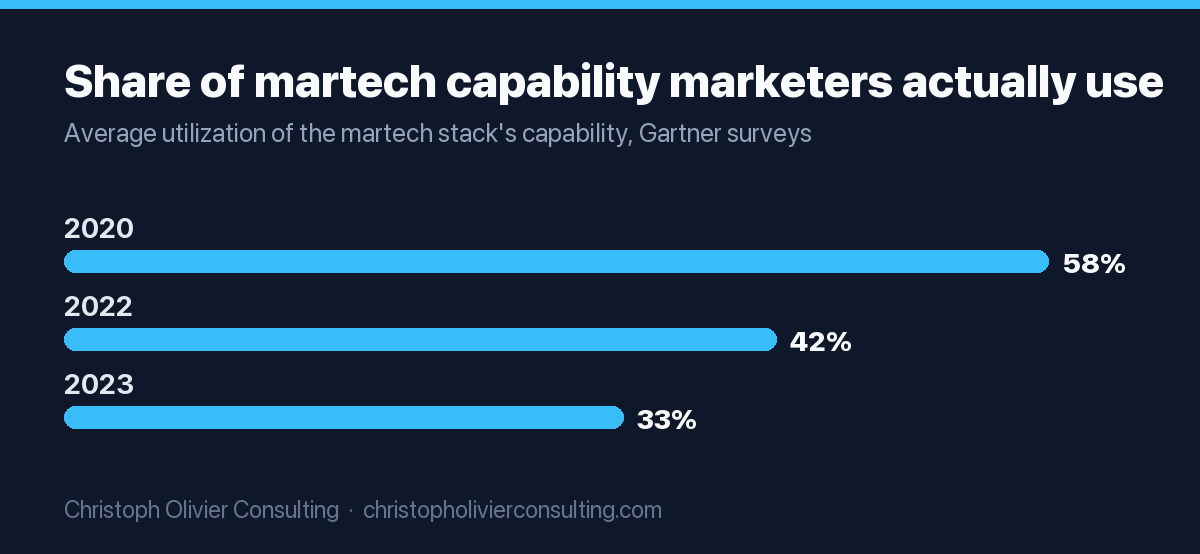
The audit matters because most firms already pay for capability they do not use. A Gartner survey of 405 marketing leaders found utilization of the martech stack’s capability fell to 33% in 2023, from 42% in 2022 and 58% in 2020.
Marketing automation consulting SOW: a 90-day scope
Paste this into a statement of work and ask each consultant to price it. Every phase ends with a deliverable you approve, so you can stop after any phase and still own something useful.
- Weeks 1 to 2, audit. Run the pass/fail audit above. Inventory every tool, form, list, field, workflow and integration. Capture baselines: leads by source, time to first response, MQL to SQL rate. Deliverable: audit report ranked by revenue impact and effort.
- Weeks 3 to 4, definitions and design. Written lifecycle stages, scoring criteria, routing rules and response SLA. Field dictionary with a system of record for each shared field. A spec, in the template above, for each workflow in the pilot. Deliverable: signed-off specs.
- Weeks 5 to 8, pilot build. Clean the data the pilot needs. Build three workflows: speed to lead, a nurture track and a consultation or onboarding sequence. Run every test case, including the records that must not enroll. Deliverable: test log and live workflows.
- Weeks 9 to 10, scoring and attribution. Lead score live and checked against closed deals. Dashboard showing leads by source, conversion by stage and time to first response. Deliverable: dashboard with metric definitions.
- Weeks 11 to 12, handoff. Runbooks for common changes, change log, recorded training, and transfer of every admin login. Deliverable: handoff pack plus a 30-day check-in date.
Write the exclusions too: content writing, ad management, new website pages and platform fees are usually out of scope, and “unlimited workflows” in a fixed fee is a dispute waiting to happen. Our lead scoring model guide has the scoring method to hold phase four to.
What that scope costs: two worked examples
These are arithmetic on the published figures above, not quotes. Assume the 90-day scope takes 70 consultant hours.
| Line | HubSpot Professional firm | Account Engagement firm |
|---|---|---|
| Consulting | 70 hours at Upwork’s expert band of $75 to $150 = $5,250 to $10,500. At MarketerHire’s $100 to $300 = $7,000 to $21,000 | Upwork project bands: lead scoring $1,200 to $2,500 + Engagement Studio $2,500 to $4,500 + Salesforce integration $4,500 to $7,000 = $8,200 to $14,000 |
| Software, first year | $800 x 12 + $3,000 onboarding = $12,600 at the starting price | Growth edition $1,250 x 12 = $15,000 |
| Total, year one | $17,850 to $33,600 | $23,200 to $29,000 |
The software often costs as much as the consultant. Compare proposals on the scope delivered, not the rate: a cheaper quote that drops testing, scoring checks or the handoff pack usually costs more later.
Consultant, tutorials, agency or hire: which fits
A common question is whether to work through the CRM’s documentation and tutorials or hire an automation expert. The vendor docs are good, as the setting links above show. The tutorials teach you which button does what; they do not decide your lifecycle stages, scoring threshold or which system owns a field. That design work is what you pay a consultant for.
| Option | Choose it when | Watch out for |
|---|---|---|
| DIY with vendor docs | One or two workflows on a platform you already know; volume is low | No spec, no tests, no one else understands the build |
| Marketing automation consultant | You need design, cleanup, CRM integration, scoring or a migration | Weak handoff leaves you dependent on one person |
| Agency | You also need content, ads and campaigns produced every month | Automation becomes a side service |
| In-house hire | Changes are daily and span several tools | Upwork puts US marketing automation specialist salaries at $63,000 to $108,000 before benefits; a hire before the system is designed inherits the mess |
The automation layer is only one part of the funnel. If your real gap is content and search that fill it, our sibling guide on hiring an inbound marketing consultant covers that role, and many firms extend the same build to intake, onboarding and proposals as part of wider business automation.
How to hire a marketing automation specialist: interview questions
Ask questions with checkable answers. The right column is what a strong answer contains.
| Ask | A strong answer includes |
|---|---|
| “What is the default re-entry behavior on our platform, and when would you change it?” | The exact setting name from the platform table above, and a use case for each choice |
| “Show me a workflow spec from a past project, client details removed.” | Trigger, exclusions, exit criteria, failure path and test cases, in writing |
| “Which system will own each shared field, and what happens when they disagree?” | A system of record per field and a sync conflict rule, not “the integration handles it” |
| “How will you test the records that should not enroll?” | Named negative test cases and a test log you receive |
| “How will you check our lead score works?” | Comparing scores of past closed-won and closed-lost deals, then adjusting |
| “What will you not automate?” | Specific steps kept human, such as first calls on high-value inquiries |
| “What do we own at the end?” | Every login, spec, runbook and recording, plus admin transfer |
Red flags in marketing automation consulting
- Guaranteed lifts. Results depend on your offer, market and follow-up. Good consultants talk about baselines and measurement.
- No audit before the quote. A fixed build price before anyone has seen your portal means your problems get copied into new workflows.
- Accounts in their name. Give them a user seat. Never let a vendor own your domain, sending reputation or super admin.
- No written specs or test log. If it is not in the SOW, you will not get it.
- Plan-blind designs. Designing 300 HubSpot workflows for a Starter portal, or more automation rules than your Account Engagement edition allows.
- Opens and clicks as the success metric. Reporting should reach pipeline and closed clients.
- Platform push before diagnosis. A partner badge is fine. A migration recommendation in the first call is not.
In my view, the best sign in a first conversation is a consultant who asks how you decide a lead is worth a partner’s time before they ask which software you use. If you want a second opinion on your current setup or a scope before you hire anyone, you can book a consultation.
Work with CO Consulting
Work with a marketing automation consultant at CO Consulting
- Build & transfer: a 90-day project where we ship the systems, document them, train your team and step out (typical $15K to $45K project fee)
- Done-for-you: we audit, design, build and maintain the stack (typical $5K to $15K a month, depending on scope)
- Every workflow scored on hours saved, error cost, revenue exposure and build complexity before we build it
- CRM, lead follow-up, booking and reporting connected into one system
Book a free strategy callSee our business automation services
Frequently asked questions
What is a marketing automation consultant?
A marketing automation consultant designs, builds and documents the rules inside your marketing and CRM software: workflows triggered by forms and behavior, lead scoring, lead routing, CRM sync and attribution reporting. The good ones start with an audit, write a spec for each workflow before building it, test records that should and should not enroll, and hand over runbooks and admin access so you can run the system without them.
How much does marketing automation consulting cost?
Upwork's cost guide puts the median for marketing automation consultants at $40 to $90 an hour, with expert rates of $75 to $150. MarketerHire publishes $100 to $300 an hour and $3,000 to $15,000 monthly retainers for vetted marketing consultants. Upwork prices platform projects such as Account Engagement lead scoring at $1,200 to $2,500 and a Salesforce integration at $4,500 to $7,000. Software fees come on top.
What goes in a marketing automation consulting SOW?
A useful SOW lists phases with an approved deliverable for each: an audit report, signed-off workflow specs and lifecycle definitions, built and tested pilot workflows with a test log, a scoring model and dashboard, and a handoff pack with runbooks, recordings and admin transfer. It should also name exclusions such as content writing, ad management and platform fees, and cap the number of workflows in a fixed fee.
What does a marketing workflow consultant do?
A marketing workflow consultant maps how leads and tasks move through your marketing and sales process, then turns each step into a written spec and an automated workflow: the trigger, who qualifies, the actions and delays, branches, exit criteria, a failure path and a named owner. The spec matters as much as the build, because it lets you audit, change or hand the workflow to someone else later.
Should I use CRM documentation and tutorials or hire an automation expert?
Use the vendor documentation if you need one or two simple workflows on a platform you already know. HubSpot, Klaviyo, Marketo and ActiveCampaign all publish clear setting guides. Hire an expert when the problem is design: lifecycle stages, scoring thresholds, which system owns each field, CRM sync, or a migration. Tutorials explain the buttons, but they do not decide those rules for your business.
How do I hire a marketing automation specialist?
Run a pass/fail audit of your current setup first so you know the problem. Then ask candidates platform-specific questions with checkable answers, such as the default re-entry setting in your tool, and ask for a sample workflow spec and test log from a past project. Start with a small fixed-fee audit or pilot before a retainer, and make sure your company owns every account.
What does a CRM automation consultant do differently?
A CRM automation consultant focuses on the sales side of the same system: lead routing and owner rotation, deal creation, task and follow-up automation, pipeline stage rules and the sync between your CRM and marketing platform. In practice the roles overlap, so judge candidates on whether they can define a system of record for each shared field and explain how sync conflicts get resolved.
More Business Automation guides
- Marketing Automation Platforms: How to Choose One for a Growing Business
- 10 Marketing Automation Workflows to Build First
- CRM and Marketing Automation Software: A Practical Guide for SMB Lead Management
- Marketing Automation: When You Need It
- No-Code Automation in 2026: Tools & Limits
- Marketing Automation Strategy: Tools to Workflows
- All Business Automation guides →