
Last reviewed: October 2026
The best content marketing tools cover six jobs: research, planning, creation, optimization, distribution and measurement. You can start at $0 with Google Search Console, Google Analytics, Google Docs, Canva Free, Buffer Free and Kit’s free newsletter plan. Most small teams then add three to six paid tools, which at the October 2026 list prices below can run from about $30 to a few hundred dollars a month.
This page sorts content marketing tools by the job they do, not by brand popularity. Each section names a free starting point and a paid upgrade, with prices checked on vendor pricing pages in October 2026. At the end you get three ready-made stacks by budget and a short process for cutting the tools you pay for but do not use.
What content marketing tools actually do
Content marketing tools are software that help you find topics people search for, plan and assign work, write and design assets, optimize them for search, distribute them through social and email, and measure what drove leads. No single product does all six jobs well, so most teams combine a few specialist tools with free Google products.
Think of your stack as a pipeline. If one stage is missing, the others underperform. A great writing tool cannot fix a topic nobody searches for, and a scheduling tool cannot fix a post nobody opens. The six jobs are:
- Research: what your buyers ask, how often, and who already ranks.
- Planning: a calendar, owners, due dates and a brief for every piece.
- Creation: drafting, editing, design and video.
- Optimization: titles, meta descriptions, internal links and on-page SEO.
- Distribution: social scheduling and email.
- Measurement: traffic, rankings, conversions and reporting.
Tool spend is rising fast in this category. In the Content Marketing Institute’s 2026 B2B Content and Marketing Trends report (1,015 B2B marketers surveyed June to August 2025), 95% said they use AI-powered applications, and AI-powered marketing tools topped the list of areas getting increased investment in 2026, cited by 45%.
Best content marketing tools by job: the 2026 comparison
The best content marketing tools for most small and mid-size teams are Google Search Console for research, Notion or Asana for planning, Google Docs plus an AI assistant for writing, Canva for design, Buffer for social, Kit or Mailchimp for email, and Google Analytics for measurement. The table shows free and paid entry points.
| Job | Tool | Free option | Paid entry point (checked Oct 2026) |
|---|---|---|---|
| Research | Google Search Console | Free | None needed |
| Research | Semrush | Free plan: 1 demo project, 10 reports per day | Paid plans with a 7-day trial |
| Research | Ahrefs | Ahrefs Free and Ahrefs Webmaster Tools | Starter plan, then Lite and up |
| Research | AnswerThePublic | See vendor page | Starter from $20/month |
| Planning | Notion | Free plan | Plus $10/seat/month billed yearly ($12 monthly) |
| Planning | Asana | Personal plan, up to 2 users | Starter $10.99/user/month billed yearly ($13.49 monthly) |
| Planning | CoSchedule | Free plan: 15 scheduled posts on 1 profile | Starter $29/month billed yearly ($39 monthly) |
| Writing/AI | Claude | Free plan | Pro $17/month billed yearly ($20 monthly) |
| Editing | Grammarly | Free plan | Pro, with a 7-day trial |
| Design | Canva | Free plan | Pro $144/year for one person |
| Video/audio | Descript | 60 media minutes/month, watermarked 720p export | Hobbyist $16/month billed yearly ($24 monthly) |
| Social | Buffer | 3 channels, 10 scheduled posts per channel | Essentials $60/year per channel |
| Social | Hootsuite | None listed | Standard plan from $99 |
| Kit | Up to 10,000 subscribers | Creator $33/month billed yearly (1,000 subscribers) | |
| Mailchimp | Up to 250 contacts | Paid tiers priced by contact count | |
| Measurement | Google Analytics | Free | Analytics 360 for enterprises |
| Reporting | Looker Studio (Data Studio) | Free | Pro tier for enterprise admin |
Prices come from each vendor’s pricing page: Notion, Asana, CoSchedule, Claude, Canva, Descript, Buffer, Hootsuite, Kit, Mailchimp and AnswerThePublic. Vendors change plans often, and some show local currency, so confirm before you buy. If you want a wider list of no-cost options, our roundup of free marketing tools goes further.
Content research tools: find topics buyers already search
Start content research with Google Search Console, because it shows the real queries that already bring people to your site, for free. Add a keyword suite such as Semrush or Ahrefs when you need search volumes, keyword difficulty and competitor gaps, and use AnswerThePublic for question-style topic ideas.
Google Search Console (free)
Search Console’s Performance report lists the queries, pages, clicks, impressions and average positions for your site. Sort by impressions and look for queries where you rank on page two. Those are often the fastest wins: an existing page that needs a better section, a clearer title or a new supporting article.
Semrush and Ahrefs (paid suites, with free tiers)
These are the two big keyword and backlink databases. Semrush’s pricing page lists a free plan with one demo project and 10 reports per day, and a 7-day trial on paid plans. Ahrefs lists a free tier, the free Ahrefs Webmaster Tools for sites you own, a low-cost Starter plan, and Lite, Standard, Advanced and Enterprise plans above it. Both companies have restructured plans recently, so check the live page in your currency. When we checked from a European location, Ahrefs Lite showed at €119 per month and the Semrush SEO plan at €134 per month on monthly billing.
AnswerThePublic
Useful for brainstorming the questions people attach to a topic (“how”, “why”, “vs”, “near me”). Treat it as an idea generator, then check volume and competition in Search Console or a keyword suite before you commit.
Research should end in a plan, not a spreadsheet of keywords. Our SEO content plan guide shows how to turn keyword data into a prioritized list of pages.
Content planning tools: calendars, briefs and workflow
For most teams, a content calendar in Notion or Asana is enough: one record per piece with the keyword, owner, status, due date and publish date. Pick CoSchedule if you want calendar and social scheduling in one product. The tool matters less than using one source of truth that everyone updates.
- Notion suits small teams that want docs, briefs and the calendar in one place. The Free plan works for one person; Plus is $10 per seat per month billed yearly.
- Asana suits teams with approvals and handoffs. The free Personal plan covers up to 2 users; Starter adds timeline views, reporting dashboards and automations.
- CoSchedule suits marketing teams that want a visual calendar tied to social publishing. Its free plan schedules up to 15 posts on one profile.
Before you pick a planning tool, decide what goes in it. A content roadmap sets the quarter’s themes and goals; the calendar is where that roadmap becomes dated tasks. Our content calendar guide includes the fields worth tracking.
Content creation tools: writing, editing and AI assistants
For writing, Google Docs remains the default because comments and suggestions make editing fast. Add an AI assistant such as Claude or ChatGPT for outlines, first drafts and summaries, and Grammarly for a final grammar pass. AI drafts still need a human editor who adds real expertise, examples and fact-checks.
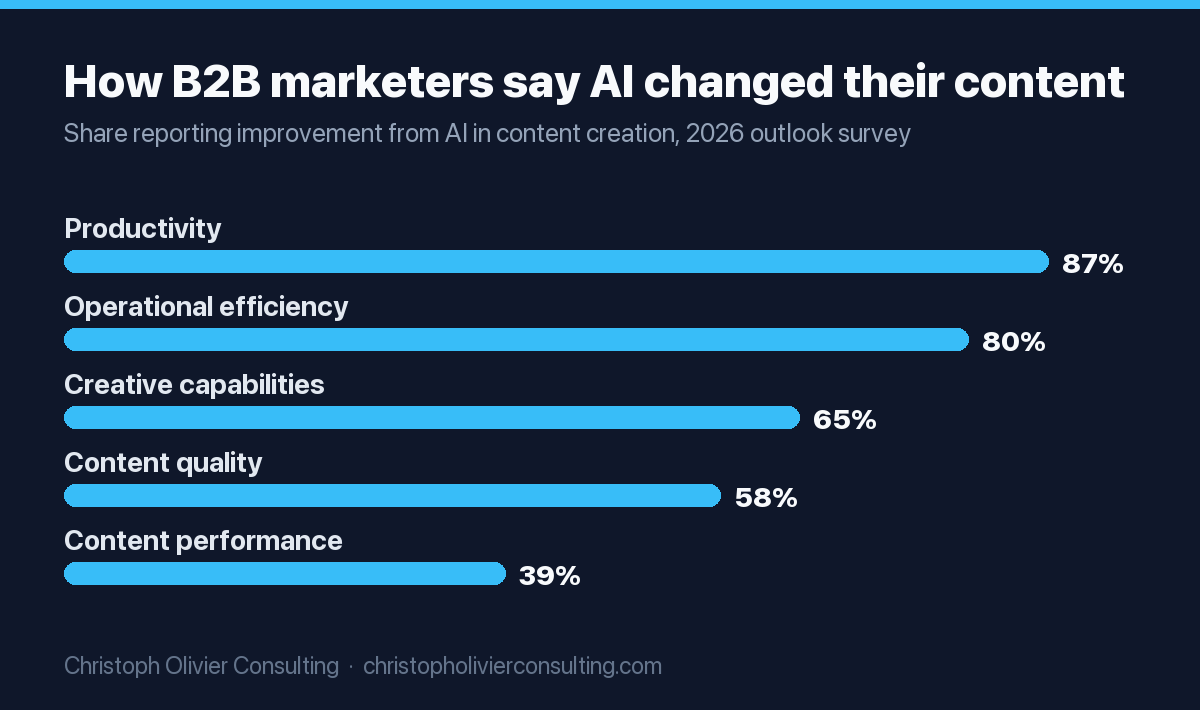
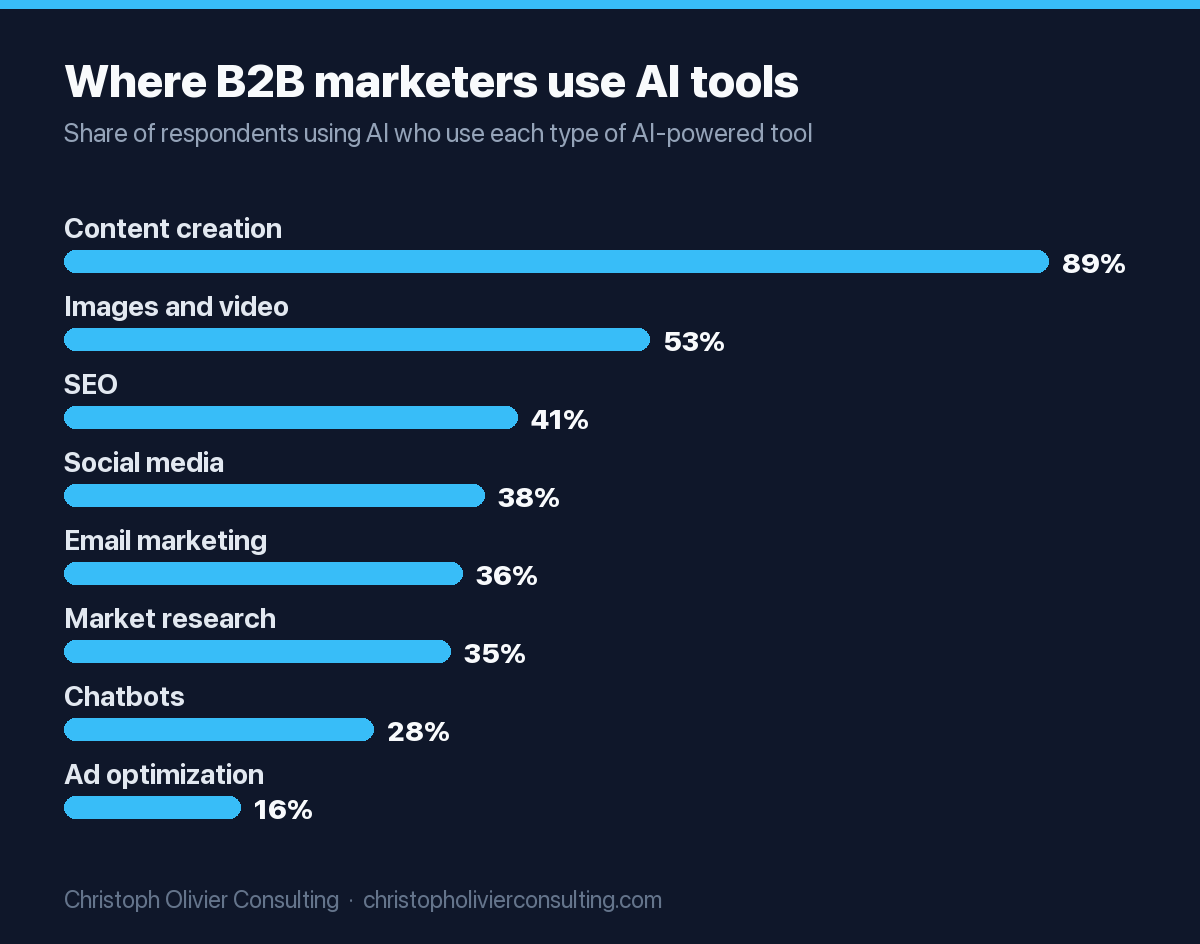
Adoption is no longer the question. CMI’s 2026 report found 89% of B2B marketers using AI use it in content creation tools. The more useful finding is the gap between speed and results: far more respondents said AI improved productivity than said it improved content performance.
That gap is the case for a human editor. Google’s own guidance says it rewards helpful content however it is produced, but that using automation to manipulate rankings is spam. In practice, I treat AI as a fast junior drafter: useful for structure and first passes, never the final word on facts, numbers or advice.
A simple AI-assisted writing workflow
- Write a one-page brief: keyword, reader, the question to answer, and the points only your firm can make.
- Ask the AI assistant for an outline, then edit the outline yourself before any drafting.
- Draft section by section, adding your own examples, opinions and client-safe specifics.
- Fact-check every number against its original source and link to it.
- Run a grammar and readability pass in Grammarly or your editor of choice.
- Have a second person read it for clarity before it goes into the CMS.
Pricing for AI assistants is modest compared to the time involved. Anthropic lists Claude Pro at $20 per month, or $17 per month billed annually, and Team standard seats at $20 per seat per month billed annually. ChatGPT also offers free and paid tiers.
Content creation tools for design and video
Canva is the default design tool for non-designers: templates, brand kits and quick resizing for every channel. For video and podcasts, Descript lets you edit by editing a transcript, which is much faster for talking-head clips. CapCut is a common pick for quick short-form vertical edits. All three have free starting points.
- Canva: the Free plan covers most basics. Pro is $144 per year for one person and adds premium templates and up to 5 brand kits. Business is $250 per year per person and adds collaboration, approvals and up to 100 brand kits.
- Descript: the Free plan gives 60 media minutes per month with watermarked 720p export. Hobbyist is $16 per month billed annually and removes the watermark with 1080p export; Creator is $24 per month billed annually with 4K export.
- CapCut: useful for captions, trims and vertical formats for short social video. Check its current plan terms before you build a workflow on it.
One rule saves hours here: build templates once. A set of five Canva templates (blog header, quote card, carousel, LinkedIn document, YouTube thumbnail) usually covers most of what a service firm publishes.
SEO optimization tools for content
On-page SEO optimization is mostly handled by your CMS plus Search Console. On WordPress, an SEO plugin such as Yoast or Rank Math manages titles, meta descriptions, canonical tags and basic schema. Search Console then tells you whether pages are indexed and which queries they show for.
Content optimization tools that score a draft against top-ranking pages can help with coverage gaps, but use them as a checklist, not a target. Chasing a term-frequency score can make writing worse. What usually moves rankings for a service firm is simpler:
- A title and first paragraph that answer the query directly.
- Headings that match the questions people actually ask.
- Internal links from related pages, so new content is found and crawled.
- Original detail, such as your process, pricing logic or decision criteria, that the top results lack.
- Fixing pages Search Console reports as not indexed.
Optimizing existing pages is often a better use of time than publishing new ones. Sort Search Console by pages with high impressions and low click-through rate, then rewrite the title and opening paragraph first.
Content distribution tools: social scheduling and email
For social distribution, Buffer is the simplest low-cost scheduler and Hootsuite suits larger teams that need approvals and social listening. For email, Kit is generous for newsletters with a free plan up to 10,000 subscribers, and Mailchimp’s free plan covers up to 250 contacts. Email is usually the channel you control best.
Social scheduling
Buffer’s free plan covers 3 channels with 10 scheduled posts per channel. Essentials is $60 per year per channel with unlimited scheduled posts, and Team is $120 per year per channel. Hootsuite states paid plans start at $99 for Standard, $199 for Professional and up to $399 for Advanced. CoSchedule’s paid plans also include unlimited social scheduling.
Email marketing
Kit lists a free plan for up to 10,000 subscribers and a Creator plan at $33 per month billed yearly for 1,000 subscribers. Mailchimp prices by contact count, with a free plan limited to 250 contacts. For professional-service firms, a monthly email that repackages your best article for clients and referral partners is often worth more than daily social posts.
Content analytics tools: measure what drives leads
Use Google Analytics 4 to track sessions and conversions from content, Search Console for rankings and clicks, and Looker Studio to combine both into one free dashboard. The goal is to connect each piece of content to inquiries or booked calls, not just page views.
Google describes Analytics as giving you the tools, free of charge, with Analytics 360 as the paid enterprise tier. Google’s documentation describes Looker Studio, now labeled Data Studio in its docs, as a no-cost tool for dashboards and reports.
Measurement is a weak spot for most teams. In CMI’s 2026 research, 33% of B2B marketers named measuring content effectiveness as a top challenge, and 40% named creating content that prompts a desired action, such as a conversion. A one-page dashboard helps with both:
- Set up GA4 key events for form submissions, booked calls and email signups.
- Connect Search Console to GA4 so query data sits beside behavior data.
- Build a Looker Studio report with three views: content traffic by page, conversions by landing page, and queries gaining or losing clicks.
- Review it monthly and feed what you learn back into the calendar.
Content marketing tool stacks by budget
A solo marketer can run a complete stack for $0 to about $30 a month. A three-person team typically spends around $200 a month at list prices. A scaling team of six can pass $450 a month before adding an SEO suite. The stacks below use October 2026 list prices with annual billing where offered.
| Job | Solo (1 person) | Small team (3 people) | Scaling team (6 people) |
|---|---|---|---|
| Research | Search Console (free) | Search Console + Semrush free plan | Search Console + Semrush or Ahrefs paid plan |
| Planning | Notion Free | Asana Starter: 3 x $10.99 = $32.97 | Asana Starter: 6 x $10.99 = $65.94 |
| Writing/AI | Google Docs + Claude Pro ($17) | Google Docs + Claude Pro: 3 x $17 = $51 | Claude Team standard: 6 x $20 = $120 |
| Design | Canva Pro ($12) | Canva Business: 3 x $250/yr = $62.50 | Canva Business: 6 x $250/yr = $125 |
| Video | Descript Free | Descript Hobbyist ($16) | Descript Creator ($24) |
| Social | Buffer Free (3 channels) | Buffer Essentials, 4 channels ($20) | Hootsuite Standard (from $99) |
| Kit Free | Kit Creator ($33) | Kit Creator ($33, rises with list size) | |
| Analytics | GA4 + Looker Studio (free) | GA4 + Looker Studio (free) | GA4 + Looker Studio (free) |
| Monthly total | $0 to $29 | About $215 | About $467 plus an SEO suite |
Worked example: the small team stack
Here is the math for a three-person team at a professional-service firm publishing two articles and one email a month. Asana Starter costs $32.97 a month for three seats. Three Claude Pro seats on annual billing are $51. Canva Business for three people is $750 a year, or $62.50 a month. Descript Hobbyist for one editor is $16. Buffer Essentials for four channels is $240 a year, or $20 a month. Kit Creator is $33 a month for up to 1,000 subscribers. That totals $215.47 a month, or about $2,586 a year, with research, analytics and reporting on free Google tools.
Two notes on that number. First, it is list price; seat minimums, taxes and currency can change it. Second, it is small next to the cost of the people using the tools. If a $16 tool saves an editor two hours a month, it pays for itself. If nobody opens it, it is waste.
How to choose content marketing software and avoid tool bloat
Choose content marketing software by starting from the job and the person doing it, not the feature list. Buy a tool only when a free option has clearly hit its limit, give every tool one named owner, and review subscriptions every quarter. Fewer tools, fully used, beat a large stack nobody maintains.
Tool bloat creeps in quietly: a trial that converts, a seat for someone who left, two tools that both schedule social posts. Use this five-step audit each quarter:
- List every subscription with its cost, renewal date, owner and number of active users.
- Map each tool to one of the six jobs. If two tools do the same job, keep the one people actually use.
- Check usage. Most tools show last login or activity. Remove seats nobody used in 60 days.
- Ask what breaks if you cancel. If the honest answer is “nothing,” cancel it.
- Downgrade before you upgrade. Many teams pay for a tier because of one feature they could replace with a free tool.
Watch for a few signs you are overbuying: you pay for an all-in-one suite but only use its scheduler; content sits in three places so nobody knows which version is final; or reports pull from four tools that disagree. In my experience, the fix is usually removing tools, not adding another.
Tools also cannot replace strategy. If your stack is set up but the content still is not producing leads, the gap is usually in topics, positioning or distribution. That is the work a content strategist does. If you want a second opinion on your stack or your content plan, you can book a consultation and we will look at it together.
Frequently asked questions
What are content marketing tools?
Content marketing tools are software that help you research topics, plan a calendar, write and design content, optimize it for search, distribute it through social media and email, and measure the results. Most teams combine free Google tools such as Search Console and Google Analytics with a few paid specialist tools for writing, design, scheduling and email.
What are the best free content marketing tools?
A capable free stack includes Google Search Console for research, Google Analytics and Looker Studio for measurement, Google Docs for writing, Notion's free plan for planning, Canva Free for design, Buffer's free plan for up to 3 social channels, and Kit's free plan for newsletters up to 10,000 subscribers. Check each vendor's current limits before relying on them.
How much should a small business spend on content marketing software?
At October 2026 list prices, a solo marketer can run a full stack for $0 to about $29 a month, and a three-person team can cover planning, AI writing, design, video, social and email for roughly $215 a month. Add an SEO suite such as Semrush or Ahrefs once you need search volume and competitor data.
Do I need Semrush or Ahrefs for content marketing?
Not at the start. Google Search Console is free and shows the real queries your site already appears for, which is enough to find early wins. A paid suite becomes worth it when you need search volumes, keyword difficulty, competitor gaps and backlink data to plan new content at a steady pace. Both offer free tiers to test first.
Can AI tools write my content marketing for me?
AI assistants can speed up outlines, first drafts and summaries, but they should not publish unedited. Google says it rewards helpful content however it is produced, while using automation to manipulate rankings is spam. Use AI as a drafting aid, then add your own expertise and examples, and fact-check every number against its original source.
What is a content marketing platform?
A content marketing platform is software that combines several jobs, such as planning, creation, publishing, distribution and analytics, in one product. All-in-one platforms reduce the number of logins, but many small teams get better value from a few focused tools plus free Google products. Choose based on which jobs you actually need covered.
How do I avoid paying for too many marketing tools?
Audit subscriptions every quarter. List each tool with its cost, owner, renewal date and active users, map it to one job, and remove duplicates. Cancel seats unused for 60 days and downgrade tiers kept for a single feature. If nothing breaks when you cancel a tool, you did not need it.
More Content Marketing guides
- How to Build a Content Calendar You Actually Keep
- AI Content Writing in 2026: No Penalties
- Podcast Marketing Strategy: A Pipeline-First Playbook
- 20 Personal Brand Statement Examples (and How to Write Yours)
- How to Hire a Content Marketing Consultant
- Shopify Email Marketing for DTC Brands
- All Content Marketing guides →