

Video email marketing works by putting a linked preview in the email (a thumbnail with a play button or an animated GIF) and playing the video on a page you control, because most inboxes will not play video inside the message. Gmail, Yahoo, AOL and Outlook for Windows do not play the HTML5 <video> tag; Apple Mail on macOS does, and Apple Mail on iOS does only when the controls attribute is set. Below: which clients play what, copy-ready HTML for all three methods, how to add video in Mailchimp, Constant Contact and Gmail, video email software with current USD prices, and a test plan with the sample-size math.
What actually plays where: video support by email client
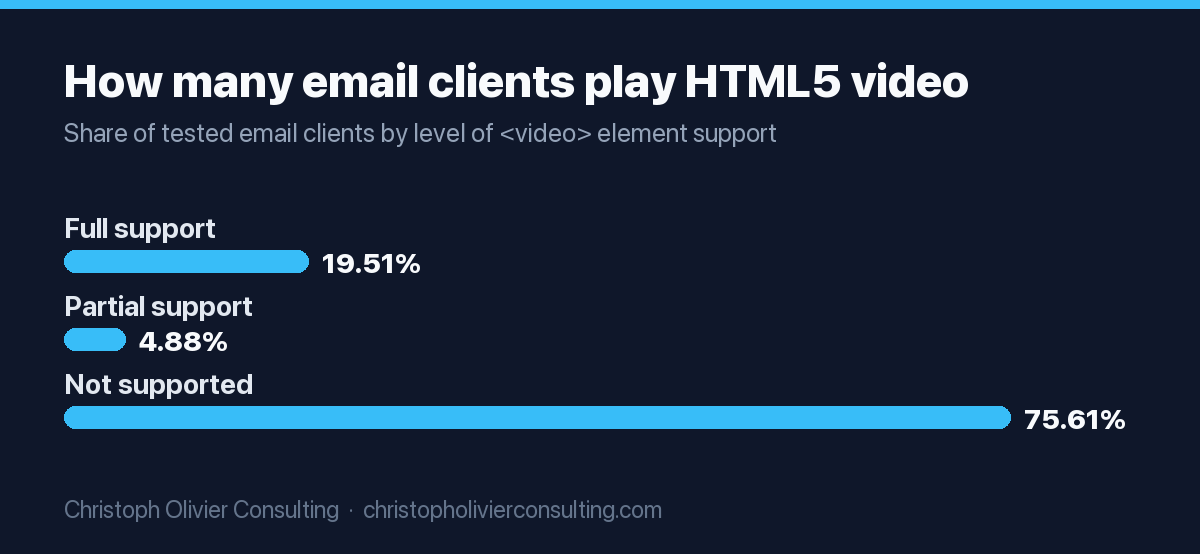
Can I Email’s <video> test puts estimated support at 19.51% full plus 4.88% partial, so roughly three out of four tested clients will not play an embedded video. The main test dates from September 16, 2019, with Outlook.com rechecked in May 2021 and January 2024 and some European webmail clients in 2022, so check your own build before you rely on it.
| Email client | HTML5 <video> plays? | What the reader sees instead | Animated GIF |
|---|---|---|---|
| Apple Mail, macOS | Yes | A playable video | Plays |
| Apple Mail, iOS | Partial: only with the controls attribute; no autoplay on iOS 13.3 | A player with controls | Plays |
| Gmail (web, iOS, Android, mobile web) | No: video, source and track tags are replaced with <u> tags | Whatever fallback you put inside the tag | Plays |
| Outlook for Windows 2007 to 2019 | No | Fallback content | First frame only; with an Office 365 account, plays 3 times then shows a replay button |
| Outlook for Mac 2011 and 2016 | Yes | A playable video | Plays |
| Outlook for Mac 16.80 | Partial: right-click to play; no controls or autoplay | A video most people will not know how to start | Plays |
| Outlook.com, Outlook iOS and Android (retested 2021 and 2024) | No: the element survives but a strict Content Security Policy blocks playback | A dead player unless you hide it | Plays |
| Yahoo Mail and AOL | No: tags stripped | Fallback content | Plays |
| Samsung Email | Partial: only with the controls attribute | A player with controls | Plays |
| Thunderbird (macOS) | Yes | A playable video | Plays |
| Proton Mail, HEY, Fastmail | No (Proton web shows the poster image but blocks playback) | Poster or nothing | Plays |
Sources: Can I Email, <video> element and Can I Email, GIF image format (tested February 2020, 97.62% full support plus 2.38% partial, the partial being classic Outlook for Windows).
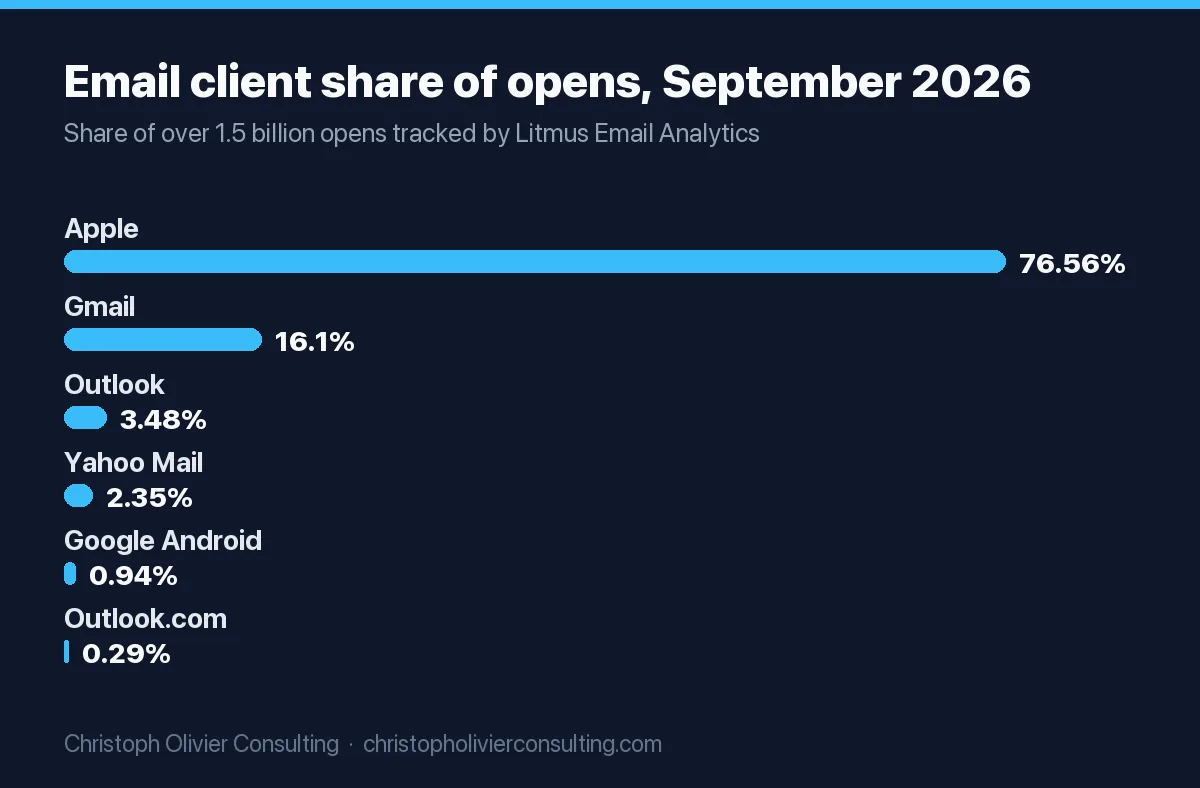
Now weigh that against where people open email. Litmus’s September 2026 market share data, from over 1.5 billion tracked opens, puts Apple at 76.56% and Gmail at 16.10%. That Apple number is inflated: Litmus says Mail Privacy Protection opens (iOS 15 and macOS Monterey onward) are “not considered reliable opens,” because Apple loads the email on its servers whether or not a person reads it. Your ESP’s client report for your own list is the number that matters, and a B2B list can look very different from the global figure.
The practical rule: design for Gmail and Outlook on Windows and the web first, since none of them will play your video, and treat in-email playback in Apple Mail as a bonus.
The three ways to put video in an email, with copy-ready HTML
Every working method links out to a hosted video. They differ in how much motion the reader sees in the inbox and how much testing you take on.
| Method | Works in Gmail and Outlook? | Build effort | Use it for | Watch out for |
|---|---|---|---|---|
| 1. Static thumbnail with a play button, linked to a landing page | Yes, everywhere images load | Low | Newsletters, nurture emails, webinar replays | No motion; images-off readers need a text link |
| 2. Animated GIF preview, linked to the video | Yes; classic Outlook for Windows shows frame one | Medium | Launches, property tours, personal sales videos | File weight; Mailchimp caps image uploads at 1 MB |
| 3. HTML5 <video> with a hidden fallback | No: they get the fallback | High, plus testing every send | Consumer lists that are heavily Apple Mail on Mac | Dead players in Outlook.com if the CSS targeting fails |
Method 1: linked thumbnail with a play button
Export a frame at 1200px wide (displayed at 600px for sharp retina rendering), bake a play triangle into the image, and link both the image and a text line under it. The text link carries the click for readers whose images are blocked.
<a href="https://yourdomain.com/watch/first-90-days?utm_source=email&utm_medium=email&utm_campaign=nurture-video" target="_blank" style="text-decoration:none;">
  <img src="https://yourdomain.com/email/first-90-days-play-1200.jpg"
       width="600" alt="Play video: How our first 90 days work (2 min)"
       style="display:block;width:100%;max-width:600px;height:auto;border:0;">
</a>
<p style="margin:12px 0 0;font-family:Arial,sans-serif;font-size:16px;line-height:24px;">
  <a href="https://yourdomain.com/watch/first-90-days?utm_source=email&utm_medium=email&utm_campaign=nurture-video"
     style="color:#1a56db;font-weight:bold;">Watch the 2-minute walkthrough</a>
</p>
Point the link at a page on your own site with the video embedded, a transcript and one next step, not at YouTube, where the sidebar recommends other people’s videos. The UTM tags let you see the email’s plays and conversions in analytics.
Method 2: animated GIF preview (including from a .mov walkthrough)
A GIF gives the inbox motion without any playback support, since GIFs display in effectively every client Can I Email tested. The constraint is weight. Mailchimp’s content studio accepts images up to 1 MB each. Klaviyo’s image reference allows files up to 10 MB but recommends 1 MB or smaller, and notes its automatic compression does not work on GIFs. Treat 1 MB as the ceiling either way, because the GIF downloads on open, often over mobile data.
If you have a phone or camera walkthrough as a .mov file (a real estate listing tour, an office tour, a product demo), the free command-line tool ffmpeg turns a four-second slice into an email-weight GIF using its palettegen and paletteuse filters:
ffmpeg -ss 3 -t 4 -i walkthrough.mov -vf "fps=10,scale=600:-1:flags=lanczos,split[a][b];[a]palettegen=max_colors=128[p];[b][p]paletteuse" -loop 0 preview.gifThat takes 4 seconds starting at second 3, drops to 10 frames per second, scales to 600px wide and builds a 128-color palette. If the file comes out over 1 MB, cut to 3 seconds, drop to 8 frames per second or reduce max_colors to 64, in that order. Then check the first frame on its own: classic Outlook for Windows shows only that frame, so it should be the best-looking shot (the front of the house, your face mid-wave) with a visible play button. Link the GIF exactly like the thumbnail in Method 1, with the same text link under it.
Method 3: HTML5 video with a fallback
This is the only method where the video plays in the inbox, and only in Apple Mail, Outlook for Mac, Samsung Email, Thunderbird and a few webmail clients. The pattern below follows Email on Acid’s HTML5 video guide (last updated September 2021): the video is hidden by default, CSS that only WebKit clients understand reveals it, and everyone else sees a linked image.
<style>
  .video-wrap { display:none; }
  @media (-webkit-min-device-pixel-ratio:0) and (min-device-width:1024px) {
    .video-wrap { display:block !important; }
    .video-fallback { display:none !important; }
  }
</style>

<div class="video-wrap" style="display:none;">
  <video width="600" height="338" controls="controls"
         poster="https://yourdomain.com/email/tour-poster.jpg"
         src="https://yourdomain.com/email/tour-h264.mp4">
    <a href="https://yourdomain.com/watch/tour"><img src="https://yourdomain.com/email/tour-play.jpg" width="600" alt="Play video: office tour (45 sec)"></a>
  </video>
</div>

<div class="video-fallback">
  <a href="https://yourdomain.com/watch/tour"><img src="https://yourdomain.com/email/tour-play.jpg" width="600" alt="Play video: office tour (45 sec)" style="display:block;border:0;"></a>
</div>
Keep the controls attribute (iOS Mail and Samsung Email need it), use an H.264 MP4, and host the file on a fast server. Email on Acid’s full version adds extra selectors for iOS and Samsung. I would only build this for a consumer list where your own client report shows a large Apple Mail share; for most B2B and professional-service lists, Methods 1 and 2 reach more people for less work.
How to add video in Mailchimp, Constant Contact, Gmail and Outlook
Mailchimp (new builder). Drag in a Video block, paste the URL into the Video URL field, then set alignment and fill the Alt Text field. According to Mailchimp’s video block guide, Vimeo and long-form YouTube links pull a thumbnail automatically; YouTube Shorts and other hosts need you to upload your own thumbnail. Clicking opens the video in a separate browser window.
Embed video in Constant Contact. Constant Contact cannot host video. Per its knowledge base article (updated April 1, 2026), you upload to YouTube, Vimeo, Wistia or a similar host, drag the Video block into the template, click the empty player or Import, paste the URL, optionally swap the thumbnail and add alt text, then click Insert. Vimeo users can connect their account and pick from the library instead, though Private Vimeo videos cannot be selected. The video does not play in the email; the thumbnail opens it in a new tab. Constant Contact recommends keeping videos under three minutes.
Gmail and Outlook (one-to-one). Use your recording tool’s GIF thumbnail. In Loom’s instructions, you open the video, select Share, then Embed, click Copy GIF Thumbnail and paste it into the email; Loom says this works in all email clients. Pasting a bare Loom link into Gmail only expands into a preview when both you and the recipient have the Loom Chrome extension, so the GIF is the safer choice.
VideoAsk and Gmail: embed vs integration
People searching “VideoAsk Gmail integration” usually want one of two things. To put a videoask in an email, VideoAsk’s help article says to open Share & Embed, choose Send via email, click Copy embed code and paste it straight into the Gmail compose window. The recipient sees an animated GIF that opens the videoask in a new tab; VideoAsk states that Gmail and Outlook do not allow a true embed. Toggle Add contact variables first if you want the link tied to one named contact.
To send a Gmail message automatically when someone answers, there is no native connector; VideoAsk documents a Zapier recipe. The trigger is VideoAsk “New Response (From a Respondent)”, which fires once the transcription is ready, and the action is Gmail “Send Email”. Map the respondent’s Contact Email into the To field and you have an instant thank-you or follow-up. VideoAsk notes free plans exist for all three tools.
Video email software compared: prices as published
“Video email software” covers two different products. Recording tools (Loom, Vidyard, BombBomb, Sendspark, Hippo Video, Dubb, Covideo) let a person record, send a GIF thumbnail from Gmail or Outlook and get view alerts. Hosting platforms (Wistia, Vimeo, YouTube) hold the video your ESP links to. Your ESP, the email service provider such as Mailchimp or Constant Contact, still sends the campaign.
| Tool | Free option | Entry paid plan (USD) | How it reaches the inbox | Best fit |
|---|---|---|---|---|
| Loom | Starter: 25 videos per person, 5-minute recordings, 720p | Business $18 per user per month, or $180 per year; Business + AI $24, or $240 per year | Copy GIF Thumbnail; Gmail integration on all plans | Firms that also record internal walkthroughs and client updates |
| Vidyard | Free: 5 videos per month, no hosting | Starter $89 per seat per month, or $59 per seat per month billed annually (shown with a “Now 10% off” banner); Teams and Enterprise quote-based | Thumbnails in email and CRM; full analytics on Starter | Sales teams that want view tracking by rep |
| BombBomb | Free trial | Core $42 per user per month billed monthly, $36 billed annually; Core + Copilot $70 or $56 | Gmail and Outlook integrations included in Core | Relationship businesses with long follow-up cycles |
| Sendspark | No free plan; 7-day trial, no card | Solo $49 per month or $468 per year (1 seat, 100 dynamic video minutes); Growth $99 per month or $828 per year (3 seats) | HubSpot, Gmail, Outlook, LinkedIn on all plans | Outbound teams personalizing one recording at scale (AI name and background swaps) |
| Hippo Video | Free: 50 automated personalized videos, 10 caption minutes, Gmail and Outlook integrations | Pro $30 per user billed monthly, $20 per user per month billed annually; Teams $75 or $60 | Gmail, Outlook, LinkedIn | Teams that want captions and personalized videos on a low budget |
| Dubb | Starter: 25 SD videos, 25 MB upload limit | Pro $59 per month, or $499 per user per year | Gmail, Outlook, LinkedIn on Starter | Solo users who want a free tier with Gmail and Outlook |
| Wistia | Free: 1 user, 25 GB storage | Business $79 per month billed annually; Business + Signals $329 per month billed annually | Hosting your ESP links to; triggered email nurtures and HubSpot on Business + Signals | Marketing teams running video in an email series who want play data by contact |
| Covideo | Free trial | Not published: quote form only | Not stated on the pricing page | Automotive dealers (integrations listed are dealer CRMs) |
| VideoAsk | Free account | Not shown on the pricing page we loaded | GIF via Send via email; Gmail through Zapier | Two-way video: intake questions, applications, testimonials |
Prices are as shown on each vendor’s pricing page on November 1, 2026, in US dollars. They change often, so confirm before you buy.
How to pick: to find out whether your prospects watch at all, Loom Starter (25 videos) or Hippo Video’s free plan is enough. If you need view alerts in a CRM, compare Vidyard Starter and BombBomb Core. If one recording has to go to hundreds of named prospects, that is Sendspark’s dynamic video. If marketing is sending the same video to a list, you need hosting (Wistia or YouTube) plus your ESP, not a sales tool.
Sales videos vs marketing videos in email
Using video in sales emails and using video in email marketing are different jobs, with different tools, lengths and metrics.
| One-to-one sales video | One-to-many marketing video | |
|---|---|---|
| Who records | The rep, partner or advisor, on a webcam or screen share | Marketing, often edited |
| Sent from | Gmail or Outlook, via Loom, Vidyard, BombBomb and similar | Your ESP (Mailchimp, Constant Contact, HubSpot, Klaviyo) |
| Inbox format | GIF thumbnail with the recipient’s name or website on screen | Static thumbnail or GIF, linked to a landing page |
| Length | Short, one message (the script below runs 90 seconds) | Under 3 minutes for most campaigns (Constant Contact’s guidance); longer for webinar replays |
| Success metric | Replies and meetings booked | Click rate, play rate, conversions |
| Where it fits | Proposal follow-up, account-based outreach, post-meeting recap | Nurture, onboarding, launches, newsletters |
For the marketing side, a video slots into the featured-story position used in many of these email newsletter examples, or into one email per step of an email drip campaign where each email answers one sales question. Onboarding videos work best as triggered emails fired when a contract is signed. For the sales side, the account-based plays in our B2B email marketing guide are where personal video earns its time.
Here is a script you can record today:
Template: 90-second proposal follow-up video
- 0 to 10 seconds: “Hi [Name], quick video on the proposal I sent on [day].” (Wave, so the GIF thumbnail moves.)
- 10 to 40 seconds: “You said the priority is [goal]. Here is where the proposal handles that.” Screen-share that section.
- 40 to 70 seconds: “The main choice is [option A] or [option B]. Here is the trade-off.”
- 70 to 90 seconds: “Reply with a time that works and we can settle scope in 15 minutes.”
Subject: [Name], 90-second walkthrough of your proposal
Body: one line of context, the GIF thumbnail, a text link (“Watch the 90-second walkthrough”), your signature. No attachment.
For topic ideas by profession, the scripts in video marketing ideas for estate planning attorneys adapt well to email for any advisory firm, and our list of email marketing ideas shows which campaigns gain most from a video.
“Video increases click-through by 300%”: where that number comes from
Almost every video email article repeats that video lifts click-through rates by 200% to 300%, credited to Forrester. The earliest dated citation we could find is a July 2010 blog post describing “a May 2009 Forrester study” in which video in email “can increase click-through rates by as much as 2x-3x.” We could not find the Forrester document itself. It is 17 years old, predates Apple’s Mail Privacy Protection (which arrived with iOS 15), and “as much as” describes a best case, not an average. Do not put it in a business case.
What dated, named research does say:
- Sales video (self-reported). Vidyard’s State of Virtual Selling Report (September 2021, conducted by Demand Metric, more than 600 sales leaders) found over 70% of sales professionals say custom-recorded video beats text emails at producing opens, clicks and responses, and nearly half of video users say it shortened their deal cycle. It is a vendor-commissioned opinion survey, not a controlled test.
- Video on the landing page. Wistia’s 2026 State of Video findings (nearly 1,000 marketers surveyed, more than 13 million videos analyzed) report almost 20% of viewers who see a lead-capture form inside a video fill it out, and a 24% play rate for homepage videos. That is the click’s destination, not the email: a video email capture form on your watch page is where a broadcast email turns into leads.
No benchmark replaces your own split test, which is why the plan below exists.
Captions, alt text and images-off readers
WCAG 2.2 Success Criterion 1.2.2 requires captions for all prerecorded audio in synchronized media, at Level A, the baseline. Most email video is also watched with the sound off.
- Captions: turn on auto-captions in your recording tool, then fix names and jargon by hand. Hippo Video’s free plan includes 10 caption minutes; check the caption allowance on whichever plan you choose.
- Alt text: start with “Play video:”, then the topic and runtime, as in the HTML above. Mailchimp’s Video block and Constant Contact’s both have an alt text field.
- Live text: put the key point and the call to action in HTML text next to the thumbnail, so a screen reader or images-off reader gets the message without the video.
- Transcript: publish it on the watch page under the player.
File size and deliverability limits to stay under
| Limit | Number | What to do | Source |
|---|---|---|---|
| Gmail attachment size (personal accounts) | 25 MB, larger files become a Drive link | Never attach video to marketing email; link to it | Gmail Help |
| Gmail message clipping | Messages over 102 KB are clipped behind “View entire message” | Keep the HTML lean so the CTA and unsubscribe link stay visible | MxToolbox |
| Mailchimp image upload | 1 MB per image | Build GIFs to 1 MB or less | Mailchimp |
| Klaviyo image upload | 10 MB maximum, 1 MB or smaller recommended; no auto-compression for GIFs | Compress GIFs before upload | Klaviyo |
| Gmail spam rate | Below 0.3% in Postmaster Tools (Google recommends under 0.10%) | Send video blasts only to people who asked for them | Google sender guidelines |
| Authentication | SPF or DKIM for all senders; SPF, DKIM and DMARC plus one-click unsubscribe above 5,000 messages a day to Gmail | Fix authentication before testing creative | Google sender guidelines |
A 4-week test plan for video in email
Run these in order. Judge every test on clicks, replies or meetings, never opens, because Apple’s machine opens distort open rates.
- Week 1, baseline. Pull your ESP’s email client report and your last three campaigns’ unique click rates. If Apple Mail on Mac is a small share, drop Method 3 from the plan.
- Week 2, video vs no video (broadcast). Split one campaign 50/50: version A links to the content with a text link only, version B adds the play-button thumbnail to the same page. Measure unique clicks divided by delivered, plus conversions on the watch page.
- Week 3, static vs GIF. If B won or tied, test the static thumbnail against a GIF under 1 MB. Check the GIF’s first frame in classic Outlook before sending.
- Weeks 1 to 4, sales video vs text (one-to-one). Alternate proposal follow-ups between the 90-second video script and a plain-text note. Log replies and meetings in the CRM for each.
Sample-size math, so you do not call a winner too early. Say your click rate is 2.0% and you want to detect a lift to 2.6%. With the standard two-proportion formula at 95% confidence and 80% power: n = (1.96 + 0.84)² × (0.02 × 0.98 + 0.026 × 0.974) ÷ (0.006)² = 7.84 × 0.0449 ÷ 0.000036 ≈ 9,800 recipients per version. A firm with a 3,000-contact list cannot settle that in one send, so repeat the same split across four or five campaigns and judge the combined numbers. One-to-one tests will never reach significance at 20 or 40 videos; look for a consistent direction over a quarter.
Pre-send check: pass or fail
- Pass: the thumbnail or GIF is linked and a text link sits under it. Fail: the only link is the image.
- Pass: the GIF is 1 MB or less and its first frame works alone. Fail: a blank or blurry frame one.
- Pass: the alt text names the video and runtime. Fail: “image”, “thumbnail” or empty.
- Pass: the watch page loads on a phone over 4G and has one next step. Fail: it sends people to YouTube.
- Pass: captions are on and names are corrected. Fail: raw auto-captions.
- Pass: no video attachment and the HTML is well under 102 KB. Fail: Gmail shows “View entire message”.
- Pass: rendered in Gmail, Outlook for Windows and Apple Mail before send. Fail: tested in one client.
- Pass: UTM tags on every link, with plays and conversions tracked. Fail: judged by open rate.
If you want help deciding where video belongs in your email program, and whether it is worth the recording time for your team, you can book a consultation and we will map it against your current funnel.
Frequently asked questions
Can you embed a video in an email?
Only in a few inboxes. Can I Email estimates about 24% support for the HTML5 video tag: Apple Mail on Mac, Outlook for Mac, Thunderbird and Samsung Email can play it, and iOS Mail needs the controls attribute. Gmail, Yahoo, AOL, Outlook for Windows and Outlook.com do not play it, so most senders use a linked thumbnail or animated GIF that opens the video on a web page.
What is the best video email software?
It depends on the job. For personal sales videos, Loom (Business $18 per user per month), Vidyard (Starter $59 per seat per month billed annually) and BombBomb (Core $36 per user per month billed annually) are the common choices. Sendspark suits personalizing one video for many prospects. For marketing campaigns, host on Wistia or YouTube and send through your ESP. Prices as published November 1, 2026.
How do I embed a video in Constant Contact?
Upload the video to YouTube, Vimeo or Wistia first, since Constant Contact cannot host video. In the editor, drag in the Video block, click the empty player or Import, paste the video URL, optionally choose a thumbnail and add alt text, then click Insert. Recipients see a clickable thumbnail that opens the video in a new tab; it does not play inside the email.
Does VideoAsk integrate with Gmail?
Not natively. To put a videoask in a Gmail message, open Share and Embed, choose Send via email, copy the embed code and paste it into the compose window; recipients see an animated GIF that opens the videoask. To send Gmail messages automatically when someone responds, VideoAsk documents a Zapier recipe: trigger New Response, action Gmail Send Email.
How do I turn a .mov walkthrough into a GIF preview for an email blast?
Cut a three to four second clip and convert it with a tool such as ffmpeg at about 10 frames per second, 600px wide and a reduced color palette, aiming for 1 MB or less, which is Mailchimp's image upload cap. Make the first frame strong with a visible play button, since classic Outlook for Windows shows only that frame, and link the GIF to the full video.
How do I add personalized videos to emails?
Either record one video per person in Loom, Vidyard, BombBomb or Hippo Video and paste its GIF thumbnail into Gmail or Outlook, or use a dynamic video tool such as Sendspark, which swaps in each prospect's name or website from one recording. In Mailchimp, the video merge tag works with YouTube, Vimeo and Wistia links. Always add a text link under the preview.
Is a video mailer the same as video email marketing?
No. A video mailer usually means a printed direct mail piece, such as a brochure with a built-in screen, sent by post. Video email marketing puts a linked preview of a hosted video in an email. Some firms pair them: the mailer for a short list of high-value prospects, then a personal video email follow-up that references it.
More Funnels & Email guides
- How Does a Webinar Work: A Comprehensive Guide
- What Are Funnels? A Plain-English Guide to Marketing, Sales, and Product Funnels
- Welcome Email Sequence: The 5-Email Series You Can Copy
- Conversion Rate Benchmarks by Industry
- Instagram Marketing in 2026: Reels & Conversion
- Funnel Marketing Agency: What They Do, When to Hire One, and How to Choose
- All Funnels & Email guides →