
Last reviewed: October 2026

A small business should plan a Google Ads budget of roughly $1,000 to $2,500 per month to start, then adjust based on your industry cost per click, how many leads you need, and what a new customer is worth. This page owns the money question: how much to spend, how to split it across campaign types, and what to expect at each budget tier. For campaign strategy and setup, see our Google Ads management guide.
How much should a small business spend on Google Ads?
Plan on $1,000 to $2,500 per month as a realistic starting range for most small businesses, which is about $33 to $83 per day. The floor is set by data, not comfort: you need enough spend to generate at least 200 to 300 clicks per month, or Google’s bidding has too little signal to optimize and you have too few leads to judge results.
If you would rather have an expert run your ads, see how CO Consulting manages paid advertising for service businesses.
The right number is a calculation, not a guess. Multiply your target monthly clicks by your industry cost per click, then sanity-check against the value of a new customer. If clicks in your market cost $8 and you want 300 of them, you are planning a $2,400 monthly budget before you spend a dollar.
What drives your Google Ads cost
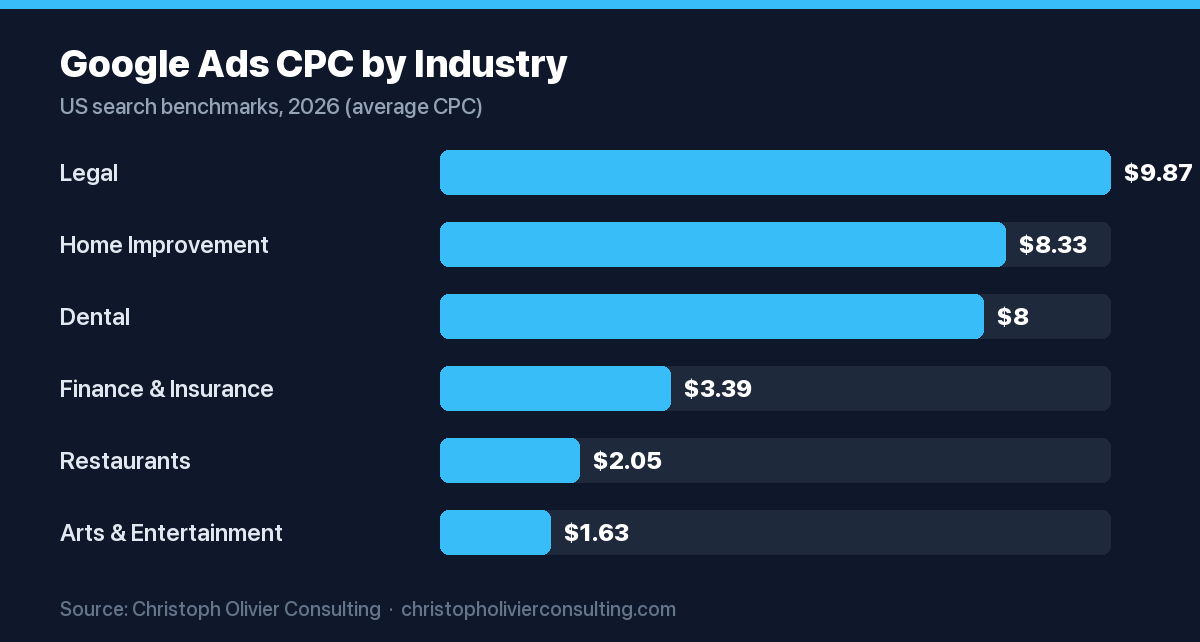
Your single largest cost driver is your industry cost per click. The 2026 all-industry average CPC for search is about $5.42, but the spread is wide: Attorneys and Legal Services average $9.87 per click while Arts and Entertainment average $1.63. Your budget has to respect the price of your market, not a blanket recommendation.
Three factors set your real number: what a click costs in your vertical, how well your landing page converts that click, and what a converted customer is worth. A high CPC is fine if your conversion rate and customer value are also high.
Cost per click by industry
Use these 2026 midpoint benchmarks to estimate your own CPC before setting spend. Legal, home improvement, and dental sit at the top; restaurants and arts sit at the bottom. Match your vertical, then multiply by the clicks you need.
| Industry | Average CPC (2026) | Notes |
|---|---|---|
| Attorneys and Legal Services | $9.87 | Highest CPC; also highest cost per lead near $131 |
| Home and Home Improvement | $8.33 | High-competition service demand |
| Dentists and Dental Services | $8.00 | High CPC paired with strong ~10.7% conversion rate |
| Finance and Insurance | $3.39 | Moderate CPC but lower ~2.6% conversion rate |
| Restaurants and Food | $2.05 | Among the lowest click costs |
| Arts and Entertainment | $1.63 | Lowest average CPC in 2026 |
Costs also move year over year. Real Estate rose about 27% and Personal Services and Health and Fitness rose about 23% in 2026, partly as AI Overviews cut organic clicks and push more demand into paid results. Treat these benchmarks as a starting estimate and confirm with your own account data after 30 days.
How to allocate your Google Ads budget across campaign types
Start high-intent, then diversify. For a first budget, put 80% to 100% into Search on your best commercial keywords, because Search captures people already looking to buy. Add Performance Max and remarketing only after Search is converting and your tracking is trustworthy.
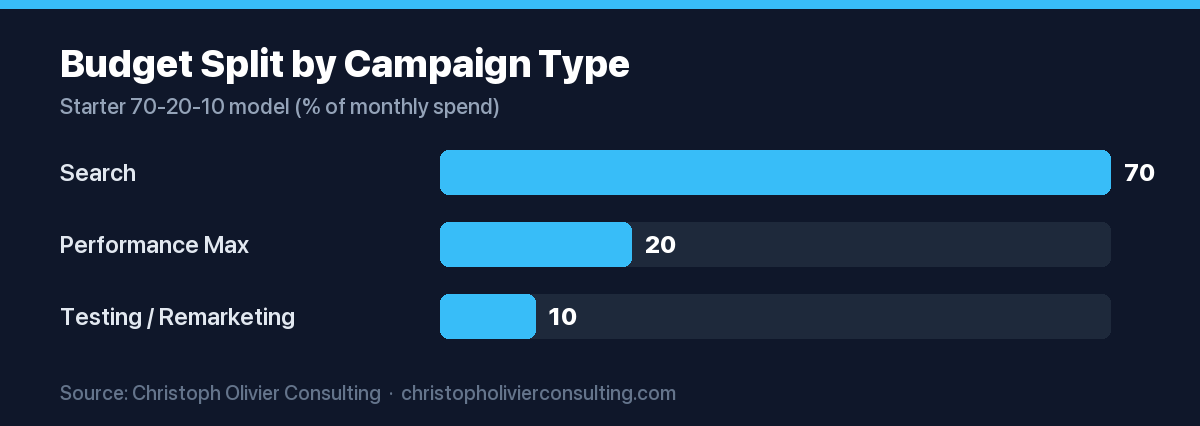
A simple model to grow into is 70-20-10: about 70% to Search, 20% to Performance Max, and 10% to testing new keywords, audiences, or formats. As your account matures you can shift toward a proven mix once you see which campaigns return the most. See our Performance Max guide before you turn that channel on.
Allocation by budget size
Smaller budgets should concentrate; larger budgets can spread. The more you spend, the more room you have to fund Performance Max and remarketing without starving your core Search campaigns of the clicks they need to optimize.
| Monthly budget | Search | Performance Max and remarketing |
|---|---|---|
| $1,500 to $3,000 | 80% to 100% | 0% to 20% |
| $3,000 to $7,500 | 70% to 90% | 10% to 30% |
| $7,500 to $15,000 | 60% to 80% | 20% to 40% |
Budget tiers and what to expect at each
What a budget buys depends on your CPC, but the tiers behave predictably. A test budget confirms whether the channel works; a growth budget produces steady lead flow; a scale budget lets you compete for the most expensive terms and add new campaign types.
| Tier | Monthly spend | Realistic goal |
|---|---|---|
| Test | $500 to $1,000 | Validate one narrow campaign in a lower-cost market; expect thin data |
| Growth | $1,000 to $3,000 | Reach 200 to 300+ clicks and enough conversions to optimize |
| Scale | $3,000 to $5,000+ | Compete in competitive verticals and fund Performance Max plus remarketing |
Fit the tier to your CPC. In a $2 per click vertical, a $1,000 budget clears the 200-to-300-click threshold; in a $9 per click vertical it does not, so competitive markets need a growth or scale budget just to gather usable data.
How to scale your Google Ads budget
Scale on evidence, not calendar dates. Raise spend only after you have held a positive return over 30 to 60 days, and move in steps of about 20% to 30% so the bidding system can re-learn without a shock. Cutting or spiking a budget overnight usually resets performance.
Reinvest where the return is proven first, then fund the next channel. A budget is a marketing decision, not only a Google decision, so size it inside your wider plan using our guide to setting a marketing budget. When Search is proven, adding Microsoft Ads to your paid mix is one candidate for that next channel.
How to set your first Google Ads budget: a step by step
Work from your goal backward to a daily number. This sequence turns customer value and industry CPC into a defensible monthly figure instead of a round guess.
- Find your industry CPC from the benchmark table above.
- Decide how many leads you need per month and estimate your landing page conversion rate.
- Calculate required clicks: leads needed divided by conversion rate.
- Multiply required clicks by your CPC to get monthly spend, then divide by 30.4 for a daily budget.
- Check the total against 200 to 300 minimum monthly clicks; raise it if you fall short.
- Allocate 80% to 100% to Search at first, then add Performance Max as results prove out.
- Review after 30 days and scale in 20% to 30% steps once the return is positive.
If you would rather have this built and managed for you, see our consulting services.
Work with CO Consulting
Want ads that book qualified calls?
- Google, Meta, LinkedIn and YouTube campaigns built around qualified pipeline, not clicks
- Run by Christoph Olivier, who has managed millions of dollars in ad spend
- Tracking and follow-up fixed before budget is scaled
- No guaranteed leads, costs or revenue; we report what the auctions actually deliver
Frequently asked questions
How much should a small business spend on Google Ads per month?
Most small businesses should plan $1,000 to $2,500 per month to start, or about $33 to $83 per day. The floor is set by data: you want at least 200 to 300 clicks per month so Google’s bidding can optimize and you have enough leads to judge results. Verticals with high cost per click, like legal, often need more.
What is the minimum budget for Google Ads to work?
There is no official minimum, but a practical floor is enough spend to buy 200 to 300 clicks per month. In a $2 per click vertical that is roughly $500 to $1,000, while a $9 per click vertical needs $2,000 to $3,000 to reach the same click volume. Below that, results are too thin to read.
How should I split my Google Ads budget across campaign types?
Start with 80% to 100% in Search on high-intent keywords, because Search reaches people ready to buy. Once Search converts and tracking is reliable, grow into a 70-20-10 model: about 70% Search, 20% Performance Max, and 10% for testing new keywords, audiences, or formats. Confirm each channel with your own account data.
Why is my Google Ads cost per click so high?
Cost per click is driven mostly by your industry. The 2026 average is about $5.42, but legal services average $9.87 and home improvement $8.33, while restaurants sit near $2.05. Competition, keyword intent, Quality Score, and location all move the number. A high CPC is acceptable when your conversion rate and customer value are also high.
When should I increase my Google Ads budget?
Increase spend only after you hold a positive return over 30 to 60 days, and raise it in steps of about 20% to 30%. Large overnight changes reset the learning phase and can hurt performance. Reinvest first in the campaigns with proven return, then fund the next channel such as Performance Max or remarketing.
How do I calculate a Google Ads budget for my business?
Work backward from your goal. Decide how many leads you need, divide by your landing page conversion rate to get required clicks, then multiply clicks by your industry cost per click for monthly spend. Divide by 30.4 for a daily budget. Finally, check the total clears the 200 to 300 monthly click minimum.
More Paid Advertising guides
- Handyman Marketing: The Channel Plan That Books More Jobs
- How Much Does Digital Marketing Cost?
- How Much Does SEO Cost in 2026?
- Junk Removal Marketing: A Channel-by-Channel Booking System
- Landscaping Marketing in 2026: Cost Per Booked Job by Channel
- Martial Arts School Marketing: A Playbook to Fill Mats and Keep Students
- Common Google Ads Mistakes: 12 Costly Errors and Exact Fixes
- All Paid Advertising guides →